
About Supaste
Overview
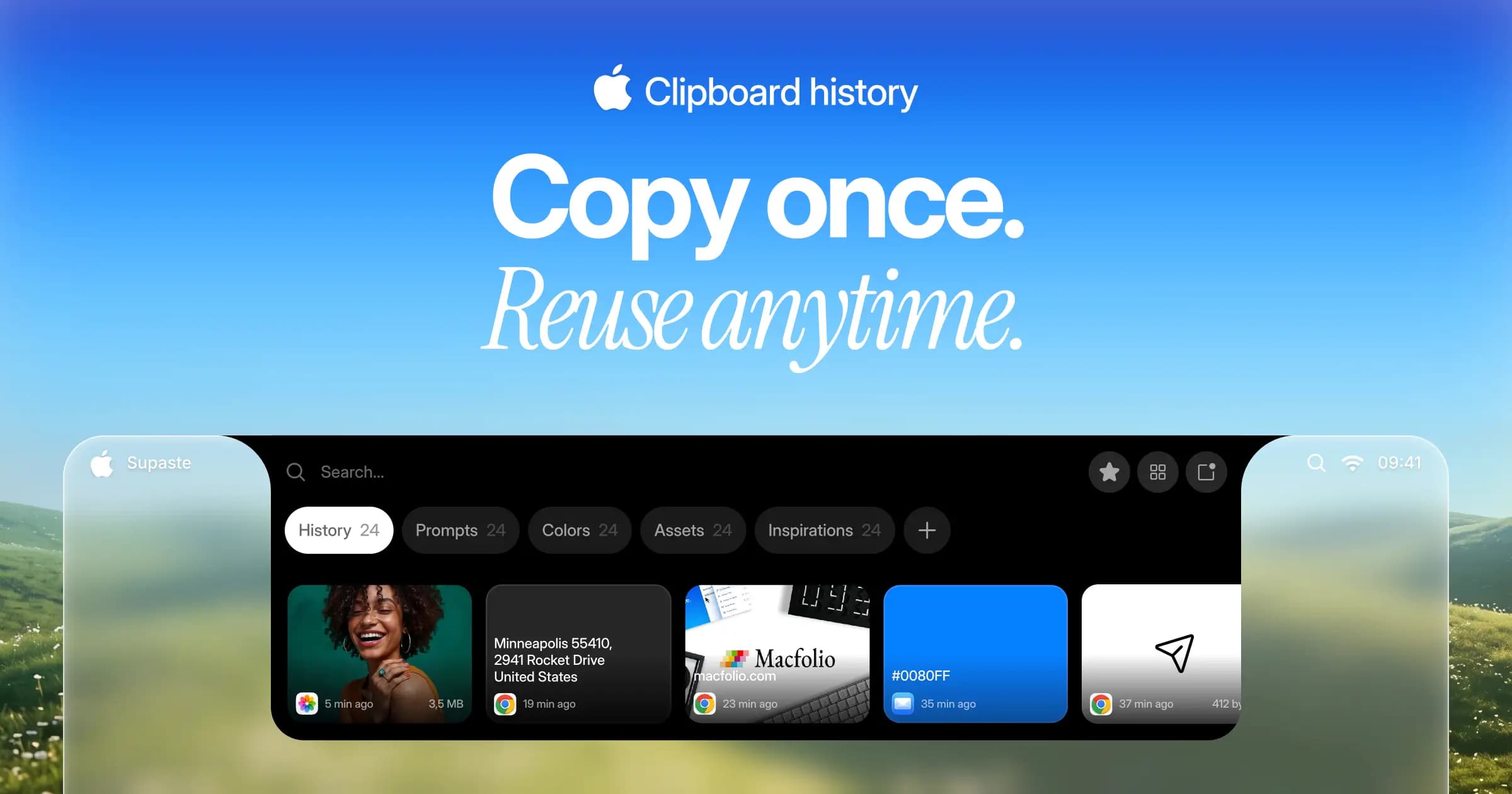
Supaste is a clipboard and screenshot history manager for macOS that saves everything you copy into a visual, searchable timeline. It automatically groups clips by content type, source app, and custom categories, so you can find and reuse text, links, images, files, code, colors, and assets later.
The app runs locally on your Mac and keeps clipboard capture on-device. You reach your history through a shelf in the Mac notch, a quick search shortcut, inline paste, drag and drop, or the full Library window. Supaste ships as a native macOS app for Sonoma 14.0 or later and sells as a one-time purchase.
Key Benefits
- Keep clipboard and screenshot history grouped automatically by content type, source app, and custom category
- Paste items back with a quick search shortcut instead of switching apps or opening a new window
- Find words inside screenshots and images through built-in OCR recognition
- Drag clips straight from the Mac notch shelf into any app you are working in
- Store history locally on your Mac and pause capture whenever you want
- Sync clips across your own devices through iCloud rather than through Supaste servers
How It Works
You copy content as usual, and Supaste records it to a timeline and sorts it by type and source app. Press Control + Command + V in any app to open quick search, or Control + Command + 0–9 to bring back one of your last ten clips. From there you preview a clip, copy it again, drag it out of the notch shelf, or file it into a custom category for later reuse.
Use Cases
- Designers keep colors, icons, screenshots, SVGs, gradients, and visual assets in a searchable shelf
- Developers save code snippets, commands, errors, JSON, API responses, and GitHub links automatically
- Content and marketing teams capture hooks, taglines, SEO keywords, drafts, and research links before they lose them
- Sales and support reps reuse email templates, product links, customer notes, and support screenshots
- Founders and operators organize investor notes, product ideas, competitor screenshots, and pricing pages in one history
- Everyday users hold on to copied links, addresses, tracking numbers, images, and quotes they meant to save
Why Choose This Product
Supaste charges once for lifetime access and bundles lifetime updates, with every feature unlocked from the first install and no subscription. It performs clipboard work offline and reports a 14-day money-back guarantee. A license covers one device, so anyone running several Macs needs an additional purchase.
Supaste Pros & Cons
- One-time purchase with lifetime updates and no subscription
- Runs locally and keeps clipboard capture fully offline
- Automatic grouping by content type, source app, and custom category
- OCR makes text inside screenshots and images searchable
- Notch shelf lets you drag clips into any app without switching windows
- Requires macOS Sonoma 14.0 or later
- License covers one device only
- No iPhone or iPad app available
Key Features
Clipboard Timeline
Supaste stores your copied items in a visual timeline grouped by content type, source app, and custom categories.
Quick Paste Search
Press Control + Command + V in any app to open Supaste and search your saved clips, templates, and screenshots.
Last 10 Shortcuts
Press Control + Command + 0–9 to recall one of your ten most recent clips without opening a window.
Image OCR Search
Supaste recognizes text inside screenshots and copied images, so you can search for words visible in an image.
Multi-Clip Copy
Collect text, links, images, files, and code from different apps into one combined clip card and paste them together.
Inline Shortcuts
Type a saved shortcut such as ;welcome anywhere to insert the linked text, template, or clip automatically.
Clip Reminders
Set a quick time, a custom date, or a return-to-app trigger as a reminder on any saved clip.
Custom Categories
Create spaces for projects, templates, brand assets, and everyday snippets so anything stays easy to find.
Built-In Tools
Supaste includes a Color Picker, Text Capture, and Quick Notes that work without leaving your current app.
Sensitive Detection
Supaste flags sensitive content in your history and lets you pause clipboard capture at any time.
Supaste Pricing
View full pricing →- All features unlocked from day one
- Lifetime updates included
- Native macOS app
- 1 device license
- 14-day money-back guarantee
Pricing extracted from the product website and may change. Check the source for current details.
Frequently asked questions about Supaste
What is Supaste?
Supaste is a clipboard and screenshot history app for Mac. It saves copied text, links, images, files, code, colors, and screenshots in a visual, searchable timeline grouped by type, app, and custom categories so you can paste anything back in seconds.
Does Supaste upload my copied content?
No. Supaste works locally on your Mac and keeps clipboard history on the device. The app states it is fully offline and privacy-first, and it lets you pause clipboard capture whenever you do not want items recorded.
Which content types does Supaste support?
Supaste handles text, links, images, screenshots, files, code snippets, colors, icons, assets, gradients, and custom saved clips. It also combines several items from different apps and content types into one multi-clip card.
Can I search my clipboard history?
Yes. You can search across your history and filter clips by the source app, such as Safari, Figma, Slack, Xcode, or Mail, or by content type. Screenshot and image OCR also lets you search for words that appear inside an image.
Is an iPhone or iPad app available?
No. Supaste ships as a native macOS app only, and it requires macOS Sonoma 14.0 or later.
Is Supaste a subscription?
No. Supaste sells as a one-time payment that includes lifetime access and lifetime updates, with all features unlocked from day one.