About ChocolateBar for Mac
Overview
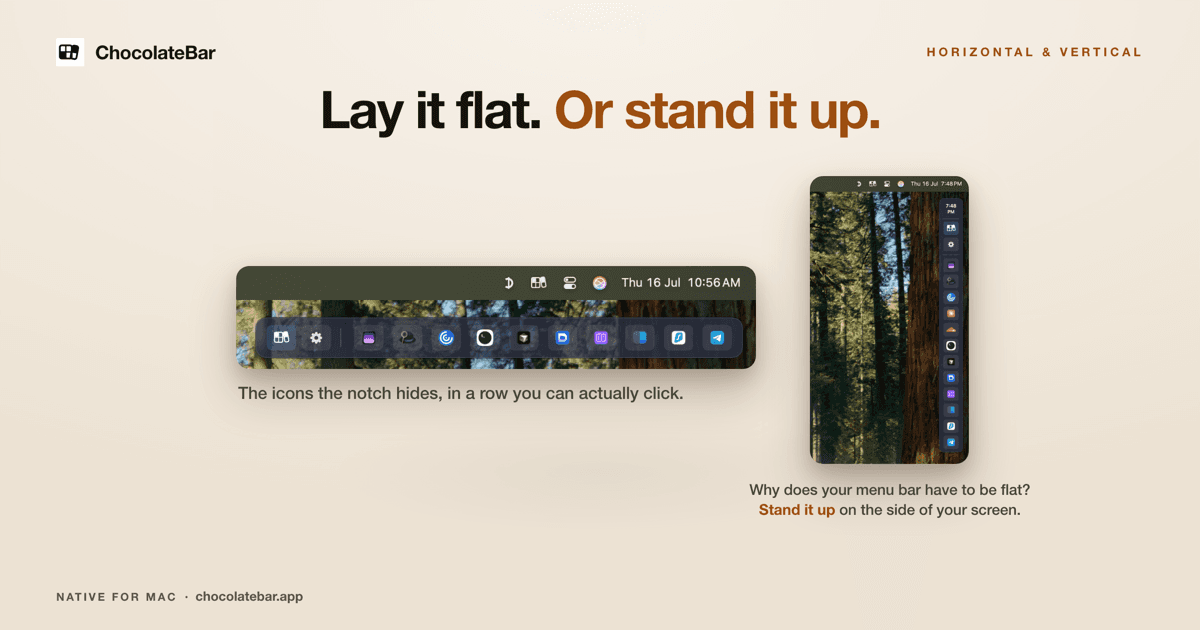
ChocolateBar for Mac is a native menu bar manager that gives the macOS menu bar a second row. It shows every menu bar icon at full size in a thin strip just below the bar, including the icons the camera notch hides, and clicking one opens that app's real menu. It works on Macs with or without a notch.
The app also hides third-party icons when the bar holds more menu bar apps than fit, so you choose between hiding clutter and seeing everything. It runs on macOS 12 Monterey through 15 Sequoia as a 5 MB universal binary for Apple Silicon and Intel, and the developer lists macOS 26 Tahoe support as coming soon.
Key Benefits
- Opens a second row of menu bar icons with ⇧⌘B or a click on the ChocolateBar icon.
- Restores icons that macOS slides behind the camera notch on 14-inch and 16-inch MacBook Pro.
- Clicks the real menu bar item, so each app's own menu opens instead of a lookalike panel.
- Hides third-party icons behind a faint boundary and reveals them again with a chevron.
- Lays the strip out horizontally across the screen or as a column against either edge.
- Saves hidden-icon snapshots as profiles that you switch with a hotkey.
How It Works
Download the DMG, mount it, drag ChocolateBar to Applications and launch it, then grant Accessibility permission in System Settings. ChocolateBar reads your existing menu bar items through Apple's Accessibility API and only contacts its servers when it checks for updates. Press ⇧⌘B or click the ChocolateBar icon to open the strip, then click any icon to trigger the real one; new menu bar icons appear in the strip automatically.
Use Cases
- MacBook Pro 14-inch and 16-inch owners reach icons that slide behind the notch once the bar fills up.
- Employees on work Macs surface the VPN, chat and security icons IT installed and they cannot remove.
- Designers and developers keep 1Password, Slack, Linear and Dropbox one shortcut away on a crowded bar.
- iMac, Mac mini and MacBook Air owners recover icons that fall off the edge when many apps run.
- Anyone juggling two contexts saves a pared-down work profile and a full home profile and cycles between them.
Why Choose This Product
Hiders such as Bartender, Hidden Bar, Ice, Thaw, Dozer and Barbee tuck icons away; ChocolateBar does that and adds a second row that shows the same icons at full size. It asks only for Accessibility permission and never for Screen Recording, because it mirrors each app's menu rather than capturing the screen — the trade-off is that mirrored menus lose original icons and some custom behavior. It is a native universal binary, not an Electron app, and each license includes one year of updates.
ChocolateBar for Mac Pros & Cons
- One-time $15 purchase with a year of updates and a 7-day refund
- Shows and clicks hidden icons in a second row, not just hiding them
- Works with or without a notch, on Intel and Apple Silicon Macs
- 48-hour full-feature trial with no card required
- Never requests Screen Recording permission, only Accessibility
- Mirrored menus lose original app icons and some custom behavior
- Does not run on macOS 11 Big Sur or earlier
- macOS 26 Tahoe support is listed as coming soon
- Rectangle and Logi Options+ icons open the app instead of a menu
Key Features
Second Row Strip
Press ⇧⌘B or click the ChocolateBar icon to open a thin strip below the menu bar that holds the icons macOS hides.
Real Menu Clicks
Clicking an icon in the strip makes ChocolateBar click the actual menu bar item, so the app's own menu opens.
Hide Menu Bar Icons
An optional toggle tucks every third-party menu bar app behind a faint boundary, and a chevron reveals the originals again.
Horizontal or Vertical
Lay the strip wide across the screen or stand it up as a slim column against either edge of the display.
Saved Profiles
Profiles snapshot which icons are hidden, their order and the strip layout, and a hotkey cycles through them.
Running App Chips
An off-by-default Show running apps option adds one chip per running app to the row, toggled in Settings or with ⌃⌘S.
Accessibility Only
ChocolateBar reads and clicks menu bar items through Apple's Accessibility API and never asks for Screen Recording permission.
Auto-Detect Icons
New menu bar icons appear in the strip automatically once the app is installed and permission is granted.
Universal Binary
The 5 MB native app runs on Apple Silicon and Intel Macs without Rosetta and is not an Electron build.
ChocolateBar for Mac Pricing
Pricing extracted from the product website and may change. Check the source for current details.
Frequently asked questions about ChocolateBar for Mac
How do I install ChocolateBar?
Download the DMG, double-click to mount it, drag ChocolateBar to your Applications folder and launch it. macOS asks for Accessibility permission on first run, which is how the app reads and clicks your existing menu bar items. Granting permission takes one click in System Settings.
Can ChocolateBar hide menu bar icons like Bartender?
Yes. An optional toggle hides the third-party icons cluttering the native menu bar, and a chevron lets you peek at them. ChocolateBar can also show those same icons in a second row, so you do not have to choose between hiding and seeing them.
The notch is hiding my menu bar icons. How do I see them?
On a 14-inch or 16-inch MacBook Pro, once the menu bar fills up, icons slide behind the camera notch and cannot be clicked. ChocolateBar shows them at full size in a row under the menu bar, opened with ⇧⌘B or a click on the ChocolateBar icon. The same app works on Macs with no notch.
Why does it need Accessibility permission?
Apple does not give apps a public way to read another app's menu bar items, so Accessibility is the workaround. ChocolateBar uses it to find your hidden icons and click them when you do. Nothing it reads from your menu bar leaves your Mac.
Does ChocolateBar work on an Intel Mac and older macOS versions?
Yes. It is a universal binary for Apple Silicon and Intel that does not need Rosetta, and it runs on macOS 12 Monterey, 13 Ventura, 14 Sonoma and 15 Sequoia. macOS 26 Tahoe support is coming soon, and it does not run on macOS 11 Big Sur or earlier.
Can I save different menu bar setups?
Yes. Profiles save a full snapshot of which icons are hidden, their order and your strip layout, so you can switch between a pared-down work setup and a full home one. Edits auto-save into the active profile, and you can assign a hotkey to cycle through them.