
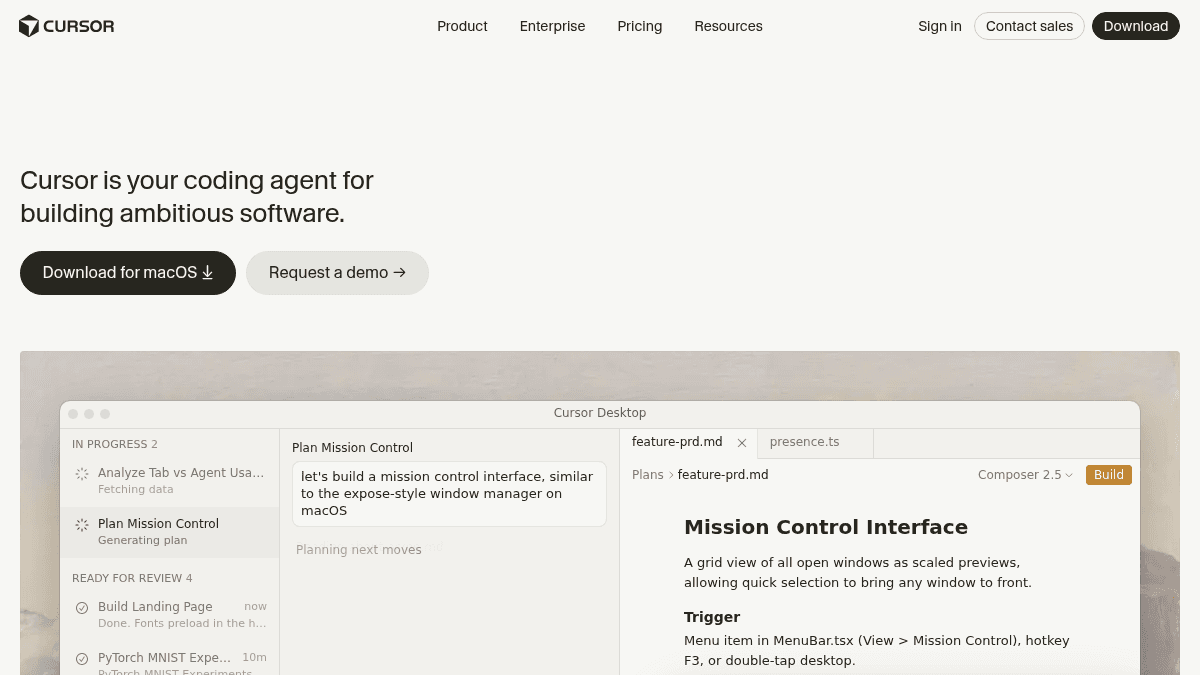
About Cursor: AI coding agent
Overview
Cursor is an AI coding agent that helps developers build ambitious software by writing, editing, and reviewing code autonomously. It operates inside a desktop IDE and extends into the terminal, Slack, and GitHub to handle tasks end to end.
Cursor was built by a team of researchers and engineers at Anysphere. It is designed for individual developers and teams who want to accelerate development by handing off coding tasks to an agent while they focus on architectural decisions and code review.
Key Benefits
- Agents turn ideas into code by working autonomously on branches, writing tests, and deploying for review.
- Secure codebase indexing, semantic search, and context-aware completions accelerate navigation of large projects.
- Cloud agents run their own computers to build, test, and demo features end to end.
- Multi-agent collaboration and shadow workspaces allow parallel work on complex tasks.
- Bugbot performs agentic code reviews with usage-based billing on paid plans.
- Team-wide privacy mode, SAML/OIDC SSO, and audit logs are available on Teams and Enterprise tiers.
How It Works
You install Cursor on macOS, open your project, and describe the task in Composer or the agent panel. The agent reads your codebase, generates a plan, then writes code, runs tests, and creates pull requests autonomously.
You review the agent's output, approve changes, and give follow-up instructions. The agent can also be invoked from the CLI, from Slack channels, or through GitHub PR reviews.
Use Cases
- Solo full-stack developers who want to ship features faster by offloading boilerplate and bug fixes to an AI agent.
- Engineering teams that use agentic code reviews with Bugbot to catch issues before merge.
- Research groups that need to build interactive dashboards and data pipelines from natural-language descriptions.
- Startup teams who rely on cloud agents to prototype, deploy, and demo new functionality without manual setup.
- Enterprise organizations that require SAML SSO, SCIM seat management, and audit logging for compliance.
Why Choose This Product
Cursor is best suited for developers and teams that want an AI agent deeply integrated into their existing workflow — IDE, terminal, Slack, and GitHub — rather than a separate chatbot. The Hobby tier is free with no credit card required, making it easy to try. Teams and Enterprise tiers add centralized billing, admin controls, and compliance features for larger organizations.
Cursor: AI coding agent Pros & Cons
- Free Hobby tier with no credit card required
- Deeply integrated into IDE, terminal, Slack, and GitHub
- Cloud agents that build, test, and demo features autonomously
- SOC 2 certified
- SAML/OIDC SSO and SCIM seat management on enterprise plans
- Limited Agent requests and Tab completions on free Hobby tier
- Bugbot requires usage-based billing on Individual plan
Key Features
AI Agent Mode
Cursor's agent autonomously plans, writes code, runs tests, and creates pull requests based on natural-language instructions.
Cloud Agents
Cloud agents use their own remote computers to build, test, and demo features end to end for review.
Terminal Integration
Cursor CLI provides command-line assistance for automating repetitive tasks directly in the terminal.
Codebase Indexing
Secure codebase indexing with semantic search enables fast navigation and context-aware completions across large projects.
Bugbot Code Review
Bugbot performs agentic code reviews that catch issues before merge, available on usage-based billing for Individual plan.
Usage Analytics
Teams plan includes usage analytics to understand how team members interact with the agent across workspaces.
Team Privacy Mode
Team-wide privacy mode is available on Teams and Enterprise plans to control data visibility.
Multi-Agent Collaboration
Multiple agents can collaborate in parallel using shadow workspaces for complex multi-step tasks.
Cursor: AI coding agent Pricing
View full pricing →- No credit card required
- Limited Agent requests
- Limited Tab completions
- Extended limits on Agent
- Access to frontier models
- MCPs, skills, and hooks
- Cloud agents
- Bugbot on usage-based billing
- Centralized team billing and administration
- Team marketplace for internal rules, skills, and plugins
- Agentic code reviews with Bugbot
- Cloud agents and automations with shared team context
- Usage analytics to understand team behavior
- Team-wide privacy mode
- SAML/OIDC SSO
- Pooled usage
- Invoice/PO billing
- SCIM seat management
- Repository, model, and MCP access controls
- Auto-run, browser, and network controls
- Audit logs and service accounts
- AI code tracking API
- Priority support and account management
- Extended limits on Agent
- Access to frontier models
- MCPs, skills, and hooks
- Cloud agents
- Bugbot on usage-based billing
- Extended limits on Agent
- Access to frontier models
- MCPs, skills, and hooks
- Cloud agents
- Bugbot on usage-based billing
| Feature | Hobby Free/mo | Individual $20/mo | Teams $40/mo | Enterprise Custom | Pro $20/mo | Pro+ $20/mo |
|---|---|---|---|---|---|---|
| No credit card required | ||||||
| Limited Agent requests | ||||||
| Limited Tab completions | ||||||
| Extended limits on Agent | ||||||
| Access to frontier models | ||||||
| MCPs, skills, and hooks | ||||||
| Cloud agents | ||||||
| Bugbot on usage-based billing | ||||||
| Centralized team billing and administration | ||||||
| Team marketplace for internal rules, skills, and plugins | ||||||
| Agentic code reviews with Bugbot | ||||||
| Cloud agents and automations with shared team context | ||||||
| Usage analytics to understand team behavior | ||||||
| Team-wide privacy mode | ||||||
| SAML/OIDC SSO | ||||||
| Pooled usage | ||||||
| Invoice/PO billing | ||||||
| SCIM seat management | ||||||
| Repository, model, and MCP access controls | ||||||
| Auto-run, browser, and network controls | ||||||
| Audit logs and service accounts | ||||||
| AI code tracking API | ||||||
| Priority support and account management |
Pricing extracted from the product website and may change. Check the source for current details.
Frequently asked questions about Cursor: AI coding agent
What is the right plan for me?
The Hobby plan is free with limited Agent requests and Tab completions. Individual plan at $20/month adds extended Agent limits, frontier models, cloud agents, and Bugbot. Teams adds centralized billing, SAML SSO, and team-wide privacy mode. Enterprise has custom pricing with pooled usage, SCIM seat management, audit logs, and priority support.
How does usage-based pricing work?
Bugbot on the Individual plan uses usage-based billing. The Teams and Enterprise plans also include cloud agents and automations with shared team context, and Enterprise offers pooled usage across the organization.
How can I see and manage Cursor's usage in my organization?
The Teams plan includes usage analytics to understand team behavior. Enterprise adds pooled usage management and audit logs for deeper visibility and control.
How does Cursor use my data?
Cursor offers team-wide privacy mode on Teams and Enterprise plans. The Enterprise plan also includes repository, model, and MCP access controls for data governance.
Is Cursor: AI coding agent free?
Cursor: AI coding agent offers a free plan with optional paid upgrades. See the pricing section for what's included in each tier.
How much does Cursor: AI coding agent cost?
Cursor: AI coding agent offers the following plans: Hobby, Individual, Teams, Enterprise, Pro, Pro+. See the pricing section for what's included in each tier and any per-seat or usage-based costs.
Used in Stacks & Workflows
Best AI Frontend Development Tools
Discover AI frontend tools for prompt-to-UI, app building, Figma-to-code, and repository-based development. Filter the collection by category, pricing, platform, and workflow fit.
Best AI Productivity Tools for Startups
by @Box
How Cursor: AI coding agent compares
Cursor: AI coding agentThis | ||||
|---|---|---|---|---|
| Starting price | Free | Free | Free | Free |
| Pricing model | Freemium | Freemium | Freemium | Freemium |
| Platforms | macOS, Web | Web, Windows, macOS, Linux | Web, macOS, Windows, Linux | Web, macOS, Windows, Linux |
| Top features |
|
|
|
|
| Rating | — | — | — | — |


