
About BooBar
Overview
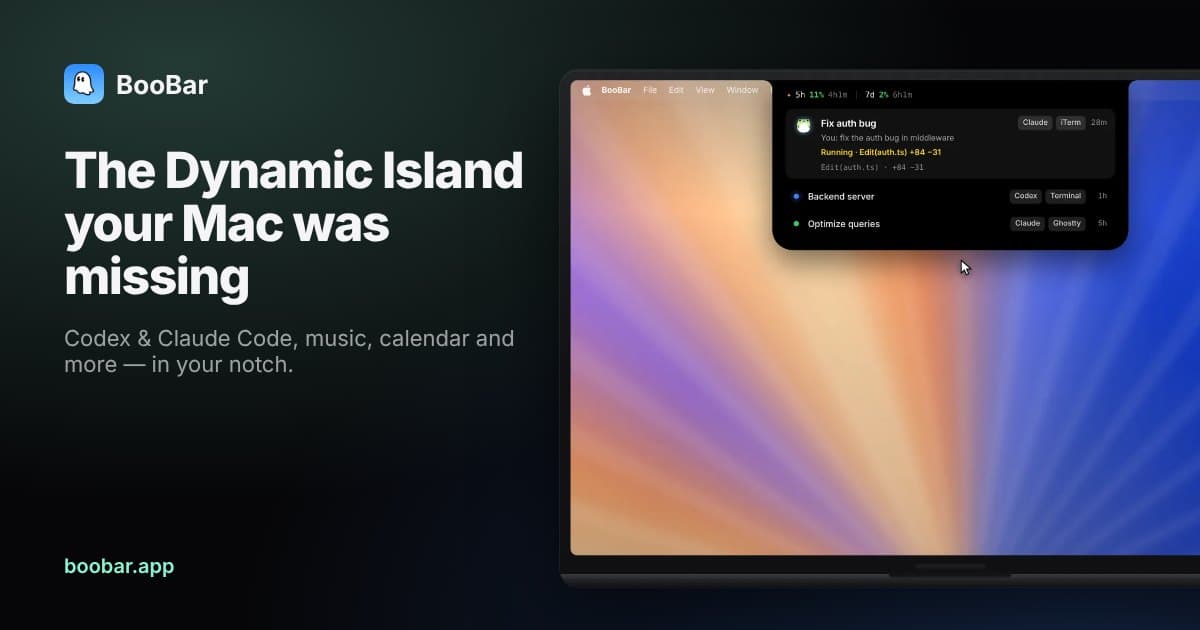
BooBar turns the top of a Mac into a living Dynamic Island on macOS 14 or later. It draws its own island on Apple Silicon and Intel machines, including Macs without a physical notch, on built-in and external displays. Users dock it to the top, left or right edge, and it expands in the direction of that edge.
The island reports on Codex and Claude Code work in progress, showing what an agent reads, what it changed and how much of the 5-hour and weekly quota remains. Permission requests wait on the island for a decision, and Codex's suggested next step sits one click away. Music, calendar, GitHub activity, system stats, verification codes and a small frog fill the rest of the space.
Key Benefits
- Approve or deny Codex and Claude Code permission requests from the notch without switching windows.
- Follow each agent session through a live transcript, file edits and remaining 5-hour and weekly quota.
- Send Codex's suggested next step into a running session with a single click.
- Press ⌃⇧N to open a wheel of sticky notes, clipboard history and dev tools from any app.
- Keep music lyrics, the next meeting, GitHub activity and system stats visible at a glance.
- Read session logs locally, with approvals passed back to the tool on the machine.
How It Works
Download the free trial and install it on a Mac running macOS 14 or later. BooBar reads the session logs Codex and Claude Code already write locally, so each session appears on the island with nothing uploaded. Press ⌃⇧N to open the wheel, pick a slice with the arrow keys or the pointer and press Return to launch it.
Use Cases
- Claude Code and Codex developers follow each session's transcript and answer permission prompts from the notch instead of switching windows.
- Engineers keep 5-hour and weekly agent quota in view so they can plan long coding sessions.
- Writers and researchers pin sticky notes to a specific file or web page so the context returns with the page.
- Support teams read sign-in verification codes delivered to the island and copy them in one click.
- Analysts convert JSON, Base64, JWT and timestamps with the offline dev tools while working in another window.
- Music listeners read live lyrics and control Apple Music or Spotify playback from the island.
Why Choose This Product
BooBar keeps agent data local: it reads logs the tools already write and passes approvals back on-device, so nothing is uploaded. It also works beyond notched MacBooks, drawing its own island on any Mac with macOS 14 or later and docking to the left or right edge when the top of the screen is busy.
BooBar Pros & Cons
- One-time purchase with free updates included
- Runs on any macOS 14+ Mac, including machines without a notch
- Reads Codex and Claude Code logs locally with no uploads
- Free trial before buying plus a 30-day no-questions refund
- Agents, clipboard, notes, dev tools, media and stats in one island
Key Features
Agent Sessions
Every Codex and Claude Code session shows a live transcript, the file edits it made and the remaining 5-hour and weekly quota on the island.
Notch Approvals
Users approve or deny an agent's permission request from the island with Always, Allow once or Deny options.
One-Click Next Steps
Codex's suggested next step appears as a button that sends it to the running session in a single click.
The Wheel
Pressing ⌃⇧N anywhere opens a wheel of tools that users pick with the arrow keys or a pointer and confirm with Return.
Sticky Notes
Notes remember the window, file or web page they belong to and reappear when the user returns to it.
Clipboard History
Copied links, images and code stay searchable in a clipboard history that keeps each type apart.
Dev Converters
More than 40 offline tools convert JSON, Base64, JWT, regex, timestamps, hashes and colours.
Background Downloads
Pasting a link grabs the video or audio in the background and reports progress and speed on the island.
Island Panels
Shortcut panels surface live lyrics and controls from Apple Music and Spotify, the next meeting and today's reminders, GitHub contributions and stars, load, network and storage meters, a focus timer and verification codes.
Frog Status
A small frog at the left edge of the island blinks, works, waits, vibes or rests to signal what the Mac is doing without any text.
BooBar Pricing
- Lifetime license for one Mac
- Dynamic Island for Codex & Claude Code
- Approvals and one-click next steps
- Wheel: sticky notes, clipboard, dev tools
- Music, calendar, GitHub, system stats, timer
- Free updates · 30-day no-questions refund
- Lifetime license for two Macs
- Free updates included
- 30-day no-questions refund
| Feature | 1 Mac $9.99 one-time | 2 Macs $14.99 one-time |
|---|---|---|
| Lifetime license for one Mac | ||
| Dynamic Island for Codex & Claude Code | ||
| Approvals and one-click next steps | ||
| Wheel: sticky notes, clipboard, dev tools | ||
| Music, calendar, GitHub, system stats, timer | ||
| Free updates · 30-day no-questions refund | ||
| Lifetime license for two Macs | ||
| Free updates included | ||
| 30-day no-questions refund |
Pricing extracted from the product website and may change. Check the source for current details.
Frequently asked questions about BooBar
Do I need a MacBook with a notch to use BooBar?
No. BooBar draws its own island on any Mac running macOS 14 or later, including built-in and external displays, on Apple Silicon or Intel machines. Users can also dock the island to the left or right edge of the screen instead of the top.
How does BooBar see my Codex and Claude Code sessions?
BooBar reads the session logs those tools already write on the Mac. Nothing is uploaded, and approval decisions are passed back to the tool locally.
Will BooBar get in the way of full-screen apps?
Turn on the Hide in full screen setting and the island steps aside whenever a video, game or app goes full screen. Settings also cover expanding on hover and showing the frog.
How many Macs can I use with one license?
You choose a 1, 2 or 3 Mac license at checkout. If you move to a new Mac, deactivate the old one from Settings and activate the new one.
What if BooBar isn't for me?
Every purchase comes with a 30-day, no-questions-asked refund. Email the team and they sort it out.
Is BooBar a subscription?
No. BooBar is a one-time purchase: buy once and keep the license forever, with free updates included. You can start with a free trial before buying.