About Are My Colours Accessible
Overview
Are My Colours Accessible is a free web-based tool that lets designers and developers check whether their color combinations meet WCAG 2.0 contrast ratio guidelines. Users pick a text color and a background color to instantly see if the pair passes AA or AAA standards for normal text, bold text, and large text.
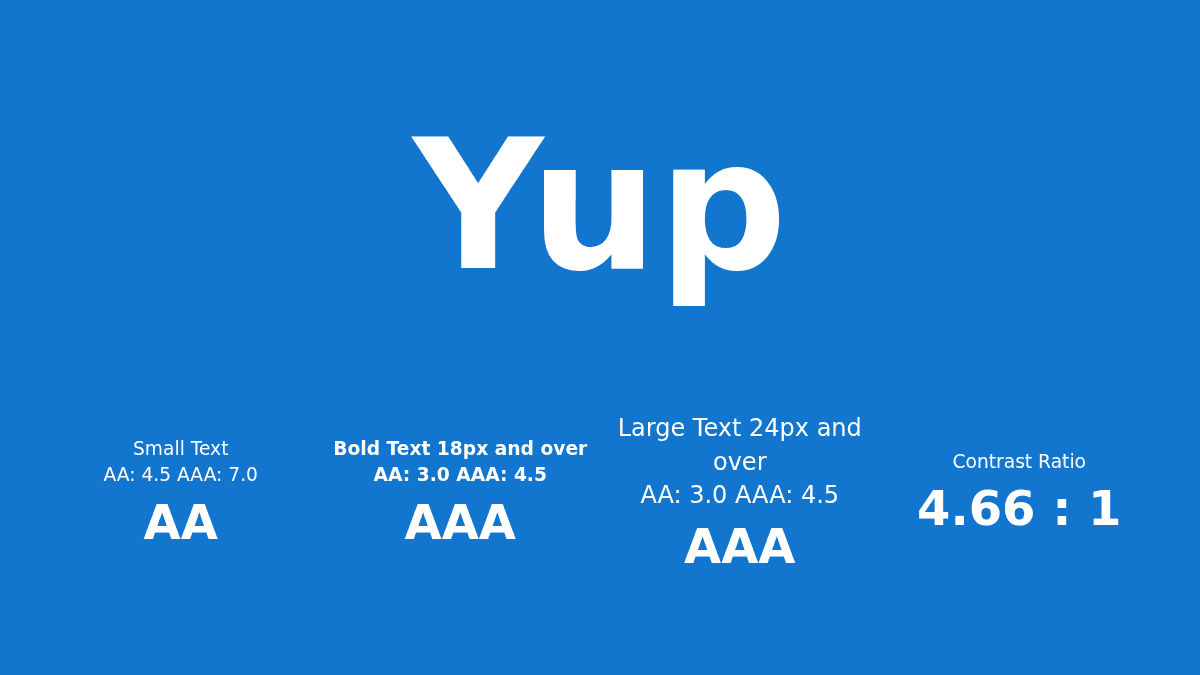
The tool displays a live contrast ratio in a visual card layout, making it easy to iterate on palette choices without leaving the browser. It is built for anyone who creates user interfaces or graphics and wants to ensure readability for people with visual impairments.
Key Benefits
- Checks contrast ratios against WCAG 2.0 AA and AAA thresholds in real time.
- Supports separate thresholds for small text (4.5:1 AA, 7.0:1 AAA) and large text (3.0:1 AA, 4.5:1 AAA).
- Provides instant visual feedback on a card showing the selected color pair.
- Free to use with no account or payment required.
- Live numeric contrast ratio displayed alongside a pass/fail indicator.
How It Works
You select a text color and a background color using hue, saturation, and lightness sliders (or you switch to hex input). The tool computes the contrast ratio and highlights which WCAG levels — AA Small, AA Large, AAA Small, AAA Large — your pair passes. The colored card updates as you adjust each slider so you can preview the result visually.
Use Cases
- UI designers checking foreground/background pairs during mockup creation or design-system work.
- Front-end developers verifying that brand color usage meets legal or internal accessibility requirements before shipping code.
- Accessibility auditors running quick spot checks on color palettes without firing up a full audit suite.
- Students or educators studying web accessibility principles who need a lightweight demonstration tool.
- Solo freelancers who need a fast, free way to validate contrast without installing any software.
Why Choose This Product
Are My Colours Accessible is best suited for anyone — from student to professional — who needs a free, zero-friction way to verify color contrast against WCAG 2.0. It focuses exclusively on contrast checking and does not address other accessibility dimensions such as screen-reader compatibility or keyboard navigation.
Are My Colours Accessible Pros & Cons
- Free and requires no account
- Instant WCAG AA/AAA pass/fail feedback
- Live color preview updates as you adjust sliders
- Supports both HSL and hex color input
- Separate thresholds for small text vs large text
- Limited to WCAG 2.0 contrast ratio checking only
- No support for checking other accessibility criteria (screen reader, keyboard navigation)
Key Features
WCAG Contrast Checker
Compares selected colors against WCAG 2.0 recommended contrast ratios for AA and AAA compliance.
HSL Color Pickers
Adjust text color using hue, saturation, and lightness sliders.
Live Color Preview
Shows a live preview card with the chosen text and background colors.
Real-time Ratio
Displays the exact contrast ratio as a decimal value in real time.
Color Mode Toggle
Color input can be switched to hue, saturation, and lightness values.
Are My Colours Accessible Pricing
Pricing extracted from the product website and may change. Check the source for current details.