
Screen Charm
Updated: Nov 26, 2026
Record your Mac screen, camera and audio, then let Screen Charm add auto-zoom, captions and vertical clips — export in 4K or share a link.
About Screen Charm
Overview
Screen Charm is a macOS screen recorder that captures your screen, webcam, microphone, and system audio in a single session, then polishes the result inside the same app. It targets founders, developers, course creators, and SaaS teams who need product demos and tutorials that look finished without learning an editing suite.
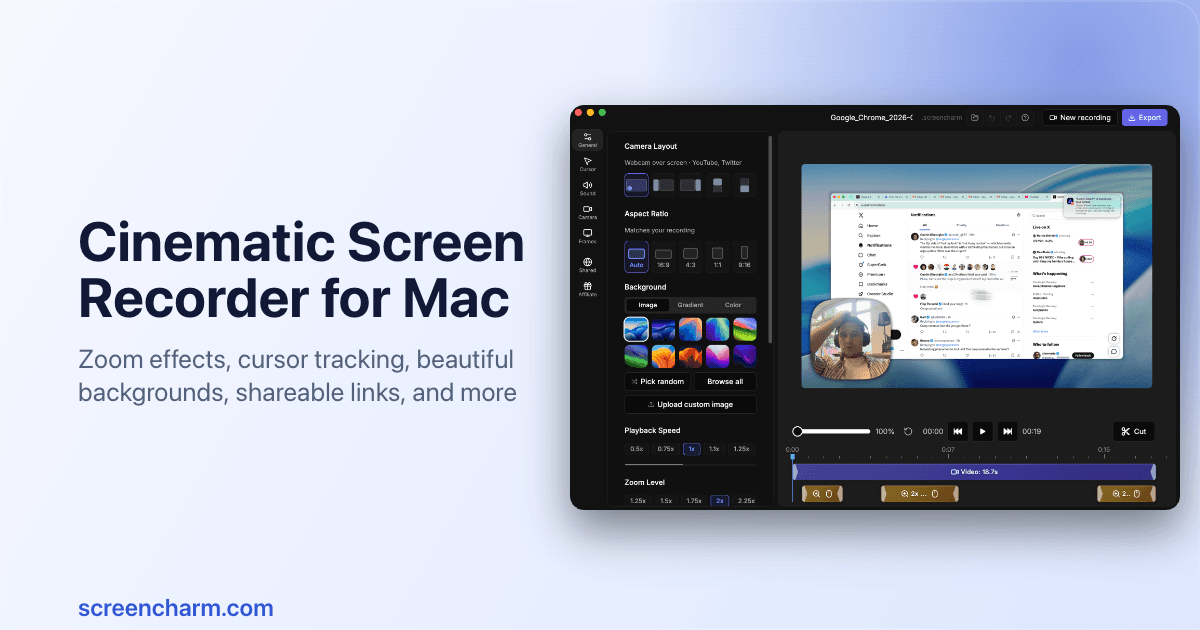
You can record a full screen, a single window, or a selected area, and pause or resume without ending the session. After recording, the app applies automatic zoom and cursor smoothing, and offers trim, captions, backgrounds, device frames, and 4K MP4 export or a shareable link. The site reports 1,000+ licenses sold and a 1,000+ audience of founders, developers, and SaaS teams.
Key Benefits
- Automatic zoom follows every click so viewers see the relevant interface without manual keyframing.
- Captions are generated from your narration and styled, so viewers can follow along with the sound off.
- Split vertical export prepares a camera-plus-screen clip for Reels, Shorts, and TikTok.
- One payment covers all features, free lifetime updates, and use on up to three Macs.
- Finished recordings save as 4K MP4 files or upload to a link that viewers open without an account or download.
- Mic enhancement removes hiss, keyboard clicks, and room noise with one toggle.
How It Works
Download the Mac app, choose a full screen, window, or area, and switch on camera, microphone, and system audio as needed. Record and pause whenever you like, then open the project in the built-in editor, where Screen Charm has already applied zoom effects and cursor smoothing. From there you trim clips, adjust zoom levels and speeds, add captions, blur private areas, and set a background or MacBook frame before exporting an MP4 up to 4K or creating a shareable link.
Use Cases
- Developers record a working demo of their code and ship a captioned clip plus a shareable link for launch posts and docs.
- Course creators use auto-zoom to keep students on the relevant UI, cut dead air, and export 4K lessons without separate editing software.
- Founders record product demos with captions for muted autoplay and a vertical clip for launch announcements.
- Indie makers present their products on video so potential customers get more information before buying.
- Social media creators turn one screen recording into the vertical format that Reels, Shorts, and TikTok require.
Why Choose This Product
Screen Charm sells a single one-time license instead of a subscription, and that purchase includes every feature, lifetime updates, and activation on up to three Macs. The app targets macOS specifically, with Apple Silicon support and Apple Silicon-ready export and preview performance, so the workflow stays inside one native app rather than a browser editor. A 14-day, no-questions-asked refund policy covers the purchase.
Screen Charm Pros & Cons
- One-time purchase with lifetime access instead of a subscription
- All features included in the single license
- Free lifetime updates and activation on up to 3 Macs
- Records screen, webcam, mic, and system audio in one session
- Exports 4K MP4 files or a link viewers open without an account
- Works only on macOS
- macOS Sonoma 14.0 or higher recommended for the download
Key Features
Record Anything
All plansCapture the full screen, a single window, or a selected area with camera, microphone, and system audio running in the same session, and pause or resume without stopping it.
Smart Auto-Zoom
All plansScreen Charm applies zoom effects automatically after each click once the recording ends, and you can keep, tweak, or turn off each effect.
Cursor Effects
All plansCursor smoothing and size adjustments apply after recording, and click highlights mark every mouse click with a subtle ripple animation.
Camera & Audio
All plansReposition and resize the webcam as a floating bubble or pin it to an edge, and the mic enhancement toggle strips hiss, keyboard clicks, and room noise.
Auto Captions
All plansGenerate captions from your narration and pick a style that matches the video so viewers can follow along muted.
Vertical Exports
All plansExport a split vertical video with camera on one side and a cursor-following screen on the other for Reels, Shorts, and TikTok.
Backgrounds & Frames
All plansWrap recordings in gradients, photos, solid colors, or a MacBook frame with control over shadow depth, padding, and corner radius.
Built-in Editor
All plansTrim, split, and mute clips, apply different speeds per clip, add background music, and undo or redo edits with one keystroke.
Privacy Blur
All plansPlace multiple blur regions anywhere on the recording to hide emails, names, or private UI, then resize each independently.
Export & Share
All plansSave an MP4 up to 4K UHD locally or upload with one click to get a link that viewers open without an account or download.
Screen Charm Pricing
View full pricing →- All features included
- Smart auto-zoom
- Free lifetime updates
- Use on up to 3 Macs
- Shareable links
- 14-day refund guarantee
Pricing extracted from the product website and may change. Check the source for current details.
Frequently asked questions about Screen Charm
Which operating systems does Screen Charm support?
Screen Charm works only on the macOS operating system. The download page offers an Apple Silicon build and recommends macOS Sonoma 14.0 or higher.
Can Screen Charm record Mac system audio?
Yes. Screen Charm records your Mac screen, microphone, webcam, and system audio in one session, so you can capture app sounds, voiceover, and camera together.
Can I record my screen and webcam at the same time?
Yes. Screen Charm records your Mac screen with a webcam overlay, and you can reposition and resize the camera overlay while editing the recording.
Does Screen Charm export recordings in 4K?
Yes. Screen Charm exports local MP4 files up to 4K UHD, and you can also create shareable links for finished recordings.
How is Screen Charm different from other recording apps?
Screen Charm tracks and memorizes cursor positions and actions on your screen, then enhances recordings with effects such as automatic zoom. You can also adjust cursor size and smooth out movement for a polished final video.
Can I get a refund if I don't like it?
Yes. Screen Charm offers a no-questions-asked refund policy. You can request a full refund within 14 days of purchase by emailing [email protected].