About Hemingway Editor
Overview
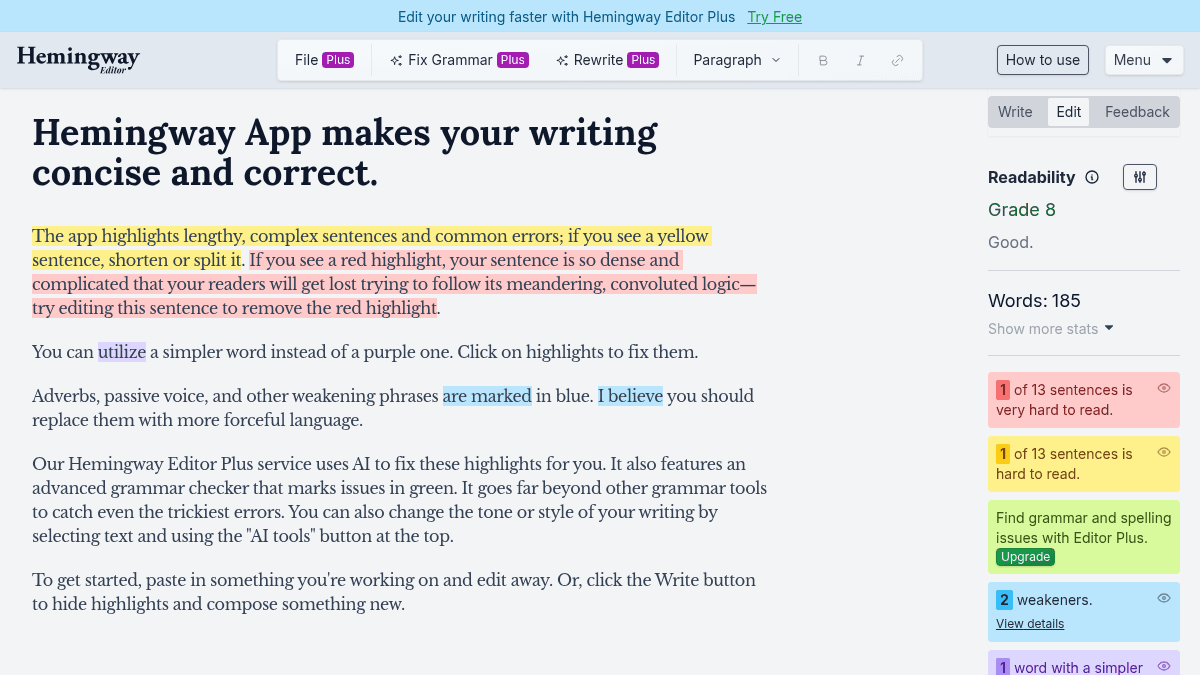
Hemingway Editor is a writing tool that helps users make their text bold and clear. It highlights readability issues, checks grammar, and adjusts tone.
Hemingway Editor Plus is the fastest way to improve writing, aimed at writers who want to produce cleaner, more readable text. Unlike basic spell checkers, it focuses on readability and sentence structure.
Key Benefits
- Fix highlighted writing issues (hard-to-read sentences, adverbs, passive voice).
- Check grammar throughout your document.
- Adjust tone to match your intended audience.
- Process writing faster than editing manually.
How It Works
Users paste or type their text into the Hemingway Editor interface. The tool highlights problem areas with color-coded markers. Users then click each highlight to see suggestions and apply fixes one by one.
Use Cases
- Novelists and fiction writers who want to tighten their prose.
- Bloggers and content creators polishing articles before publishing.
- Students working on essays and academic papers.
- Business professionals writing emails, reports, and proposals.
- Non-native English speakers who need to improve readability.
Why Choose This Product
Hemingway Editor suits any writer who wants a fast, straightforward way to produce bold, clear text. The free 2-week trial requires no credit card.
Hemingway Editor Pros & Cons
- Simple, fast editing workflow
- Color-coded issue highlighting
- Free 2-week trial, no credit card
- Grammar checking plus readability
- Tone adjustment tools
- No free plan beyond a 2-week trial
- No mobile app mentioned
Key Features
Issue highlighting
Color-coded highlights identify hard-to-read sentences, adverbs, passive voice, and simpler alternatives.
Grammar checking
Grammar checker catches errors throughout the document in addition to readability fixes.
Tone adjustment
Tone adjustment tools help writers match their intended voice and audience.
Hemingway Editor Pricing
- Fix highlighted issues
- Check grammar
- Adjust tone
Pricing extracted from the product website and may change. Check the source for current details.
How Hemingway Editor compares
H Hemingway EditorThis | ||
|---|---|---|
| Starting price | Free | Free |
| Pricing model | Freemium | Freemium |
| Platforms | — | Web, macOS, Windows, iOS, Android |
| Top features |
|
|
| Rating | — | — |