
About VisionSync
Overview
VisionSync is strategic planning software that holds an approved plan, the work underneath it, and a record of what moved. It gives every goal, strategy, measure and initiative a named owner, then collects progress updates on a cadence the organization sets.
The University of Nebraska Medical Center built the platform to run its own strategy and licensed the technology through UNeMed/UNeTech in 2023. Leaders in higher education, healthcare, nonprofits, government and enterprise now use it, and it adapts to structures tracking 5 goals or 500.
Key Benefits
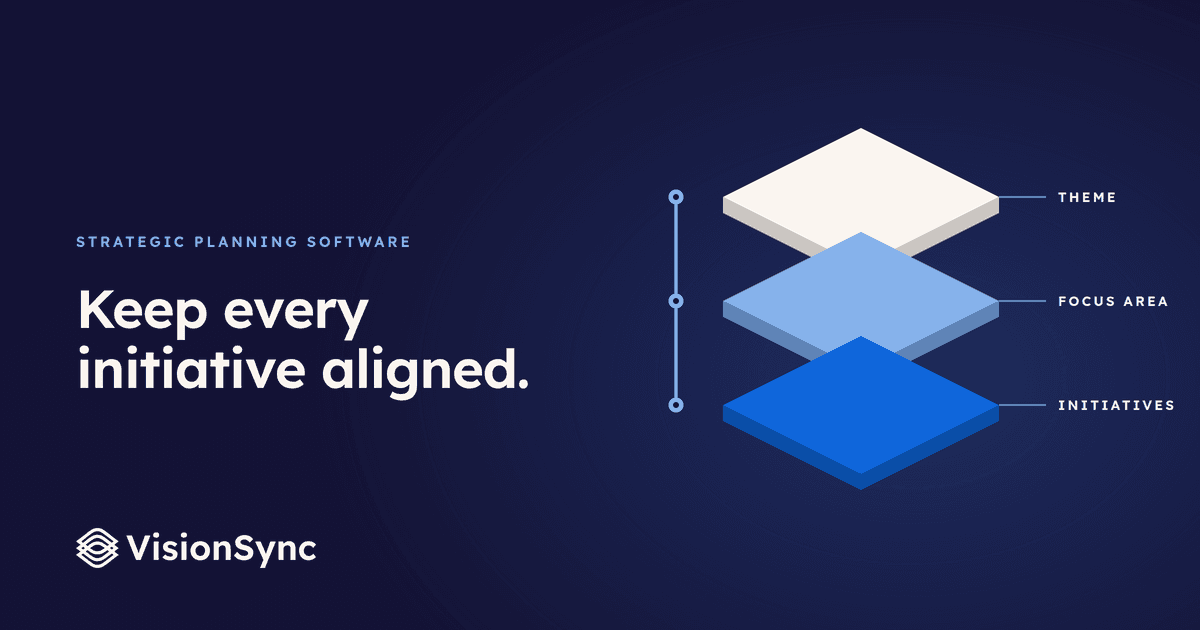
- Cascades C-suite objectives down to departmental goals and individual KPIs with visual mapping that shows how work ladders up.
- Sends automated reminders and collects progress updates on a set cadence instead of status meetings.
- Generates one-click executive summaries for leadership, boards and stakeholders from live plan data.
- Rolls initiative-level progress up to goal status, with each number traceable to the person, date and comment behind it.
- Supports SAML single sign-on through Okta, Entra ID, Shibboleth or Google with role-based access control.
- Publishes a current VPAT covering WCAG 2.1 AA and Section 508 for institutional accessibility reviews.
How It Works
Teams build the plan hierarchy and name each level the way their organization does, whether that is goal, strategy, objective or initiative. Owners take assigned tasks, due dates and review periods, log progress on the cadence you set, and receive reminders through Microsoft Teams, Slack or email. Status rolls up to the goal automatically, so leaders pull an executive summary or dashboard rather than chasing updates.
Use Cases
- Higher education strategy offices: track initiatives across campuses and generate HLC accreditation evidence as a report instead of a rebuild.
- Healthcare quality leaders: give service-line owners tasks, due dates and review periods, such as a readmissions reduction initiative reporting 68% complete.
- Nonprofit and public-sector planners: run annual or multi-year plans on a quarterly review rhythm with nonprofit rates applied to the quote.
- Multi-entity systems: let each campus or affiliate plan its own way while leadership keeps one consolidated view.
- Chiefs of staff and planning directors: replace fragmented spreadsheets with a single source of truth for owners, metrics and board-ready reporting.
- Chambers of commerce and civic teams: move economic development plans from contract to full adoption inside 30 days.
Why Choose This Product
VisionSync ran inside an academic medical center before it became a company, and the University of Nebraska System's four campuses, Pittsburg State University and the Greater Omaha Chamber use it today. It tracks strategy rather than to-dos: goals cascade through a configurable structure that maps to departments, campuses, locations and affiliates. Pricing is scoped per engagement as a one-time implementation and training fee plus monthly platform access sized to seat count, and the vendor does not publish list prices.
VisionSync Pros & Cons
- Cascades organization objectives down to departmental goals and individual KPIs
- Automated reminders replace status meetings and manual progress chasing
- One-click executive summaries and exports built from live plan data
- VPAT documents WCAG 2.1 AA and Section 508 conformance
- SSO with Okta, Entra ID, Shibboleth or Google plus role-based access
- No published list price; quotes are scoped per engagement
- Seat tiers are set once a year rather than metered monthly
Key Features
Configurable Plan Structure
Teams rename any plan level and add deeper levels so goals, strategies, measures and initiatives match their own terminology, with progress entered at the bottom level.
Initiative Ownership
Every initiative carries a named owner, action items, a due date and a review period, with RACI roles covering other contributors.
Calculated Progress Roll-Up
Progress entered at the initiative level normalizes across different targets and rolls up to goal status, and clicking a number reveals the person, date and comment behind it.
Automated Reminders
Reminders go out through Microsoft Teams, Slack or email on whatever cadence the plan sets.
Executive Reporting
One-click executive summaries for leadership, boards and stakeholders, with every view and export reading the same live data.
SSO and Role Access
SAML sign-in works with Okta, Entra ID, Shibboleth or Google, and roles control what each person can see.
Data Encryption
Plan data is encrypted in transit and at rest.
Documented Accessibility
A current VPAT covers WCAG 2.1 AA and Section 508 so institutional accessibility reviews have real documentation.
Guided Implementation
A named implementation lead runs plan migration, org mapping, a dedicated sandbox, admin certification, owner workshops and recorded training that stays with the team.
Included Support
Email and in-app help, quarterly check-ins, yearly refresh training and all product updates come with platform access and no premium queue.
VisionSync Pricing
View full pricing →- One plan and one department
- A handful of owners who all know each other
- Guided setup and a group training session
- Every user gets their own login
- Multi-year plans that need to roll up
- Owners across functions
- Quarterly review that has to hold together
- Board-ready reporting
- Accreditation evidence pulled without a scramble
- SSO/SAML for the institution band
- Success manager who knows your calendar
- Multi-campus and multi-entity structures
- Each unit plans its own way
- One consolidated leadership view
| Feature | Team Custom | Department Custom | Institution Custom | System Custom |
|---|---|---|---|---|
| One plan and one department | ||||
| A handful of owners who all know each other | ||||
| Guided setup and a group training session | ||||
| Every user gets their own login | ||||
| Multi-year plans that need to roll up | ||||
| Owners across functions | ||||
| Quarterly review that has to hold together | ||||
| Board-ready reporting | ||||
| Accreditation evidence pulled without a scramble | ||||
| SSO/SAML for the institution band | ||||
| Success manager who knows your calendar | ||||
| Multi-campus and multi-entity structures | ||||
| Each unit plans its own way | ||||
| One consolidated leadership view |
Pricing extracted from the product website and may change. Check the source for current details.
Frequently asked questions about VisionSync
What is strategy planning software?
Strategy planning software turns a strategic plan into day-to-day action. Instead of leaving goals buried in spreadsheets and slide decks, VisionSync connects every team and individual to the organization's top priorities, automates progress tracking, and gives leaders real-time visibility into how the strategy is being executed.
How is VisionSync different from project or task management tools?
Task tools track to-dos; VisionSync tracks your strategy. It connects daily work to measurable outcomes, cascades goals across every level of the organization, and delivers leadership-ready insight in one click, so you see not just what is getting done but whether it is moving the plan forward.
Who uses VisionSync?
Leaders in higher education, healthcare, nonprofits and enterprise use VisionSync when they need clear alignment, measurable accountability and full visibility without chasing updates. It works for executives, managers and individual contributors alike, linking every role to the organization's strategic goals.
How does VisionSync align teams around strategic goals?
VisionSync uses a configurable cascading-goals framework that adapts to your structure, including departments, locations, sub-entities and affiliates. Goals flow from organization-wide objectives down to individual contributions, so every team can see how their work ladders up to the bigger picture.
How does VisionSync track progress and hold owners accountable?
Automated reminders and progress updates keep everyone on pace without micromanagement. Real-time dashboards show who is on track, who needs support and where priorities are shifting, replacing status meetings with a single living source of truth.
How quickly can we implement VisionSync?
Most organizations go live within 90 days. Guided onboarding includes a dedicated sandbox, structured training and a strategy alignment session. The pricing page puts the time commitment at about 8 to 16 hours across the team over an 8 to 12 week implementation.