
About Vegas Pro
Overview
Vegas Pro is a professional non-linear video editor from Vegas Creative Software by Boris FX. It pairs with Sound Forge for audio production and ACID Pro for music creation, forming an integrated video and audio production suite.
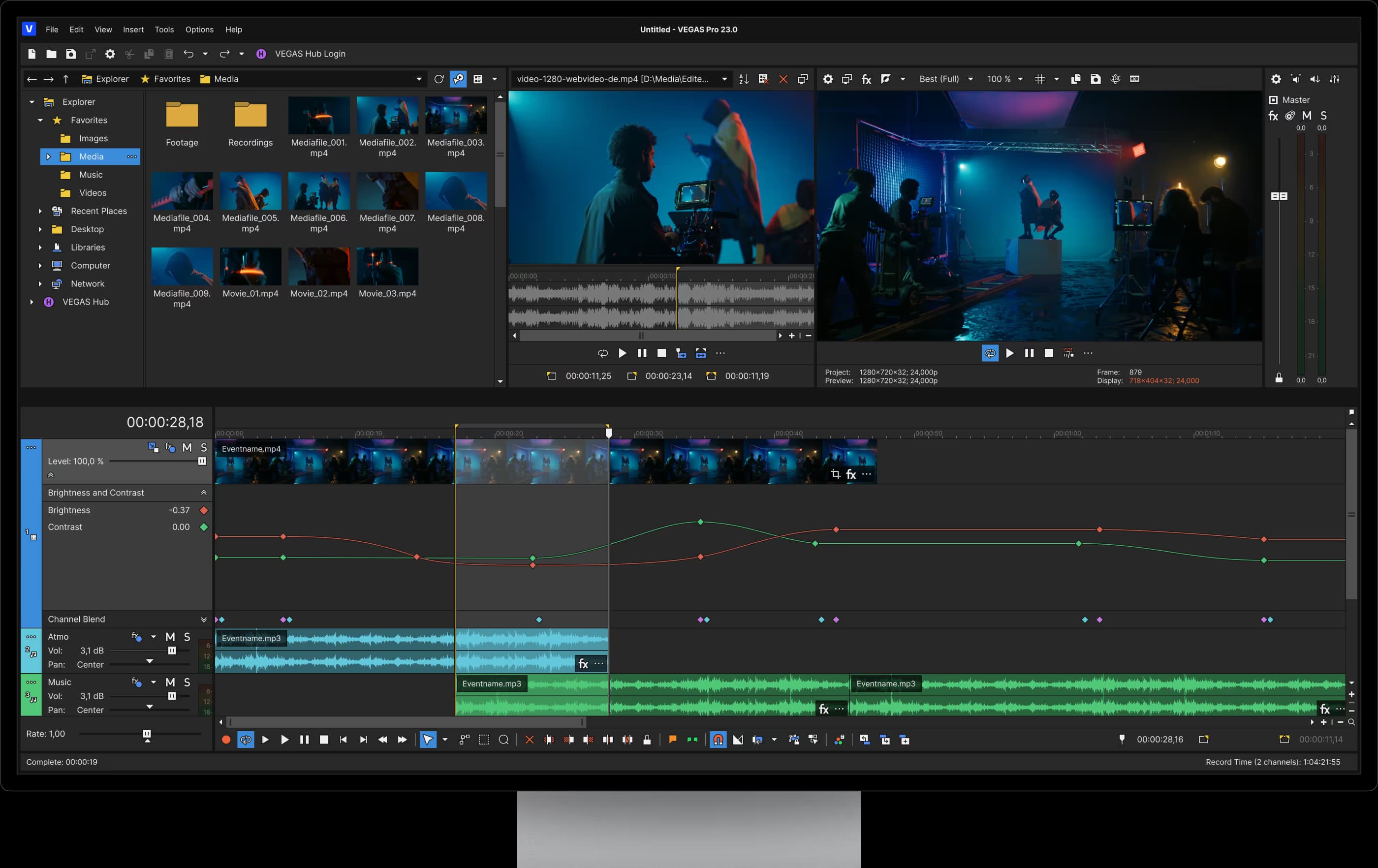
The editor centers on a fully customizable timeline where users arrange unlimited video and audio tracks. A GPU-accelerated Vegas Core engine handles playback, compositing, and rendering, while built-in AI tools automate subtitles, voiceovers, and video upscaling.
Key Benefits
- GPU-accelerated Vegas Core engine delivers smooth high-resolution editing and rendering
- AI tools generate subtitles, voiceovers, object masks, and video upscaling
- Continuum 2D and 3D titling creates professional titles and motion graphics
- Advanced color grading tools shape footage with cinematic color styles
- Multicam editing syncs footage from multiple cameras for events and interviews
- Integrated audio tools plus Sound Forge support precision editing and mastering
How It Works
Editors drag and drop clips onto the timeline, trim and arrange them, and overlap events to create instant crossfades and transitions. They apply color grading, effects, titles, and AI-powered tools, then render the finished project through the Vegas Core engine. Plans scale from the base editor up to Ultimate, which bundles Boris FX visual effects tools.
Use Cases
- Video editors build and refine multi-track timelines with fast GPU-accelerated preview
- Content creators add subtitles, voiceovers, and AI upscaling to social videos
- Filmmakers grade footage and composite effects for cinematic looks
- Event and live producers sync multi-camera footage for interviews and productions
- Audio professionals pair Vegas Pro with Sound Forge for editing and mastering
Vegas Pro Pros & Cons
- GPU-accelerated Vegas Core engine for smooth high-resolution editing
- Integrated AI tools for subtitles, voiceovers, masking, and upscaling
- Three tiers scaling from base editor to full Boris FX VFX suite
- Built-in access to Storyblocks royalty-free media library
- Multicam editing for events, interviews, and live productions
Key Features
GPU-Accelerated Timeline
The Vegas Core engine speeds up playback, compositing, effects processing, and rendering of high-resolution footage.
AI-Powered Tools
AI features generate subtitles with speech-to-text, create voiceovers with text-to-speech, mask objects, apply style transfers, and upscale video.
Advanced Color Grading
Professional color correction and grading tools create cinematic color styles and shape the look of footage.
Multicam Editing
Sync and edit footage from multiple cameras for interviews, events, and live productions.
Compositing and Effects
Layer video elements and apply compositing modes, masks, and effects to build complex visual compositions.
Integrated Audio Tools
Professional-level audio editing, recording, and mixing tools sit directly inside the editing environment.
Continuum Titling
Continuum Title Pack creates animated 2D and 3D titles with layout, lighting, and animation controls.
Mocha Vegas Tracking
Planar tracking attaches effects, graphics, and titles to moving objects with masks, roto, and stabilization.
Particle Illusion Pro
A real-time GPU 2D/3D particle engine generates effects such as fire, smoke, sparks, and energy bursts.
Storyblocks Media Library
Access royalty-free stock footage, music, and sound effects directly inside Vegas Pro.
Vegas Pro Pricing
View full pricing →- GPU accelerated timeline editing
- AI tools
- Continuum 2D+3D titling
- Advanced color grading
- Multi-cam editing
- Storyblocks media library (subscription only)
- Everything in Vegas Pro
- Mocha Vegas planar tracking
- Particle Illusion Pro
- Sound Forge
- CrumplePop VST plugins
- Everything in Vegas Pro Plus
- Continuum VFX plugins
- Mocha Pro
- CrumplePop SoundApp standalone
- Optics
| Feature | Vegas Pro Custom | Vegas Pro Plus Custom | Vegas Pro Ultimate Custom |
|---|---|---|---|
| GPU accelerated timeline editing | |||
| AI tools | |||
| Continuum 2D+3D titling | |||
| Advanced color grading | |||
| Multi-cam editing | |||
| Storyblocks media library (subscription only) | |||
| Everything in Vegas Pro | |||
| Mocha Vegas planar tracking | |||
| Particle Illusion Pro | |||
| Sound Forge | |||
| CrumplePop VST plugins | |||
| Everything in Vegas Pro Plus | |||
| Continuum VFX plugins | |||
| Mocha Pro | |||
| CrumplePop SoundApp standalone | |||
| Optics |
Pricing extracted from the product website and may change. Check the source for current details.
Frequently asked questions about Vegas Pro
Is Vegas Pro free?
Vegas Pro is a paid product. See the pricing section for current plans and starting prices.
How much does Vegas Pro cost?
Vegas Pro offers the following plans: Vegas Pro, Vegas Pro Plus, Vegas Pro Ultimate. See the pricing section for what's included in each tier and any per-seat or usage-based costs.
What platforms does Vegas Pro support?
Vegas Pro is available on: Windows.