About Signal Recorder SR-7
Overview
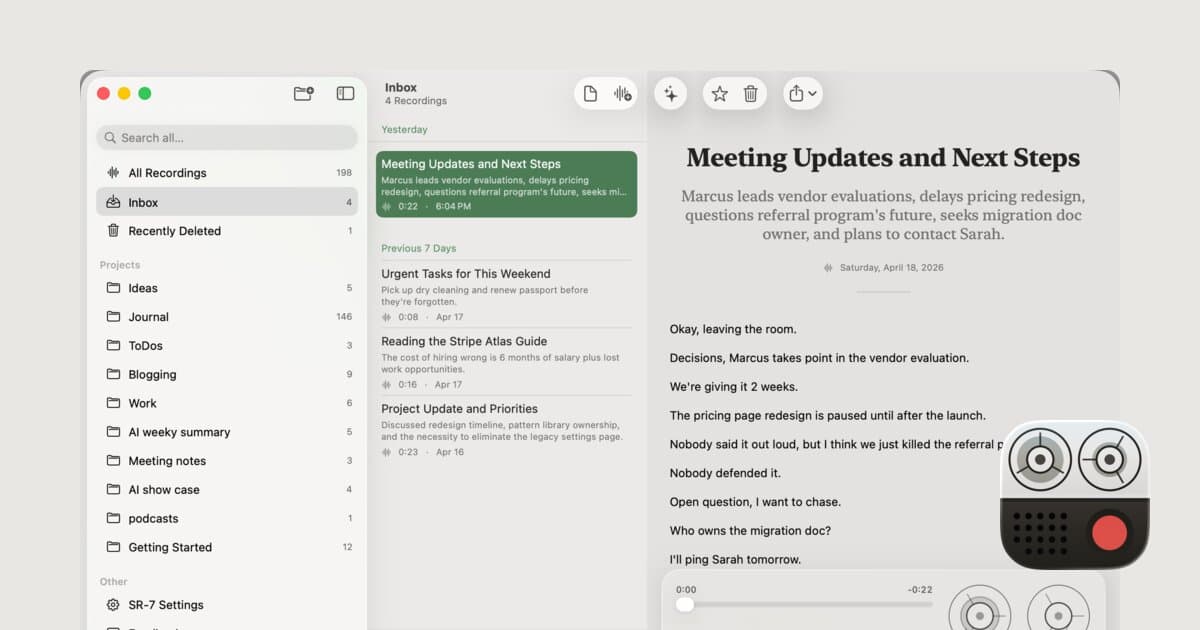
Signal Recorder SR-7 is a voice recorder for iPhone, iPad and Mac that transcribes speech on the device using Apple's on-device speech framework and writes a title and one-sentence summary for every recording with Apple's on-device models. A single $7.99 purchase covers all three devices, with no subscription, no in-app purchase and no account to create.
The app keeps one library across devices and moves recordings, transcripts and projects between them through the user's own iCloud with CloudKit, which stays off until the user switches it on. Search covers file names, titles, summaries and full transcripts. On the Mac, each recording also mirrors to a markdown file with YAML front matter inside a folder the user picks.
Key Benefits
- The record button sits at the bottom of every list, so a thought takes one tap and no typing.
- Transcription, titles and summaries all run on the user's own device, and the App Store privacy label reads Data Not Collected.
- Every recording arrives with an automatic title and a one-sentence summary.
- Search reaches file names, titles, summaries and full transcripts, so an old remark stays one query away.
- One $7.99 purchase covers iPhone, iPad and Mac, and Family Sharing extends it to up to six people.
- On the Mac, each recording becomes a markdown file with YAML front matter in a folder the user chooses.
How It Works
The user records inside the app or imports audio from another recorder, including drag and drop or Command-O on the Mac. Apple's on-device speech framework then turns the audio into text, and Apple's on-device models write a title and a one-sentence summary, which requires Apple Intelligence. The library stays on the device and can mirror to a markdown folder on the Mac; optional iCloud sync carries it between devices, with audio travel as a separate choice.
Use Cases
- Consultants speak three talking points into the phone while walking to a meeting room and arrive to a transcript and title.
- Interviewers record their read on a research call while it is fresh, then search every debrief for a pattern.
- Writers read a line from a book aloud and say why it matters, keeping the quote and their reaction in one recording.
- Journalists and diarists record two minutes of reflection each evening and build a journal they can search later.
- Musicians and field recordists mount a teenage engineering TP-7 with Field Kit on the Mac and drag memos into SR-7 to get them transcribed and titled.
- Developers connect Claude Code to the local MCP server so an AI client can search the archive, read transcripts and create notes.
Why Choose This Product
SR-7 keeps the whole signal path on hardware the user already owns: no SR-7 account, no developer servers, and no analytics or telemetry, with sync routed through the user's own iCloud. The Mac output is plain text, so an Obsidian vault, a git repository or a script can read the library. The page is candid about fit: SR-7 records the user's own voice and does not join calls or label speakers.
Signal Recorder SR-7 Pros & Cons
- On-device transcription, titles and summaries; App Store label reads Data Not Collected
- $7.99 one-time purchase with no subscription, in-app purchase or account
- Mac library mirrored as markdown files with YAML front matter
- Local MCP server with 20 tools for Claude Code and other AI clients
- Family Sharing extends the purchase to up to six people
- Titles and summaries require Apple Intelligence
- The Mac app needs Apple silicon (M1 or later)
- MCP server and markdown library folder are Mac only
- No speaker labels; SR-7 does not join calls
Key Features
On-Device Transcription
SR-7 transcribes audio with Apple's on-device speech framework in the language the device uses, and works without Apple Intelligence.
Automatic Title and Summary
Apple's on-device models write a title and one sentence for every recording, which requires Apple Intelligence switched on.
Full-Text Search
Search covers file names, titles, summaries and complete transcripts across the library.
Markdown Library
On the Mac, SR-7 writes a folder per project and a markdown file per recording with YAML front matter, a stable uuid and an optional hidden .audio folder.
Local MCP Server
The Mac app runs a server on 127.0.0.1 with 20 tools that let Claude Code or any MCP client search recordings, read transcripts and create notes.
iCloud Sync
CloudKit keeps recordings, transcripts and projects in step across iPhone, iPad and Mac, stays off until switched on per device, and treats audio as optional.
Audio Import
SR-7 imports WAV, AIFF, MP3, M4A, AAC, CAF, FLAC and ALAC files from other recorders, keeping MP3, M4A and AAC as they are.
Projects, Stars and Inbox
Recordings sort into projects, star the ones to revisit, or stay in the Inbox.
Variable Playback
Playback runs from 0.5× to 2× with 15-second skips in either direction.
Recording Length Setting
Each recording can run up to 180 minutes, with a limit the user sets between 15 and 180 minutes starting at 60.
Signal Recorder SR-7 Pricing
Pricing extracted from the product website and may change. Check the source for current details.
Frequently asked questions about Signal Recorder SR-7
Where do transcription and summaries run?
On your device. SR-7 transcribes with Apple's on-device speech framework and writes titles and summaries with Apple's on-device models. Nothing reaches the developer's servers; if you switch on iCloud sync, recordings travel through your own iCloud account instead.
Which languages does it transcribe?
The languages Apple's on-device transcription supports on your OS version. SR-7 uses your device's language by default. The developer does not publish a fixed list because that list comes from Apple.
Is SR-7 a meeting recorder?
No. SR-7 is a personal recorder for your own voice and does not join calls or label speakers. If you need a bot in Zoom, Google Meet or Teams, the page points to Otter as the tool built for that.
What do I need to run it?
iOS 26, iPadOS 26 or macOS 26, plus an Apple silicon chip (M1 or later) on the Mac. Titles and summaries need Apple Intelligence switched on, while transcription works without it.
Can I use it with Obsidian?
Yes, on the Mac. Choose a location inside your vault and SR-7 creates its SR-7 Library folder there, with a note per recording and YAML front matter on top. SR-7 manages that folder and rewrites files when a recording changes, so edit in SR-7 and read in Obsidian.
Can my AI tools read my recordings?
On the Mac, yes. SR-7 runs a local MCP server with 20 tools that stays off until you switch it on, so Claude Code or another MCP client can search the archive and read transcripts. Any tool with file access can also read the markdown library.