
About Ora
Overview
Ora is a team task manager for planning, chatting, and executing projects in one place. It combines kanban boards, list and table views, real-time collaboration, and built-in time tracking so teams can organize and follow work from a single workspace.
Founded in Bulgaria, Ora offers a free forever plan for up to 10 members alongside paid tiers for larger teams. The company has announced that Ora is joining ClickUp and closing soon, with users asked to export their data.
Key Benefits
- Free forever plan supports up to 10 members at no cost
- Multiple project views include kanban, list, and spreadsheet-style table
- Built-in time tracking and estimates show the team what you are working on
- Real-time collaboration through comments, mentions, and notifications
- Recurring tasks, task relationships, and list action automations on paid plans
- Free observers and guests let clients and stakeholders follow project progress
How It Works
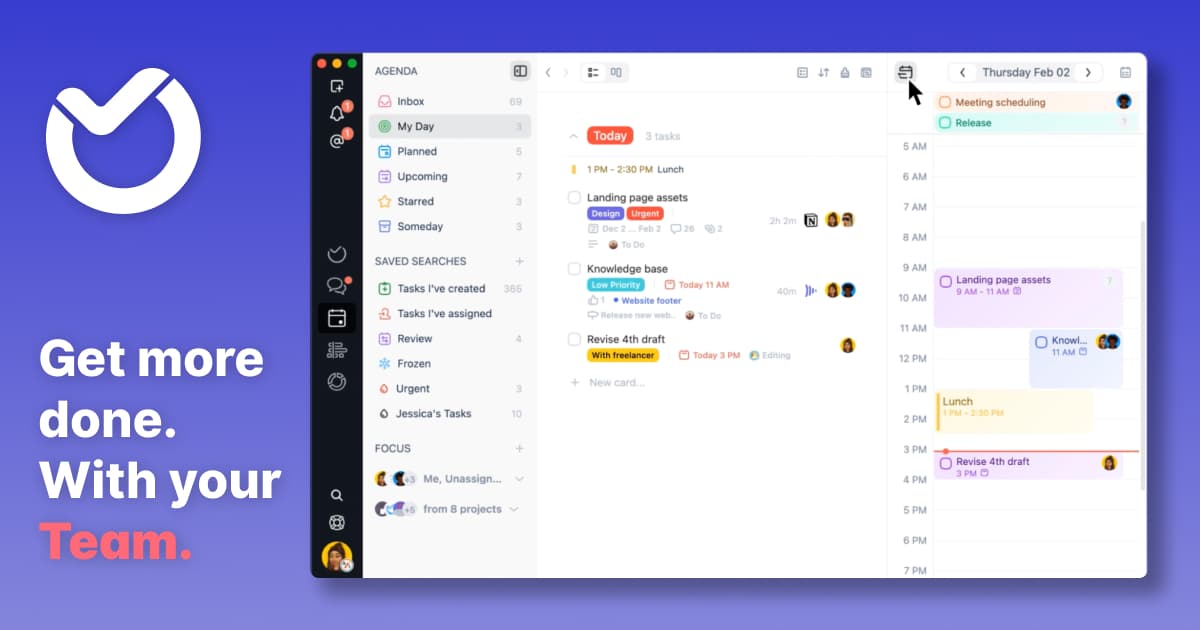
Create projects with unlimited cards and tasks, arrange work into lists, assign teammates, and set due dates directly on each card. Use the Agenda and Inbox views to pull tasks from every project into one place and schedule them by due date.
Use Cases
- Software development teams run agile workflows with kanban boards and sprint views
- Agencies add clients as free observers to watch progress and comment on tasks
- Consulting and service teams track billable time with timers and manual logging
- Remote teams collaborate in real time with comments, mentions, and notifications
- Product managers organize work into milestones, labels, and task relationships
Why Choose This Product
Ora emphasizes simple, minimalistic tools that teams can expand as needed, adding features like observers, recurring tasks, and automations only when required. Note that Ora is closing soon and migrating to ClickUp, so new users should consider the transition before adopting it.
Ora Pros & Cons
- Free forever plan for up to 10 members
- Built-in time tracking and estimates with real-time visibility
- Multiple views: kanban, list, table, agenda, and calendar
- Free observers and guests for clients and stakeholders
- 50% discount for educational and non-profit organizations
- Service closing soon; users are asked to export their data and migrate to ClickUp
- Credit card required to start the Professional free trial
- Observers only available on paid plans
Key Features
Multiple views
Organize work as kanban boards, lists, or spreadsheet-style table views within each project.
Task details
Each card holds attachments, markdown, checklists, comments, due dates, and time tracking in one detail view.
Time tracking
Estimate tasks, start a timer, or log time manually and show your team what you are working on in real time.
Agenda and inbox
Group tasks from all projects in one place and schedule them by due date across inbox, today, weekly, and calendar views.
Recurring tasks
Professional+Repeat a task on a daily, weekly, or monthly basis on the Professional plan.
Task relationships
Professional+Mark tasks as parent, child, duplicate, related, or blocking one another on the Professional plan.
Labels and milestones
Add context to cards with labels and organize tasks into project milestones.
List automations
Professional+Trigger reactions like assignment or status changes when a task moves to a specific list on the Professional plan.
Ora Pricing
View full pricing →- Free forever for up to 10 users
- Unlimited projects, tasks, comments, and attachments
- Max file size 10mb
- Basic add-ons
- No observers
- Everything from Free
- Max file size 1GB
- Task relationships, List actions, and Recurring tasks
- Free observers and guests
- 30-day free trial
- Everything from Professional
- Single Sign On
- File encryption
- Contact us for pricing
| Feature | Basic Free/mo | Professional $5.99/mo | Enterprise $27.99/mo |
|---|---|---|---|
| Recurring tasks | |||
| Task relationships | |||
| List automations |
Pricing extracted from the product website and may change. Check the source for current details.
Frequently asked questions about Ora
Can I try Ora for free?
Yes. Ora is free forever for up to 10 team members. Larger teams or users who want Professional features can start a 30-day free trial, which requires credit card information. You can cancel before the trial period ends.
What is the difference between the free and paid plans?
Ora Basic is free for up to 10 members. Professional adds project observers, recurring tasks, list actions, task relationships, attachments up to 1GB, and custom project backgrounds. Enterprise adds single sign-on and file encryption.
How can I pay for Ora?
Ora accepts credit card and PayPal. All payments are handled securely by Braintree, a PayPal company.
What happens when my team size changes?
Your plan upgrades or downgrades automatically. When a member joins, you are charged for the additional member only for the remaining days of the billing cycle. When you remove a member, the remaining days are returned as credit toward your next bill.
Is my credit card information secure?
Ora uses Braintree, a PayPal company, to handle credit card data. Card information is not stored on Ora's servers, and Braintree is a Validated Level 1 PCI DSS Compliant Service Provider.
Do you issue invoices and is VAT included?
Yes, Ora issues invoices and VAT is included in the price when it applies. You can edit your invoice and provide company information in the billing section.