
About Flixier: Free Online Video Editor With AI Editing
Overview
Flixier is an AI-powered video editor that runs entirely in a browser tab with no downloads or installs. It combines a full multi-track editor with AI tools and cloud rendering, so finished videos export quickly even on low-spec computers.
Users can edit clips themselves, let the AI assistant Eva handle repetitive steps, or have Eva generate a ready-to-post video when nothing was recorded. The tool serves social creators, training teams, and anyone producing polished video without dedicated editing hardware.
Key Benefits
- Runs fully in the browser with no installation required
- Renders 4K MP4 exports in the cloud instead of on your laptop
- Auto-generates subtitles and translates them into 130+ languages
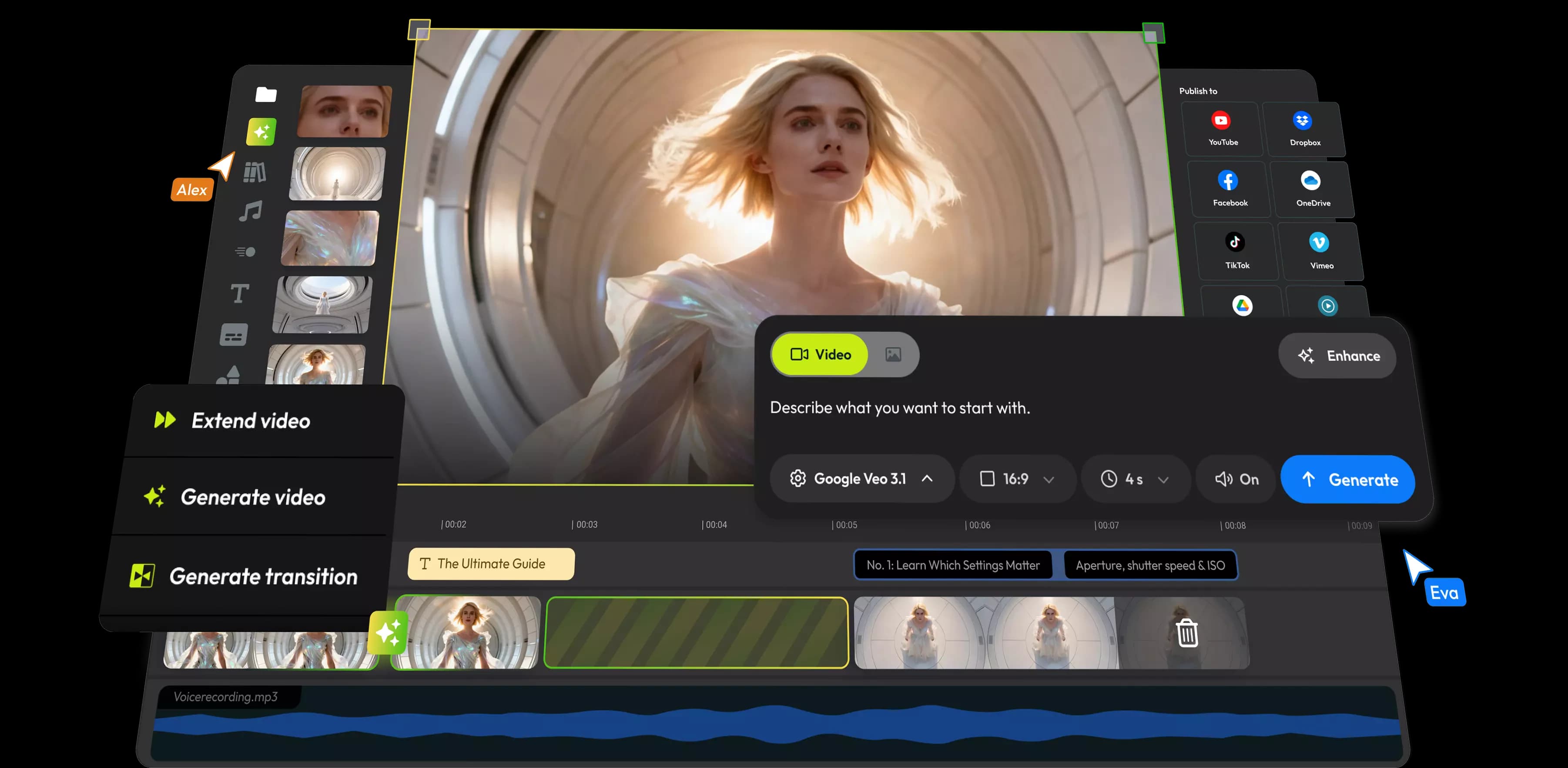
- Generates AI video clips directly inside the editing timeline
- Includes a stock library with 4M+ clips, photos and tracks
- Publishes straight to YouTube, TikTok or Drive from the editor
How It Works
Sign up without a credit card, import media from any source such as a device upload, cloud storage, or a screen and webcam recording, then cut, add text and music, and clean the audio in the timeline. For faster results, ask Eva to make the first cut or generate a full draft, then refine it and export, with rendering handled in the cloud so a full-length video finishes in minutes.
Use Cases
- Social media creators cut clips into vertical videos for Reels, TikTok and Shorts
- Marketing teams repurpose long videos into short clips without re-uploading
- Product teams record screen and voice to build demo videos that sell
- L&D and HR teams turn process docs into training and onboarding videos
- Educators record screen tutorials and publish clean walkthroughs
Why Choose This Product
Flixier differs from standalone AI generators by putting generation inside a full editing suite, so users go from prompt to finished video in one place without exporting and re-uploading. Teams can review on the timeline, keep a shared brand kit, and publish from the editor directly.
Flixier: Free Online Video Editor With AI Editing Pros & Cons
- Runs fully in the browser with no installation
- Cloud rendering finishes 4K exports in minutes
- AI video generation inside the editing timeline
- Auto subtitles and translation in 130+ languages
- Free plan available with no credit card
- Free plan adds a Flixier watermark
- Free and Starter tiers have a limited stock library
- Free plan caps exports at 10 min per month and 720p
Key Features
Cloud editor
A full multi-track video editor operates entirely in a browser tab with no downloads or installs.
AI video generation
Creator+Generate video clips from text prompts or images directly inside the editing timeline.
Auto subtitles
All plansAuto-generate captions and translate them into 130+ languages without typing.
Cloud rendering
Renders full-length 4K MP4 exports in the cloud so they finish in minutes on any laptop.
Stock library
Creator+Includes a stock library with 4M+ clips, photos and tracks.
Screen recording
Record screen or webcam to capture tutorials, demos, and meetings.
Team collaboration
Creator+Supports real-time collaboration with comments placed on the timeline at the exact second they refer to.
Brand Kit
Creator+Shared logos, fonts and colours in a team brand kit keep every video on brand.
Audio enhancer
Clean audio in one click and remove background noise to improve quality.
Flixier: Free Online Video Editor With AI Editing Pricing
View full pricing →- 10 min video export per month
- 5 min of subtitles per month
- 720p resolution
- 2 GB storage
- Limited stock library
- Flixier watermark
- 60 min video export per seat per month
- 120 min of subtitles per seat per month
- Full HD 1080p resolution
- 20 GB storage per seat
- Limited stock library
- No watermark
- Unlimited video exports
- 1500 min of subtitles per seat per month
- 4K resolution
- 250 GB storage per seat
- 4M+ stock assets
- Unlimited collaborators
- Unlimited video exports
- Unlimited subtitle exports
- 4K resolution
- Unlimited storage
- 4M+ stock assets
- Priority chat support
| Feature | Free Free/mo | Starter $19/mo | Creator $39/mo | Business $69/mo |
|---|---|---|---|---|
| AI video generation | ||||
| Auto subtitles | ||||
| Stock library | ||||
| Team collaboration | ||||
| Brand Kit |
Estimate based on listed per-seat pricing. Volume discounts and add-ons may apply.
Pricing extracted from the product website and may change. Check the source for current details.
Frequently asked questions about Flixier: Free Online Video Editor With AI Editing
What is Flixier and how does it work?
Flixier is an AI-powered video editor that runs entirely in your browser with no downloads or installations. You sign up, import media from any source, and start editing. Cloud-based technology handles all processing, so even low-spec devices can create professional videos in minutes.
How does AI video generation work in Flixier?
AI video generation works directly inside the editing timeline. Type a prompt to generate a clip and place it where you want, extend clips from the last frame, create AI transitions, and try different AI models before committing. You can refine immediately by trimming and adding voiceover, captions, and effects without leaving the editor.
Can I generate videos using AI with Flixier?
Yes. Flixier's AI can generate video drafts from text prompts or images, create voiceovers, generate subtitles automatically, translate audio to 130+ languages, and enhance video and audio quality. The AI handles the heavy lifting while you keep full creative control.
Is Flixier better than standalone AI video generators?
Flixier combines AI video generation with a full editing suite. Standalone generators like Sora or Runway create clips but still need a separate editor to trim, add audio, or combine scenes. Flixier puts generation inside the timeline so you go from prompt to finished video in one place.
Is Flixier free to use?
Flixier offers a free plan that lets you explore all features and create videos without a credit card. Premium plans unlock additional export quality, storage, and advanced features, with no hidden costs or surprise limitations. The free version carries a Flixier watermark.
Can teams collaborate on videos in Flixier?
Yes. Flixier supports real-time collaboration, allowing multiple team members to work on the same project simultaneously. You can share projects with a link, leave comments, and iterate faster without emailing files back and forth.