About Colorable
Overview
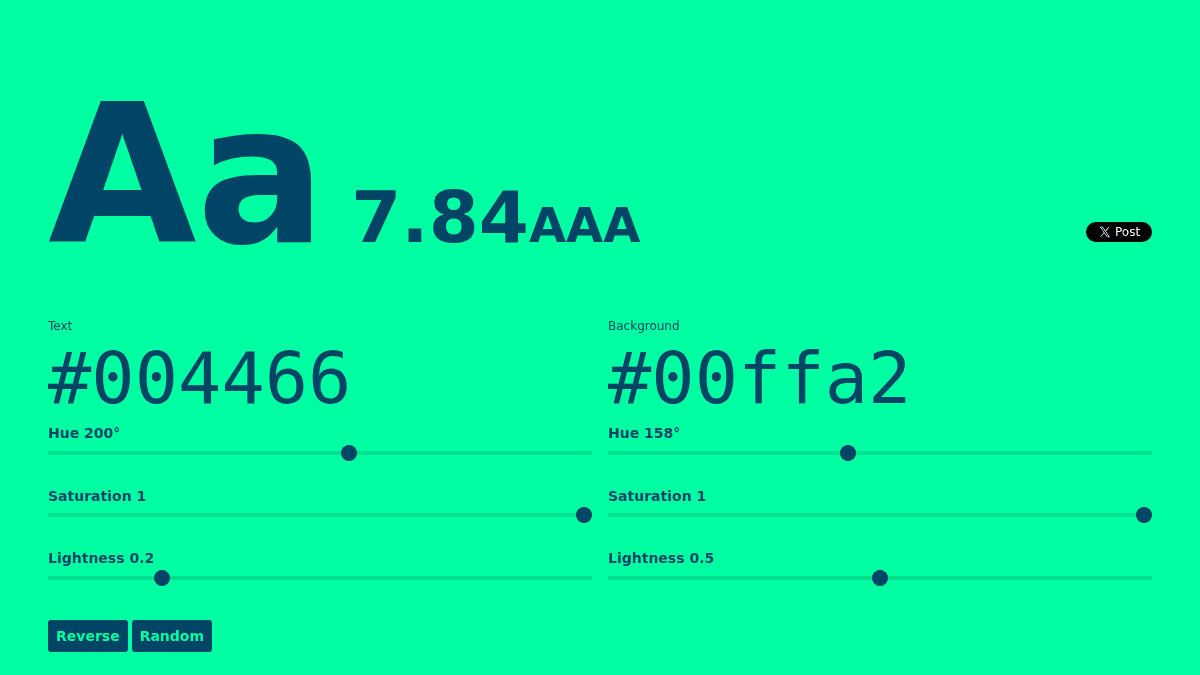
Colorable is a web-based tool that evaluates color contrast ratios between text and background colors to verify WCAG accessibility compliance. It displays real-time contrast measurements and accessibility ratings (AAA, AA, fail) as you adjust text hue, saturation, and lightness values.
The tool helps designers and developers ensure their color choices meet accessibility standards without relying on external validators. It combines a visual contrast checker with an interactive color picker interface, letting you experiment with different color combinations and immediately see whether they pass accessibility thresholds.
Key Benefits
- Real-time contrast ratio calculation displayed as a numerical score and accessibility rating.
- Separate hue, saturation, and lightness controls for both text and background colors.
- Instant visual feedback showing exactly how text renders against the selected background.
- Free access to WCAG accessibility compliance checking without signup or account creation.
How It Works
Adjust the hue, saturation, and lightness sliders for your text color and background color. The tool immediately calculates the contrast ratio and displays it alongside a WCAG rating (AAA, AA, or fail). Use the Reverse button to swap text and background colors, or click Random to generate new color combinations and explore compliant options.
Use Cases
- Web designers prototyping color palettes need to verify every combination passes WCAG AA or AAA standards before implementation.
- Frontend developers building accessible interfaces use Colorable to validate text-background pairs during development.
- Accessibility auditors test existing color schemes to identify non-compliant combinations that need redesign.
- UI/UX teams establishing brand color guidelines rely on this tool to ensure all approved colors work together accessibly.
Why Choose This Product
Colorable suits anyone building digital products who needs a quick, free way to check color accessibility without leaving their browser. It requires no installation, no sign-up, and no complex configuration—just load the page and start testing. The tool is ideal for designers and developers who want instant feedback on contrast compliance during the design phase.
FREE
Colorable Pros & Cons
- Free color contrast checker with no signup required
- Real-time WCAG accessibility rating (AAA, AA, fail)
- Interactive HSL color sliders for precise control
- Instant visual feedback with live text preview
Key Features
Contrast Ratio Calculator
Displays the numeric contrast ratio between two colors and returns a WCAG accessibility rating (AAA, AA, or fail).
Interactive Color Picker
Adjusts hue, saturation, and lightness sliders independently for both text and background colors.
Live Preview
Shows real-time text rendering against the selected background to visualize contrast before use.
Reverse Colors
Swaps the text and background colors instantly to test both color combinations.
Random Generator
Creates random color combinations so users can explore and discover compliant color pairs.
How Colorable compares
C ColorableThis | |||
|---|---|---|---|
| Starting price | — | Free | Free |
| Pricing model | unknown | Free | Free |
| Platforms | Web | Web | Web |
| Top features |
|
|
|
| Rating | — | — | — |
