About Canvanizer
Overview
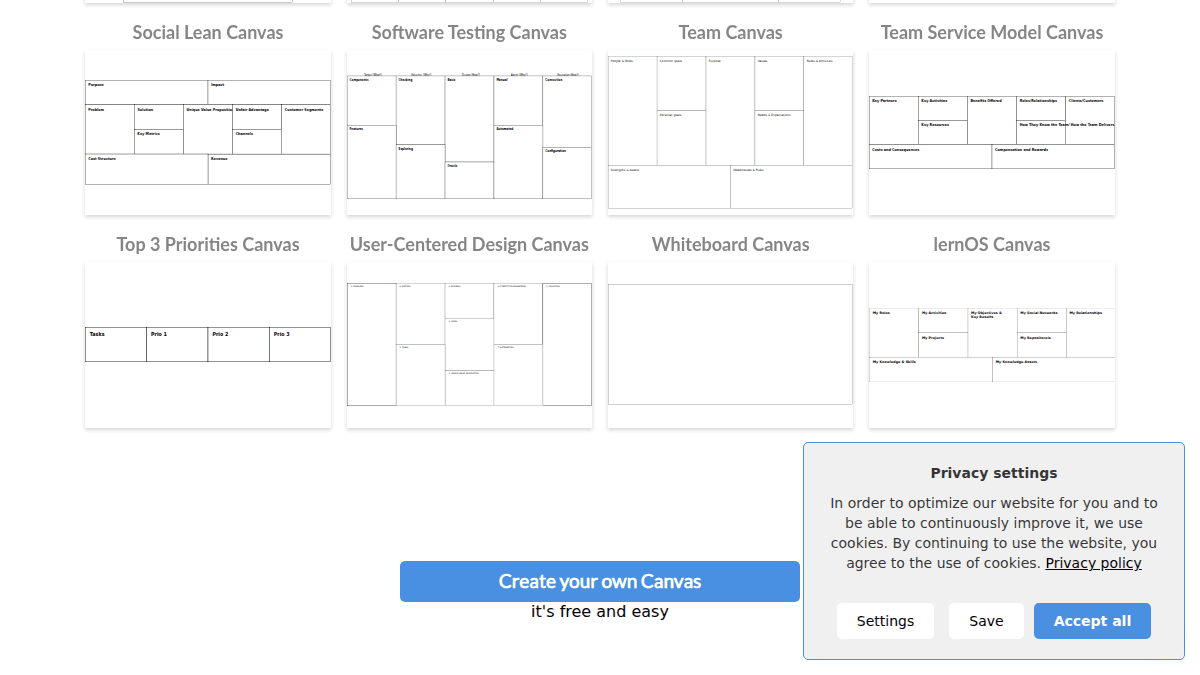
Canvanizer is a web-based brainstorming and strategy tool built around visual canvas templates. It helps teams create business model canvases, SWOT analyses, customer journey maps, and over 40 other structured frameworks directly in the browser.
Unlike generic whiteboard tools, Canvanizer provides pre-structured templates so users can skip setup and focus on filling in ideas. It targets startup founders, product managers, service designers, and agile teams who need a shared space to iterate on strategy.
Key Benefits
- Over 40 pre-built canvas templates covering business, service design, project management, and general frameworks.
- Real-time sync — all changes are synced across everyone with the same canvas open.
- AI canvas generation from an idea prompt on the Standard plan.
- Export canvases as PDF, PNG, or Markdown on paid plans.
- More than 2.79 million canvases have been created using the platform.
- Available in multiple languages: English, Spanish, French, Italian, Dutch, Polish, and more.
How It Works
You choose a pre-structured canvas template or create a custom one from scratch. You share a secret URL with teammates and everyone edits in real time — every change syncs instantly. You finetune ideas by moving notes around, create variations by cloning canvases, and optionally publish read-only versions for public feedback on blogs.
Use Cases
- Startup founders mapping out their business model using the Business Model Canvas or Lean Canvas templates.
- Service designers documenting customer journeys and identifying pain points with the Customer Journey Canvas.
- Product managers planning roadmaps using the GO Product Roadmap Canvas or Product Vision Board Extended Canvas.
- Agile teams running retrospectives with the 4L Retrospective Canvas or Lean Change Canvas.
- HR professionals designing organizational change with the HR Innovation Canvas or Internal Communication Model Canvas.
- Freelancers and job seekers building a visual CV or résumé using the CV / Resume Canvas.
Why Choose This Product
Canvanizer is best suited for teams that want structured brainstorming without the overhead of setting up a new workspace. It is free to start with 50 notes in a personal workspace, and paid plans add unlimited notes, private canvases, AI generation, and larger team collaboration. The tool is limited to canvas-style frameworks and does not offer freehand drawing or unbounded whiteboard capabilities.
Canvanizer Pros & Cons
- Free tier available with 50 notes
- Over 40 pre-built canvas templates included
- Real-time collaboration via shared secret URL
- Export to PDF, PNG, and Markdown on paid plans
- AI canvas generation from idea prompt on Standard plan
- Free plan limited to 50 notes and no private canvases
- No freehand drawing or unbounded whiteboard features
- Limited to canvas-style frameworks only
Key Features
Pre-built Canvas Templates
Canvanizer offers over 40 popular canvas templates including Business Model Canvas, Lean Canvas, SWOT analysis, Customer Journey Canvas, and more.
Real-time Collaboration
Team members with the same canvas URL see all changes synced instantly as notes are moved and ideas are finetuned.
AI Canvas Generation
The Standard plan uses AI to generate a full canvas from a user's idea prompt.
Private Canvases
Paid plans allow creating private canvases with revocable links for controlled access.
Multi-format Export
Canvases can be exported as PDF, PNG, and Markdown on Startup and Standard plans.
Multi-language Support
The interface supports English, Spanish, French, Italian, Dutch, Polish, and other languages.
Customizable Segments
The Standard plan allows users to customize canvas segments beyond the default template structure.
Image Upload
Users on paid plans can upload images and select from different fonts on their canvases.
Project Workspaces
Paid plans include project workspaces for organizing team progress and collaboration across multiple canvases.
Side Notes
The Standard plan supports side notes for adding supplementary information to canvas segments.
Canvanizer Pricing
View full pricing →- Personal Workspace
- 50 free notes
- Personal Workspace
- Unlimited notes and private canvases
- 1 Project Workspace
- Invite up to 5 collaborators
- Export: PDF, PNG, Markdown
- Selectable fonts
- Image upload
- All STARTUP plan features
- AI will generate the full canvas
- Unlimited notes and private canvases
- 3 Project Workspaces
- Invite up to 15 collaborators
- Customizable segments
- Side notes
| Feature | Free Free/yr | Startup $25/yr | Standard $75/yr |
|---|---|---|---|
| Personal Workspace | |||
| 50 free notes | |||
| Unlimited notes and private canvases | |||
| 1 Project Workspace | |||
| Invite up to 5 collaborators | |||
| Export: PDF, PNG, Markdown | |||
| Selectable fonts | |||
| Image upload | |||
| All STARTUP plan features | |||
| AI will generate the full canvas | |||
| 3 Project Workspaces | |||
| Invite up to 15 collaborators | |||
| Customizable segments | |||
| Side notes |
Pricing extracted from the product website and may change. Check the source for current details.
Frequently asked questions about Canvanizer
Is Canvanizer free?
Yes, Canvanizer offers a Free plan at $0 per year that includes a Personal Workspace and 50 free notes. Paid plans start at $25 per year for the Startup plan.
What templates does Canvanizer offer?
Canvanizer offers over 40 pre-structured canvas templates including Business Model Canvas, Lean Canvas, SWOT analysis, Customer Journey Canvas, Project Canvas, Empathy Map Canvas, and many more across business, service design, project management, and general categories.
Can I collaborate with my team in real time?
Yes, you share a secret canvas URL with your team and all changes are synced in real time for everyone with the same canvas opened. Paid plans also include project workspaces for team progress and collaboration.
How much does Canvanizer cost?
Canvanizer offers the following plans: Free, Startup, Standard. See the pricing section for what's included in each tier and any per-seat or usage-based costs.
What platforms does Canvanizer support?
Canvanizer is available on: Web.
How Canvanizer compares
CanvanizerThis | ||
|---|---|---|
| Starting price | Free | Free |
| Pricing model | Freemium | Freemium |
| Platforms | Web | Web |
| Top features |
|
|
| Rating | — | — |