About Adobe Fonts
Overview
Adobe Fonts gives designers access to thousands of typefaces from the world's leading foundries through a single subscription. Instead of buying individual font licenses or managing licensing rights separately, users get the entire library included with any Adobe Creative Cloud membership.
More than 30,000 fonts are available for instant use in desktop applications and on the web, with simplified licensing that covers personal and commercial projects. The service is designed for anyone who works with type — graphic designers, web developers, video editors, and illustrators.
Key Benefits
- Access over 30,000 fonts from leading type foundries with a single subscription.
- Use the full library for both personal and commercial projects without additional licensing fees.
- Start with more than 5,000 fonts for free — no paid plan required.
- Fonts work instantly in desktop Creative Cloud apps and on websites via Web Projects.
- Embed fonts in PDFs for viewing and printing without conversion issues.
- Use fonts in video and broadcast content for in-house or commercial projects.
How It Works
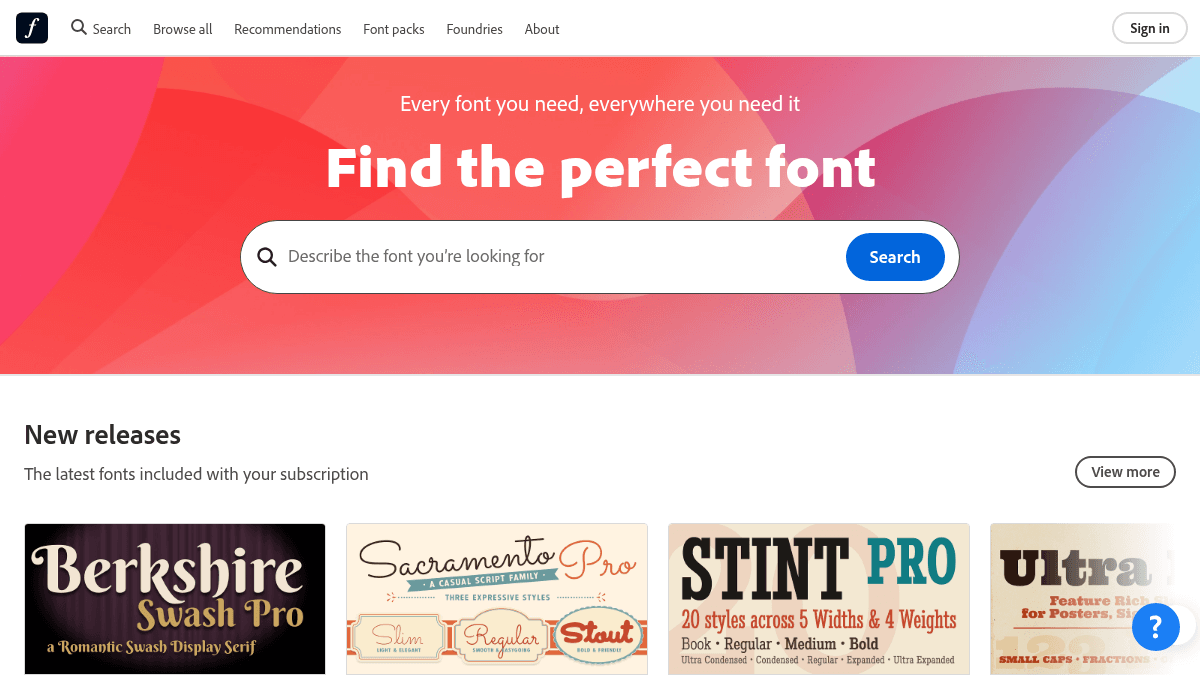
You sign into your Adobe account, browse the font library, and activate any font with one click — it becomes available in your desktop applications immediately. For websites, you create a Web Project that generates a link or CSS to embed the fonts into your pages. You can also build custom collections of favorite fonts and share them with collaborators.
Use Cases
- Graphic designers — access the complete library for branding, logos, and print layouts without per-font purchasing.
- Web developers — add licensed fonts to any website using the Web Project feature and a single embed code.
- Video editors — use any Adobe Fonts typeface in commercial and in-house video productions.
- Illustrators and digital artists — pull professional type into vector artwork and image composites inside Creative Cloud apps.
- Print publishers — embed fonts into PDFs so documents render correctly regardless of the viewer's local font set.
Why Choose This Product
Adobe Fonts is best suited for Creative Cloud subscribers who want a large, legally cleared font library without managing individual licenses. The service explicitly covers both personal and commercial use, including video and broadcast. Users outside the Adobe ecosystem will need a Creative Cloud membership to access the full library, though 5,000 fonts are available free.
Adobe Fonts Pros & Cons
- 30,000+ fonts from leading foundries
- Simplified licensing covers personal and commercial use
- Free tier includes 5,000+ fonts
- One-click activation in desktop apps
- Web Project feature for website embedding
Key Features
Desktop app sync
One-click activation syncs fonts across all Creative Cloud desktop apps like Photoshop, Illustrator, and InDesign.
Web Project feature
A Web Project generates a link or CSS code to embed any licensed font into any website.
Custom collections
Create custom collections of your favorite fonts and share them with collaborators.
30,000+ fonts
Over 30,000 typefaces from leading foundries such as Hoefler&Co., Monotype, and Type Network.
PDF font embedding
Embed fonts directly into PDFs so documents display correctly for any viewer.
Video & broadcast use
Use the full font library in both personal and commercial video and broadcast projects.
Browse & filter tools
Filter fonts by classification (serif, sans-serif, script, etc.) and by language support.
Free starter library
Start using over 5,000 fonts at no cost; full library requires a Creative Cloud subscription.
Adobe Fonts Pricing
- Access to over 5,000 fonts
- Use fonts in desktop apps
- Use fonts on websites via Web Projects
- Licensed for personal and commercial use
- Create and share custom collections
- Access to over 30,000 fonts
- All Free tier features
- Full foundry library
- Use in video and broadcast
- PDF font embedding
| Feature | Free Free | Creative Cloud Custom |
|---|---|---|
| Access to over 5,000 fonts | ||
| Use fonts in desktop apps | ||
| Use fonts on websites via Web Projects | ||
| Licensed for personal and commercial use | ||
| Create and share custom collections | ||
| Access to over 30,000 fonts | ||
| All Free tier features | ||
| Full foundry library | ||
| Use in video and broadcast | ||
| PDF font embedding |
Pricing extracted from the product website and may change. Check the source for current details.
Frequently asked questions about Adobe Fonts
Can I use Adobe Fonts for commercial projects?
Yes. The Adobe Fonts library can be used for both personal and commercial projects, including logos, website publishing, PDFs, and video content.
Is Adobe Fonts free?
Yes, you can get started with more than 5,000 fonts for free. A paid Creative Cloud subscription unlocks the full library of over 30,000 fonts.
Where can I use Adobe Fonts?
You can use fonts in desktop applications like Photoshop and Illustrator, on websites via Web Projects, inside PDFs, and in video and broadcast content.
How much does Adobe Fonts cost?
Adobe Fonts offers the following plans: Free, Creative Cloud. See the pricing section for what's included in each tier and any per-seat or usage-based costs.
What platforms does Adobe Fonts support?
Adobe Fonts is available on: Web.
How Adobe Fonts compares
Adobe FontsThis | ||||
|---|---|---|---|---|
| Starting price | Free | Free | $15.00 | — |
| Pricing model | Freemium | Free | Paid | Freemium |
| Platforms | Web | Web | Web | Web |
| Top features |
|
|
|
|
| Rating | — | — | — | — |


