About Typescale
Overview
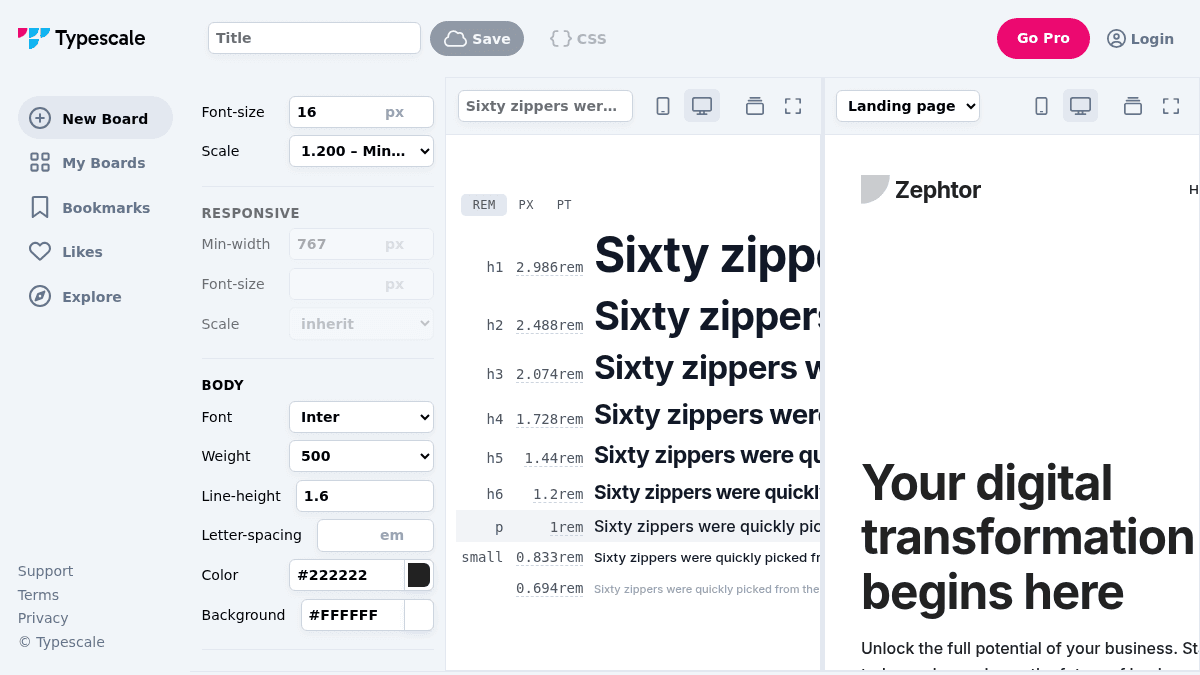
Typescale is a web-based tool for creating consistent typography systems using modular scales. It generates CSS code for headings and body text based on selected scale ratios.
The tool helps designers and developers build balanced type hierarchies by choosing from preset musical-scale ratios or entering a custom value. Users can preview fonts, manage multiple boards, and save their work to revisit later.
Key Benefits
- Generate modular typography scales using ratios such as Minor Second (1.067) through Perfect Fifth (1.500), with Golden Ratio (1.618) available on Pro.
- Preview hundreds of Google Fonts directly within the interface, from Adobe Garamond Display to ZCOOL XiaoWei.
- Create responsive breakpoints with min-width rules that inherit or override the base scale.
- Export CSS output ready for use in web projects, with an option to edit on CodePen.
- Save multiple boards, bookmark favorites, and browse community work through Explore.
- Use clamp-based responsive sizing with the Responsive Clamp toggle for fluid typography.
How It Works
You select a starting font-size scale ratio from the dropdown, such as Minor Third or Perfect Fourth. The tool computes heading sizes from H1 through H6 and body text. You choose a body font from the library, adjust any heading or body value manually, and copy the generated CSS or open it on CodePen to refine further.
Use Cases
- Front-end developers who need consistent CSS typography scales without manual math.
- UI designers prototyping type systems for web layouts and experimenting with font pairings.
- Design students learning modular scale theory and how ratios affect visual hierarchy.
- Freelance web designers who want to save and organize multiple project boards for different clients.
- Typographers exploring type specimen boards and bookmarking font combinations for reference.
Why Choose This Product
Typescale suits anyone building a web project who wants a fast, visual way to generate a proportional type system. The tool does not offer direct export to design tools like Figma or Sketch, and the Golden Ratio scale is locked behind the Pro subscription.
Typescale Pros & Cons
- Free tier with core typography scale features
- Integrated Google Fonts preview
- CSS export to CodePen
- Responsive breakpoint support
- Bookmark and save boards
Key Features
Modular scale presets
Choose from predefined musical-scale ratios like Minor Second, Perfect Fourth, or enter a custom value.
Google Fonts library
Preview and apply any Google Font directly from the integrated font library.
Responsive breakpoints
Add breakpoints with min-width rules and inherit or override the base scale.
Clamp-based sizing
Toggle clamp-based fluid typography output for responsive sizing without breakpoints.
CSS output generation
Generate CSS code for all heading levels and body text based on the selected scale.
Board save and organize
Save multiple boards, bookmark typography combinations, and browse community boards.
CodePen integration
Open your current typography board directly on CodePen to further edit the CSS.
Individual size override
Manually override any heading or body size after the scale generates default values.
Typescale Pricing
- Access to all scale ratios except Golden Ratio
- Google Fonts library
- CSS export
- Save and manage boards
- Golden Ratio (1.618) scale
- Unlimited boards
- Priority support
| Feature | Free Free/mo | Pro $??/mo |
|---|---|---|
| Access to all scale ratios except Golden Ratio | ||
| Google Fonts library | ||
| CSS export | ||
| Save and manage boards | ||
| Golden Ratio (1.618) scale | ||
| Unlimited boards | ||
| Priority support |
Pricing extracted from the product website and may change. Check the source for current details.
Frequently asked questions about Typescale
Is Typescale free?
Typescale offers a free plan with optional paid upgrades. See the pricing section for what's included in each tier.
How much does Typescale cost?
Typescale offers the following plans: Free, Pro. See the pricing section for what's included in each tier and any per-seat or usage-based costs.
What platforms does Typescale support?
Typescale is available on: Web.