About P. C. M. 0.25
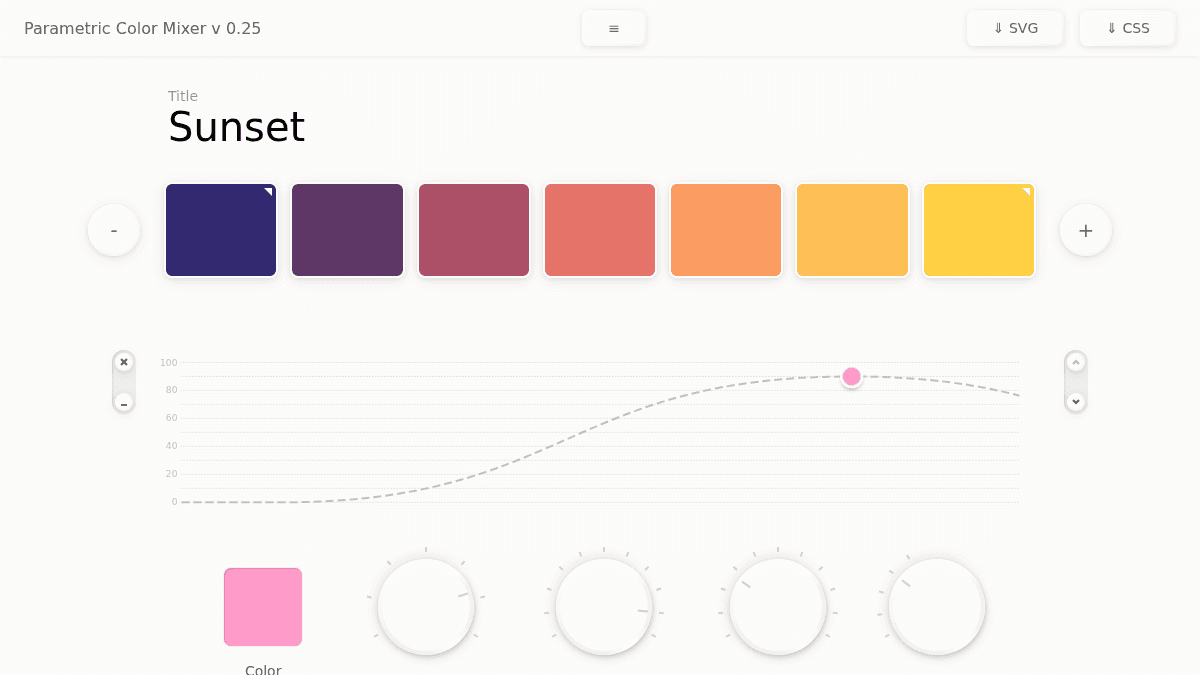
Overview Parametric Color Mixer (PCM) is a web-based tool for generating and blending color palettes using parametric controls. It solves the problem of manually tweaking color stops by giving users sliders for position, impact, range, and blend on each color stop in a gradient. The tool is designed for designers and developers who need fine-grained control over color mixing without leaving the browser. Unlike traditional color picker tools, PCM offers parametric sliders that independently control each dimension of a color stop. Key Benefits Control each color stop with four independent parametric sliders — Color, Position, Impact, Range, and Blend. Export finished palettes as SVG or CSS code with one click. Paste HEX values directly from the clipboard into the color mixer. Runs entirely in the browser with no installation or account required. Created by Dawid Woldu as an open web application. How It Works You add or remove color stops using the plus and minus buttons, then adjust each stop's Color, Position, Impact, Range, and Blend via individual parametric sliders. Once satisfied, you export the resulting gradient as SVG or CSS using the dedicated buttons in the toolbar. Use Cases UI designers who need precise parametric control over gradient color stops for web projects. Front-end developers generating CSS gradient code directly from a visual interface. Digital artists experimenting with layered color blends and impact ranges. Design students learning how individual parameters affect color mixing outcomes. Why Choose This Product PCM is best suited for anyone who prefers parametric sliders over picking color positions manually on a gradient bar. The tool has no pricing tiers, no accounts, and no paid features — it is fully free to use in the browser.
P. C. M. 0.25 Pros & Cons
- Free to use with no sign-up required
- Exports gradients as SVG or CSS
- Fine-grained parametric controls per color stop
- Runs entirely in the browser
Key Features
Parametric sliders
Each color stop has five dedicated sliders: Color, Position, Impact, Range, and Blend.
SVG export
Export the mixed color palette as an SVG file with one click.
CSS export
Export the gradient as CSS code ready for use in web projects.
HEX paste
Paste HEX color values from the clipboard directly into the mixer.
Add or remove stops
Add new color stops or remove existing ones using plus and minus buttons.
P. C. M. 0.25 Pricing
Pricing extracted from the product website and may change. Check the source for current details.