
About LogRocket
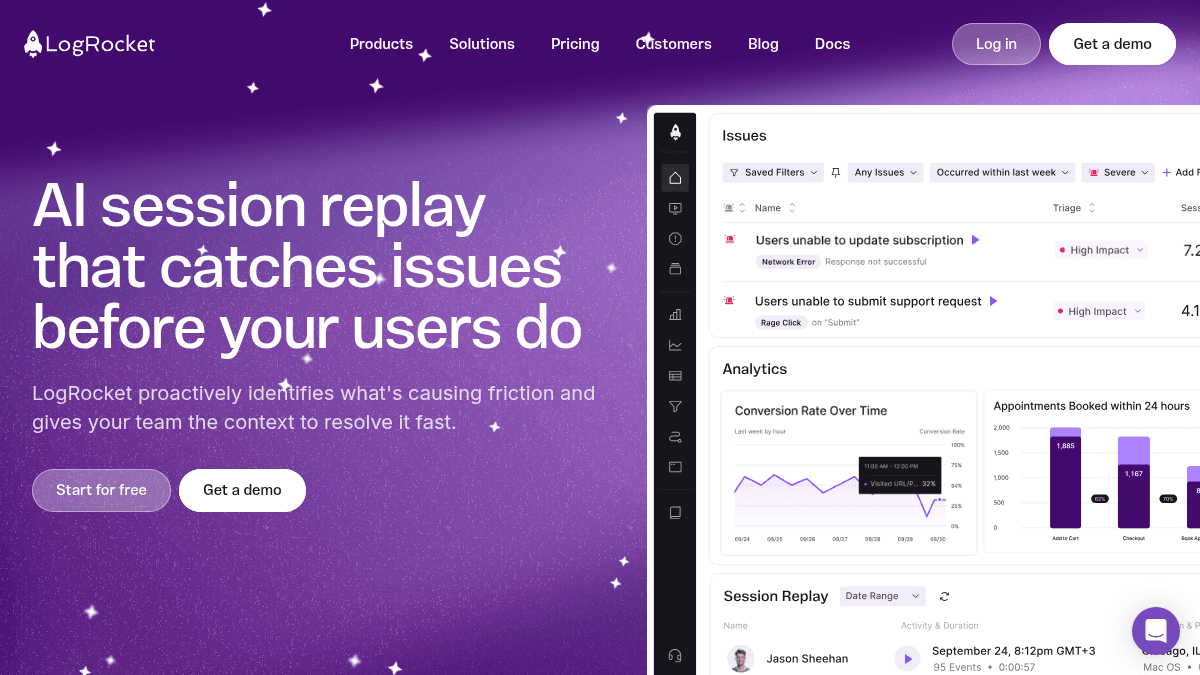
Overview LogRocket is an AI-powered session replay and product analytics platform that helps engineering, product, and design teams identify and resolve user-facing issues. It automatically captures every event, console log, network request, and error alongside a video-like replay of what the user experienced. Unlike traditional analytics or error monitoring tools, LogRocket combines quantitative product analytics with qualitative session replays and AI-driven issue detection. The platform serves over 3,000 customers including 7-Eleven, Appfire, and Blue Cross Blue Shield of Massachusetts, across retail, healthcare, software, and other industries. Key Benefits Galileo AI proactively surfaces technical and UX issues impacting users and delivers reproduction steps. Unlimited analytics events, error events, and log events are included on every plan with no caps. Session replays capture DOM playback, console logs, network logs, errors, and performance data automatically. Conversion funnels, path analysis, and timeseries help teams understand user behavior at aggregate and individual levels. SSO, RBAC, and audit logging are available on Pro and Enterprise plans for team governance. Self-hosted deployments are available for regulated industries requiring SOC 2, HIPAA, FedRAMP, or PCI compliance. How It Works You install the LogRocket SDK on your website or mobile app via an NPM package or a script tag. The platform automatically starts capturing session replays, errors, network requests, console logs, and performance metrics for each user visit. You then browse sessions through dashboards—Galileo AI highlights issues requiring attention—or drill into individual replays alongside analytics to identify root causes. Use Cases Engineering teams use session replays and console logs to debug user-reported issues without guesswork. Product managers build conversion funnels and path analyses to understand drop-off points in their application. UX designers review heatmaps, rage-click maps, and individual session replays to identify friction in user flows. Customer support teams correlate tickets with session replays to diagnose problems faster. E-commerce teams optimize checkout conversion by watching real user sessions and identifying abandonment causes. Healthcare and financial services organizations deploy self-hosted LogRocket to meet strict data-residency and compliance requirements. Why Choose This Product LogRocket is best suited for product and engineering teams that want a single platform combining session replay, product analytics, error tracking, and frontend performance monitoring. The AI-driven Galileo layer automatically surfaces issues, reducing manual triage time. Because pricing scales with session volume, high-traffic applications may require careful configuration of conditional recording to manage costs.
LogRocket Pros & Cons
- Galileo AI proactively finds issues across all sessions
- Unlimited analytics, errors, and logs on every plan
- Self-hosted option for regulated industries
- Integrates with Zendesk, Intercom, Qualtrics, G2, Gong
- 14-day free trial with no credit card required
- Free tier limited to 14-day trial only
- Pricing scales with session volume, not flat rate
- Conditional recording captures only ~25% of sessions on default settings
- Galileo AI features require Pro plan or above
Key Features
Session Replay
Watch a video-like replay of every user visit with DOM playback, console logs, and network activity.
Product Analytics
Build conversion funnels, path analyses, and timeseries charts to understand user behavior.
AI Issue Detection
Galileo AI surfaces technical and UX issues impacting users and provides reproduction steps.
Error Tracking
View the most frequent errors, network failures, and crashes affecting users with AI-driven prioritization.
Performance Monitoring
Correlate frontend performance with user experience impact and create dashboards to track changes over time.
UX Analytics
Visualize user experience at individual and aggregate levels with clickmaps, heatmaps, and rage-click maps.
Galileo AI Features
Get AI-generated summaries of individual sessions, funnel insights, heatmap insights, and anomaly detection.
Quick Integration
Install via NPM or script tag and start collecting data on any language or framework.
LogRocket Pricing
View full pricing →- Unlimited analytics events
- Unlimited error events
- Unlimited log events
- Unlimited projects & environments
- Clickmaps, heatmaps, rage-click maps
- Frontend performance monitoring
- Everything in Core
- AI session summaries
- AI issue detection
- AI funnel insights
- AI heatmap insights
- RBAC & audit logging
- Everything in Pro
- Unlimited seats
- Streaming Data Export
- Enterprise platform support
- Self-hosted available
- 2,000 free API / MCP credits per month
| Feature | Core Free/mo | Pro Free/mo | Enterprise Custom/mo |
|---|---|---|---|
| Unlimited analytics events | |||
| Unlimited error events | |||
| Unlimited log events | |||
| Unlimited projects & environments | |||
| Clickmaps, heatmaps, rage-click maps | |||
| Frontend performance monitoring | |||
| Everything in Core | |||
| AI session summaries | |||
| AI issue detection | |||
| AI funnel insights | |||
| AI heatmap insights | |||
| RBAC & audit logging | |||
| Everything in Pro | |||
| Unlimited seats | |||
| Streaming Data Export | |||
| Enterprise platform support | |||
| Self-hosted available | |||
| 2,000 free API / MCP credits per month |
Pricing extracted from the product website and may change. Check the source for current details.
Frequently asked questions about LogRocket
Is LogRocket free?
LogRocket offers a free plan with optional paid upgrades. See the pricing section for what's included in each tier.
How much does LogRocket cost?
LogRocket offers the following plans: Core, Pro, Enterprise. See the pricing section for what's included in each tier and any per-seat or usage-based costs.
What platforms does LogRocket support?
LogRocket is available on: Web, iOS, Android.