
About Accessible Colors
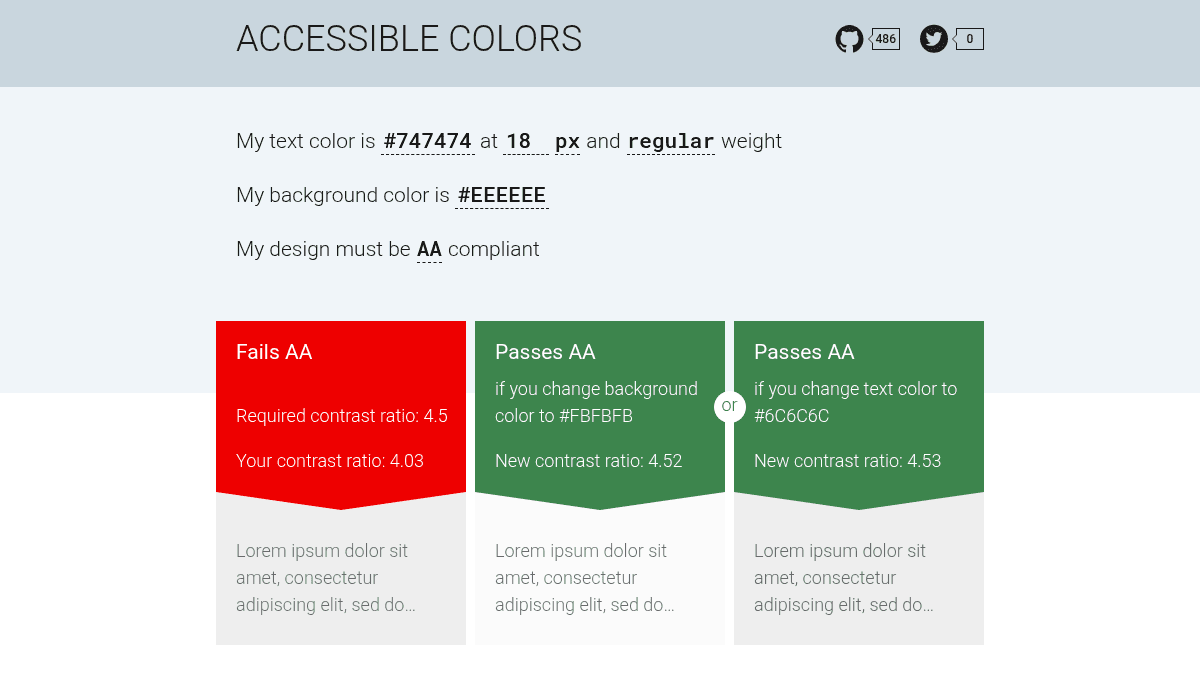
Overview Accessible Colors is a free web-based tool that checks color contrast ratios against WCAG 2.0 AA and AAA standards. It helps designers and developers test background and text color combinations for accessibility compliance. The tool automatically finds the closest accessible colors when a chosen combination fails contrast requirements. It is a simpler alternative to full accessibility audit suites, focused specifically on color contrast checking. Key Benefits Checks color contrast against both WCAG AA and AAA standards in real time. Automatically suggests the nearest accessible color when a pair fails contrast requirements. Works entirely in the browser with no installation or account needed. Supports both normal text and large text contrast thresholds. Provides clear pass/fail indicators for each WCAG level. How It Works You enter a background color and a text color using hex values or the color picker. The tool instantly calculates the contrast ratio and displays pass or fail results for WCAG AA and AAA levels for both normal and large text. If the combination fails, the tool suggests the closest accessible color to replace your selection. Use Cases Front-end web developers checking color combinations during design implementation. UI/UX designers verifying that interface color choices meet accessibility standards. Accessibility auditors evaluating existing websites for WCAG compliance. Brand designers ensuring corporate color palettes include accessible pairings. Students learning about web accessibility and color contrast requirements. Why Choose This Product Accessible Colors is best suited for anyone who needs a quick, no-fuss color contrast checker without signing up or installing software. It focuses on one task — checking and fixing color contrast — and does it well. The tool does not offer broader accessibility auditing features like screen reader testing or automated page scans.
Accessible Colors Pros & Cons
- Free to use with no account required
- Checks both AA and AAA WCAG standards
- Suggests closest accessible color alternatives
- Works entirely in the browser
- Supports normal and large text thresholds
Key Features
Color contrast checker
Tests background and text color combinations against WCAG 2.0 AA and AAA contrast ratio requirements.
Auto-suggest accessible colors
When a color pair fails contrast requirements, the tool automatically finds the closest accessible alternative.
Normal and large text
Checks contrast against separate thresholds for normal text and large text as defined by WCAG.
Color picker input
Lets you enter colors via hex values or an interactive color picker for precise selection.
Real-time results
Contrast ratio and pass/fail status update instantly as you adjust colors.
Accessible Colors Pricing
Pricing extracted from the product website and may change. Check the source for current details.