
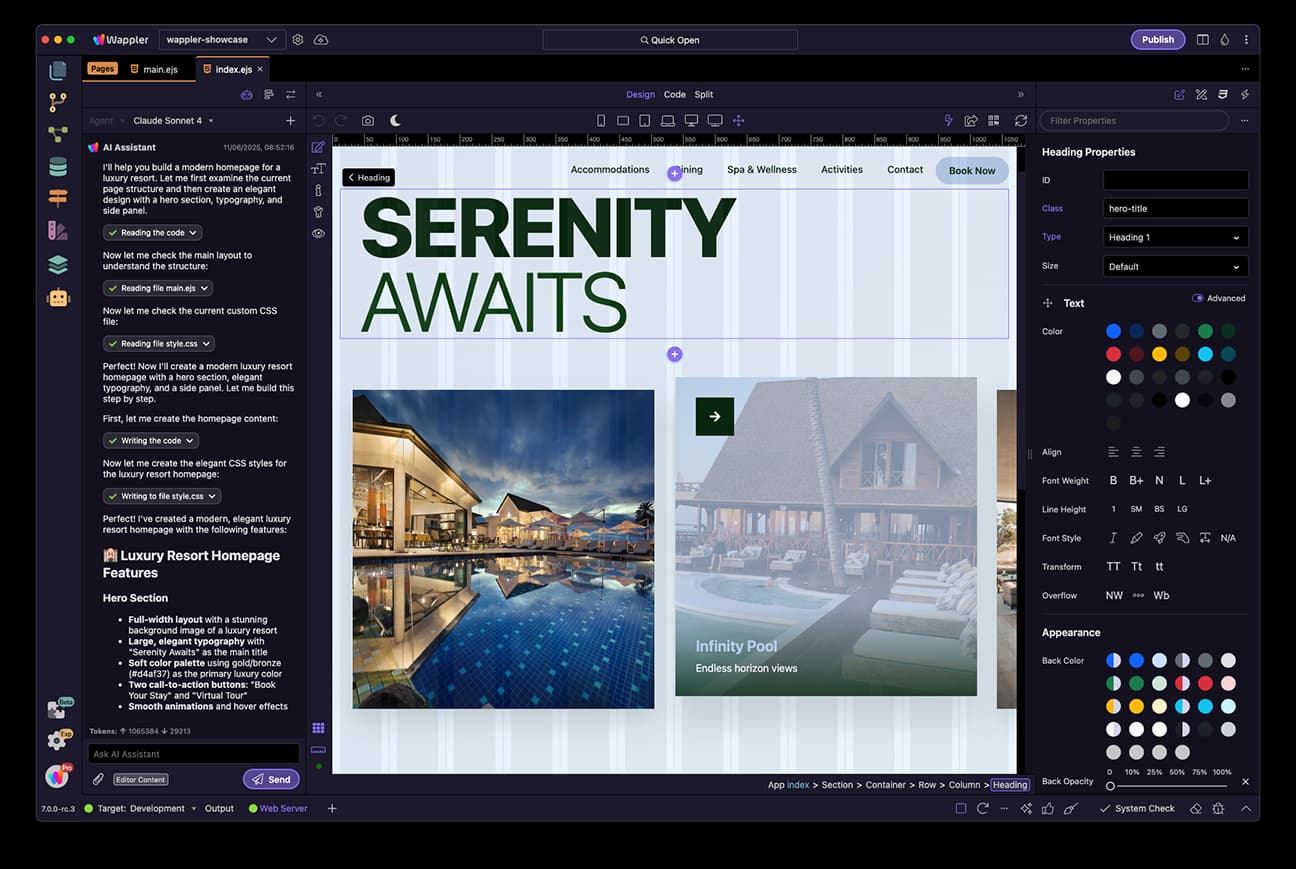
About Wappler - Build Production-Ready Web Apps Visually with AI
Overview
Wappler is a cross-platform visual development environment for building production-ready web applications. Designers, developers and founders use it to create responsive websites and full-stack apps in a single workflow, from first screen to production deployment.
Dynamic Zones International B.V., the team behind DMXzone and more than twenty years of visual-development tooling, develops Wappler. The product generates editable, standards-based source code that users fully own.
Key Benefits
- Build pages, app logic, databases and backend workflows in one connected product
- Generate editable HTML, CSS and JavaScript that you own and can hand off
- Use project-aware AI to make changes across design, code and server workflows
- Deploy to your own hosting or cloud without vendor lock-in
- Track every change with native Git integration and instant backups
How It Works
Users design responsive pages visually in the Layout Designer, then connect live data and interactions with App Connect. They model databases and build backend workflows with Server Connect, and finally deploy the generated source code to their chosen hosting or cloud.
Use Cases
- Startups and founders validate product ideas with proofs of concept that carry through to production
- Designers and marketers build polished, responsive websites with dynamic data
- Developers accelerate full-stack delivery while retaining code, Git and deployment control
- E-commerce teams build online stores with Stripe payments, subscriptions and order webhooks
Why Choose This Product
Wappler differs from typical no-code platforms by generating editable, standards-based source code that users fully control. Its project-aware AI works across the visual editors while keeping every technical choice visible and reviewable.
Wappler - Build Production-Ready Web Apps Visually with AI Pros & Cons
- Generates editable, standards-based HTML, CSS and JavaScript
- Project-aware AI works across design, code, database and backend editors
- Native Git integration with GitHub, GitLab and Bitbucket
- Full source-code ownership with no vendor lock-in
- Cross-platform desktop app for Windows, macOS and Linux
- Basic plan excludes databases, authentication and API connectors
- No free plan, only a 14-day trial requiring a payment method
- Educational tier prohibits commercial use
Key Features
Visual Layout Designer
Drag, drop and style UI elements visually while Wappler generates clean HTML, CSS and JavaScript behind the scenes.
AI Manager
Coordinates project-aware AI Assistants across the Design, Code, Database and Server Connect editors from one visible thread.
App Connect
Connects live data to components, manages state, validates forms and creates browser-side interactions with visual tools.
Server Connect
Builds secure backend workflows visually, including APIs, authentication and business logic for Node.js, PHP or ASP.NET.
Visual Query Designer
Builds SQL queries visually by picking tables, choosing columns and setting filters for MySQL, PostgreSQL, SQL Server or SQLite.
API Connector
Connects any external API service visually, with built-in OAuth2 support for 18+ providers such as Google, Facebook and Stripe.
E-commerce Builder
Builds online stores visually with 300+ prebuilt Stripe actions, subscriptions, trials, coupons and payment webhooks.
Git Version Control
Creates branches, commits changes and connects to GitHub, GitLab or Bitbucket with instant backups and one-click rollback.
Multi-target Publishing
Deploys source code to FTP/SFTP, Docker, DigitalOcean or any other hosting with complete code ownership and no lock-in.
Wappler - Build Production-Ready Web Apps Visually with AI Pricing
View full pricing →- For students, teachers and nonprofit organizations
- No commercial use
- Up to 5 projects
- Custom publishing options
- Community support
- For individuals and freelancers
- Commercial use allowed
- Unlimited projects
- Custom publishing options
- Community support
- For small companies and organizations
- Commercial use allowed
- Unlimited projects
- For registered companies with multiple employees
- Custom publishing options
- Community support
- For large companies and organizations
- Commercial use allowed
- Unlimited projects
- For organizations with 50+ employees
- Custom publishing options
- Priority email support
| Feature | Educational €19/mo | Individuals €39/mo | Business €69/mo | Enterprise €99/mo |
|---|---|---|---|---|
| For students, teachers and nonprofit organizations | ||||
| No commercial use | ||||
| Up to 5 projects | ||||
| Custom publishing options | ||||
| Community support | ||||
| For individuals and freelancers | ||||
| Commercial use allowed | ||||
| Unlimited projects | ||||
| For small companies and organizations | ||||
| For registered companies with multiple employees | ||||
| For large companies and organizations | ||||
| For organizations with 50+ employees | ||||
| Priority email support |
Pricing extracted from the product website and may change. Check the source for current details.
Frequently asked questions about Wappler - Build Production-Ready Web Apps Visually with AI
What can I build with Wappler?
Build websites, web and mobile apps, desktop apps, APIs and database-driven systems from one visual development environment.
Do I need to be an experienced developer?
No. Wappler combines visual tools, project-aware AI and guided learning resources to help you build complete projects without requiring extensive coding experience.
Does Wappler generate standard code?
Yes. Wappler creates editable HTML, CSS and JavaScript, together with the project and backend files required by your chosen technologies.
Do I own my projects and source code?
Yes. Your project files and source code remain under your control, and applications you deploy continue to run independently of Wappler.
Where can I deploy my applications?
Deploy to your own hosting, server or cloud infrastructure using the deployment workflow that fits your project, such as FTP/SFTP, Docker or DigitalOcean.
How does the 14-day trial work?
Explore the features included in your selected plan for 14 days. A valid payment method is required, and your subscription begins automatically when the trial ends unless you cancel before then.