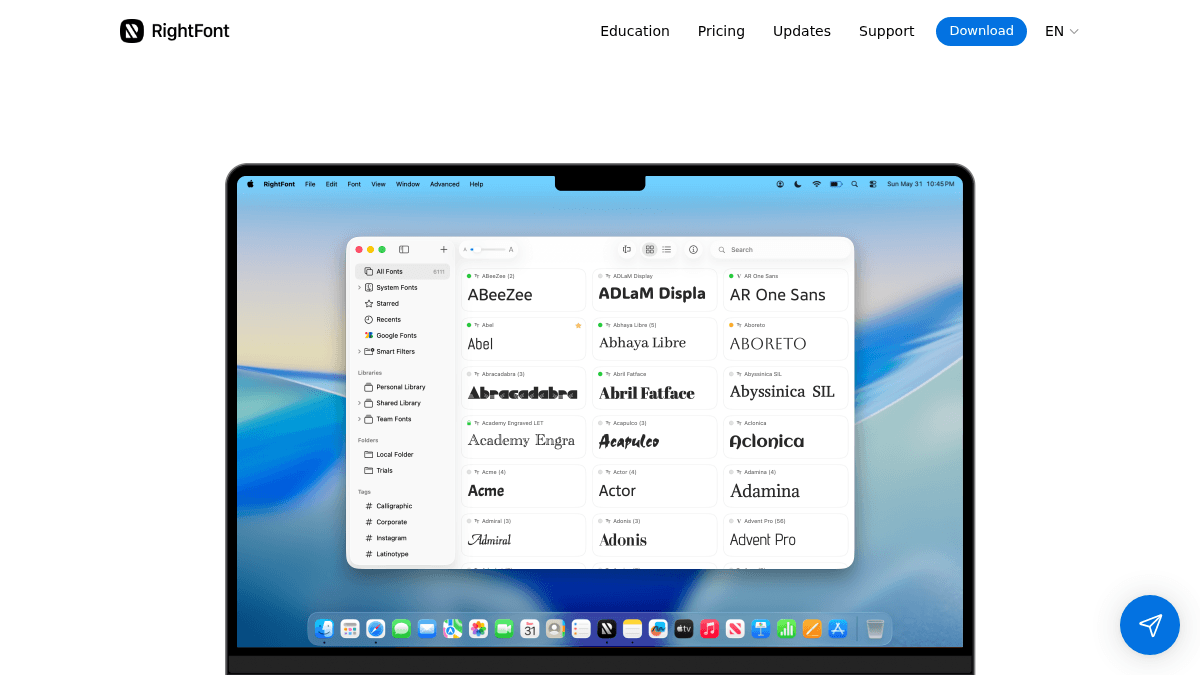
About RightFont
Overview RightFont is a font management application built specifically for macOS. It gives designers a single workspace to organize, preview, activate, and share fonts without copying files into the system font directory. The app replaces manual font handling and file-system browsing with unified search, tags, font sets, and smart filters. RightFont integrates with design tools such as Adobe Photoshop, Illustrator, InDesign, Figma, Sketch, and Affinity apps, and supports Google Fonts, iCloud, Dropbox, and team libraries. It runs on macOS 11 or newer and is compatible with macOS Tahoe. Key Benefits Browse and preview fonts without installing them — keep the library organized without copying into system directories. Access local folders, team libraries, and Google Fonts from a single workspace, even with tens of thousands of fonts. Use unified search, tags, font sets, and smart filters to instantly narrow down fonts. Automatically detect and activate missing fonts when opening documents in Photoshop, Illustrator, Sketch, or other supported apps. Change fonts for selected text or layers with one click inside compatible design applications; RightFont activates the font in the background. Share fonts, sets, and tags with team members regardless of location. How It Works You launch RightFont and point it at your local font folders, team library locations, or Google Fonts account. The app scans and indexes everything without moving files into the system library. You browse fonts using the preview pane, apply tags and smart filters, then activate fonts on demand. When you open a design document that uses a font not yet installed, RightFont prompts you to activate it. To change font styling in a live document, you select text in the design app and choose the new font from RightFont — the app swaps the font and activates it if needed. Use Cases Graphic designers working across Adobe Creative Suite apps can activate missing fonts automatically when documents open and change fonts in selected text layers from within RightFont. Creative teams managing shared font libraries can sync sets, tags, and fonts over iCloud or Dropbox so every member uses the same typefaces. User interface and web designers using Figma or Sketch can apply one-click font changes to text layers and rely on RightFont to handle activation in the background. Motion designers working in After Effects can keep thousands of fonts organized with smart filters and preview presets without slowing down their system. Print and publication designers using InDesign or Affinity Publisher can use the app to organize large type collections and share curated font sets with collaborators. Freelance designers managing a mix of local and Google Fonts can keep everything searchable from one window and transfer licenses between machines as needed. Why Choose This Product RightFont is suited for designers and creative teams who work on macOS and need a dedicated tool to organize large font collections, activate missing typefaces automatically inside design apps, and share font assets with colleagues. The one-time purchase model avoids recurring subscription fees. It runs only on macOS and a device-based single license covers one Mac.
RightFont Pros & Cons
- One-time purchase, no subscription
- Works with 15+ design applications
- Unified search across local, Google, and team fonts
- Automatic missing font activation in design apps
- 30-day money back guarantee
Key Features
Unified font workspace
Manage local folders, Google Fonts, and team libraries from one workspace without copying files into the system directory.
Missing font activation
RightFont prompts you to activate missing fonts when opening a document in Photoshop, Illustrator, Sketch, or other supported apps.
One-click font change
Select text in a supported design app and switch its font with one click — RightFont activates the font in the background.
Powerful search and filters
Search, tag, build font sets, and save custom smart filters to narrow down large collections instantly.
Font preview and info
Use flexible preview presets, create custom presets, and view OpenType features, glyphs, and detailed font information.
Team sharing
Share fonts, font sets, and tags with team members over iCloud or Dropbox.
Google Fonts sync
Sync Google Fonts directly into your RightFont workspace.
RightFont Pricing
View full pricing →- For 1 device only
- One-time purchase
- 1 year of updates and support
- 24/7 human support by email
- 30-day money back guarantee
- Devices
- One-time purchase
- 1 year of updates and support
- 24/7 human support by email
- 30-day money back guarantee
| Feature | Single License $59.00 one-time | Volume License $250.75 one-time |
|---|---|---|
| For 1 device only | ||
| One-time purchase | ||
| 1 year of updates and support | ||
| 24/7 human support by email | ||
| 30-day money back guarantee | ||
| Devices |
Pricing extracted from the product website and may change. Check the source for current details.