
About regex101: build, test, and debug regex
Overview
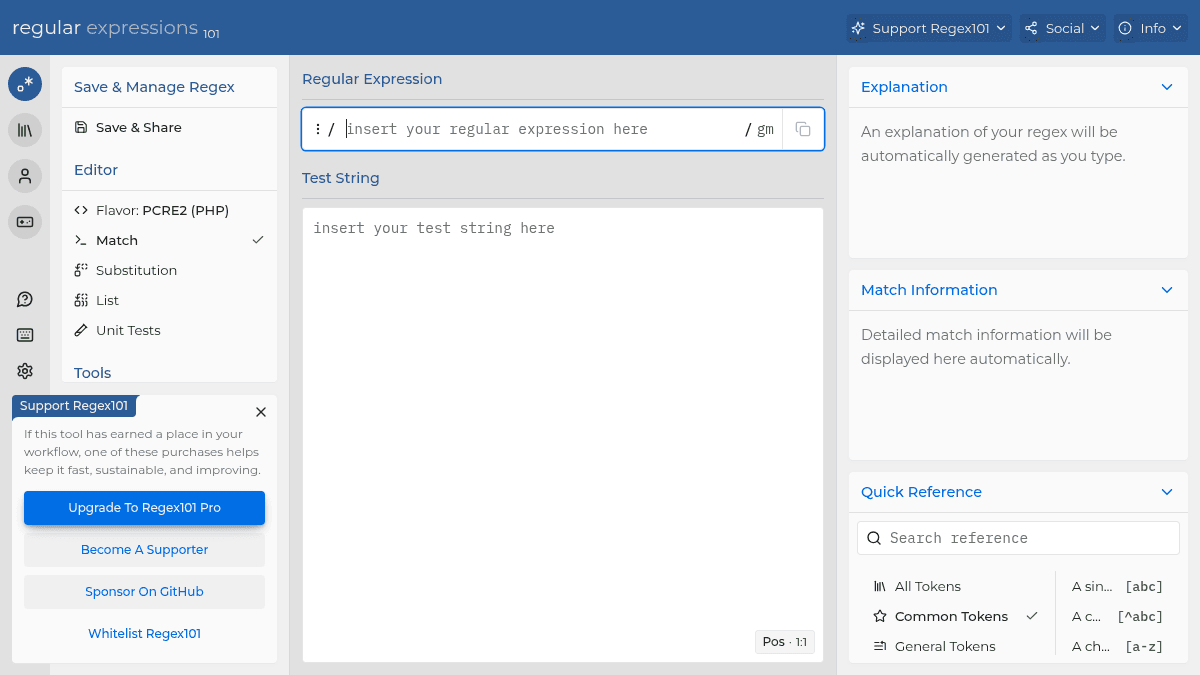
regex101 is a web-based regular expression testing and debugging tool that supports seven major regex flavors: PCRE2 (PHP), Python, GO, JavaScript, Java, C#/.NET, and Rust. It serves developers who need to write, test, and understand complex regular expressions without installing local tooling or switching between language-specific environments, offering a consistent interface across all supported engines.
Unlike basic regex testers that only show match results, regex101 generates a plain-English explanation of each regex pattern as you type, breaking down every token, quantifier, and group construct. A built-in quick reference sidebar provides instant access to syntax guides for common tokens, anchors, character classes, and substitution rules, reducing the need to consult external documentation.
Key Benefits
- Real-time regex explanation breaks down each pattern component into readable descriptions as you type.
- Detailed match information displays capture groups, indices, and match spans for every successful match.
- Multi-flavor support lets you switch between PCRE2, Python, GO, JavaScript, Java, C#/.NET, and Rust engines.
- Built-in quick reference covers all common tokens, anchors, quantifiers, group constructs, and character classes.
- Save and share functionality lets you store regex patterns to your account or generate shareable links.
- Integrated tools include a code generator, regex debugger, benchmark runner, and match exporter.
How It Works
You paste or type a regular expression into the editor panel and enter test strings in the adjacent input area. As you type, the tool highlights syntax, generates a plain-English explanation of each regex token, and displays match information including captured groups and character indices. You switch between regex flavors using the editor dropdown to verify behavior across engines, access the quick reference sidebar for syntax help, and use the integrated tools menu to debug step-by-step, benchmark performance, or generate ready-to-use code in your target language.
Use Cases
- Backend PHP developers validate and debug PCRE2 patterns before deploying them to production validation logic.
- Python data engineers test and refine regex patterns for log parsing, data extraction, and text normalization pipelines.
- JavaScript frontend developers prototype form validation patterns and test edge cases across different input strings.
- Go backend engineers benchmark regex performance using the built-in tool to compare pattern efficiency across approaches.
- Computer science students use the regex quiz and community patterns to practice and learn regular expression syntax interactively.
- C#/.NET developers generate ready-to-use regex code snippets for their applications using the code generator tool.
Why Choose This Product
regex101 suits developers who work across multiple programming languages and need to verify regex behavior in each language's specific regex engine. The tool requires JavaScript to function, making it inaccessible in text-only browsers or environments where scripts are disabled.
Key Features
Syntax-Highlighted Editor
Write and edit regular expressions with color-coded syntax highlighting and real-time visual feedback as you type.
Real-Time Explanation
Each regex token, quantifier, and group construct is automatically explained in plain English as the pattern is typed.
Match Information
Detailed match results display captured groups, character indices, and match spans for every successful match against test strings.
Quick Reference
Built-in sidebar provides instant syntax guides for common tokens, anchors, quantifiers, group constructs, character classes, and substitution rules.
Multi-Flavor Support
Switch between PCRE2 (PHP), Python, GO, JavaScript, Java, C#/.NET, and Rust regex engines to verify flavor-specific behavior.
Regex Debugger
Step through the regex matching process token by token to identify why a pattern succeeds or fails on given input.
Benchmark Tool
Measure and compare regex pattern execution speed to optimize performance across different approaches.
Unit Tests
Write and run unit tests directly against regex patterns to validate expected matching and substitution behavior.
Export Matches
Export match results for use in external tools, documentation, or sharing with collaborators.
Save & Share
Save regex patterns to a personal account or generate shareable links for collaboration with other developers.
regex101: build, test, and debug regex Pricing
Pricing extracted from the product website and may change. Check the source for current details.