
About Interface In Game
Overview
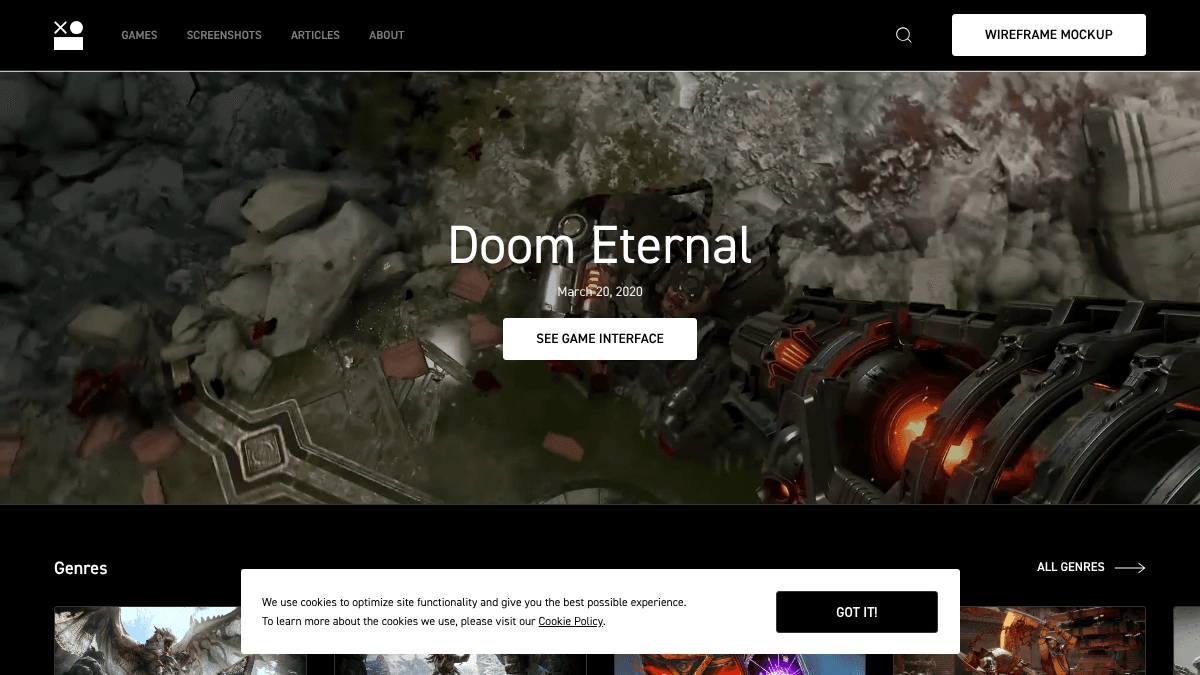
Interface In Game is a curated collection of video game UI screenshots and videos, built for game designers and gaming enthusiasts who need design references and creative inspiration. It catalogues interfaces from hundreds of games across genres, themes, and UI element types.
Unlike general design inspiration sites, Interface In Game focuses exclusively on in-game UI, making it a targeted resource for designers working on menus, HUDs, inventory systems, skill trees, and more.
Key Benefits
- Access over 5,000 in-game screenshots and thousands more across 20+ categorised UI element types.
- Browse interfaces filtered by genre, including Action, RPG, FPS, Strategy, Puzzle, and more.
- Filter by visual theme — Cartoon, Sci-Fi, Fantasy, Horror, Medieval, and others — to match a target art direction.
- Read interviews with industry professionals such as Lead UX Designers, UI Programmers, and UX Directors from studios like Ubisoft and Warhorse Studios.
- Access wireframe mockup PSD design resources to support the early stages of game UI design.
How It Works
You search or browse by game title, genre, theme, or UI element type — such as Inventory, Skill Tree, Map, or Settings. You select a game or element category to view its screenshot and video collection. You also read articles and interviews to supplement visual references with industry insights.
Use Cases
- Game UI/UX designers at studios who need to benchmark menu systems, HUDs, or inventory layouts against existing commercial titles.
- Indie game developers building their first UI who want to study how established games handle tutorials, loading screens, or skill trees.
- UX students specialising in game design who use real screenshots to analyse interface patterns and visual hierarchies.
- Art directors setting a visual tone who browse by theme — such as Pixel Art or Sci-Fi — to align UI style with game world aesthetics.
- Game design educators who use the interview archive and wireframe resources as supplementary teaching material.
Why Choose This Product
Interface In Game suits game designers and indie developers who need a focused, genre- and theme-filtered UI reference library rather than a broad design showcase. The combination of screenshots, videos, professional interviews, and downloadable wireframe resources makes it a multi-format reference tool for the game design community.
Interface In Game Pros & Cons
- Free to access with no visible paywall
- 20+ UI element categories with thousands of screenshots each
- Covers 15 genres and 10 visual themes for targeted browsing
- Includes professional interviews with senior designers from major studios
- Offers downloadable wireframe PSD resources for practical design use
Key Features
Game UI Library
A curated collection of video game UI screenshots and videos spanning hundreds of titles across multiple genres and release years.
Element Type Filtering
Screenshots are categorised into 20+ UI element types including Menu (6,081), In-Game (5,186), Stats (2,013), Overlay (3,021), and Inventory (1,241).
Genre Filtering
Browse interfaces filtered by 15 genres including Action (241 games), Adventure (112), FPS (68), RPG (54), and Strategy (71).
Theme Filtering
Filter games by visual theme such as Cartoon, Sci-Fi, Fantasy, Horror, Medieval, Pixel Art, and Modern to match a specific art direction.
Industry Interviews
Published interviews with professional game UI/UX designers from studios including Ubisoft, Warhorse Studios, Gameloft, Behaviour Interactive, and Territory Studio.
Wireframe PSD Resources
A set of 60+ wireframe mockup PSD design resources for game UI available as downloadable assets.
Game Search
A search function lets users find specific game titles directly within the collection.
Interface In Game Pricing
Pricing extracted from the product website and may change. Check the source for current details.
Frequently asked questions about Interface In Game
What kind of content does Interface In Game include?
Interface In Game includes screenshots and videos of video game UI interfaces, organised by game title, genre, visual theme, and UI element type. It also publishes articles, professional interviews with game UI designers, and wireframe mockup PSD resources for designers.
Who is Interface In Game designed for?
The site is designed for video game lovers and game designers who want to get inspiration and support their creative process when designing game interfaces.
What UI element types can I browse?
You can browse 20+ element types including Menu, In-Game, Stats, Overlay, Inventory, Progress, Tutorial, Settings, Skill Tree, Map, Store, Lobby, Scoreboard, Loading, Level Selection, Dialogue, Game Over, Start Screen, Credits, Quest, and Character.
What genres and themes are available?
Genres include Action, Adventure, FPS, RPG, Strategy, Indie, Puzzle, Simulation, Platformer, Card Game, Fighting, Racing, Sport, MMO, and Music. Themes include Cartoon, Fantasy, Sci-Fi, Horror, Medieval, Modern, Pixel Art, Military, Western, and Pirate.
Is Interface In Game free?
Yes — Interface In Game is free to use. See the pricing section for any optional add-ons.
What platforms does Interface In Game support?
Interface In Game is available on: Web.
How Interface In Game compares
Interface In GameThis | ||||
|---|---|---|---|---|
| Starting price | Free | Free | — | — |
| Pricing model | Free | Free | Freemium | unknown |
| Platforms | Web | Web | Web | Web |
| Top features |
|
|
|
|
| Rating | — | — | — | — |


