About Dispatch
Overview
Dispatch is a native macOS toolkit for indie Apple developers that covers the entire App Store lifecycle: researching niches, writing ASO metadata, designing screenshots, tracking keywords and ranks, mining competitor reviews, and checking a submission before launch. Built by Michael Frankland at Yuzool, it replaces the dozen separate SaaS tools developers often assemble for the same work.
Dispatch is local-first: drafts, projects, and App Store Connect API keys stay on the Mac, and its AI features run on-device through Apple Foundation Models with no backend and no analytics. It is a one-time purchase, sold as a lighter Mac App Store edition and a deeper direct Research edition for competitor analysis and review mining.
Key Benefits
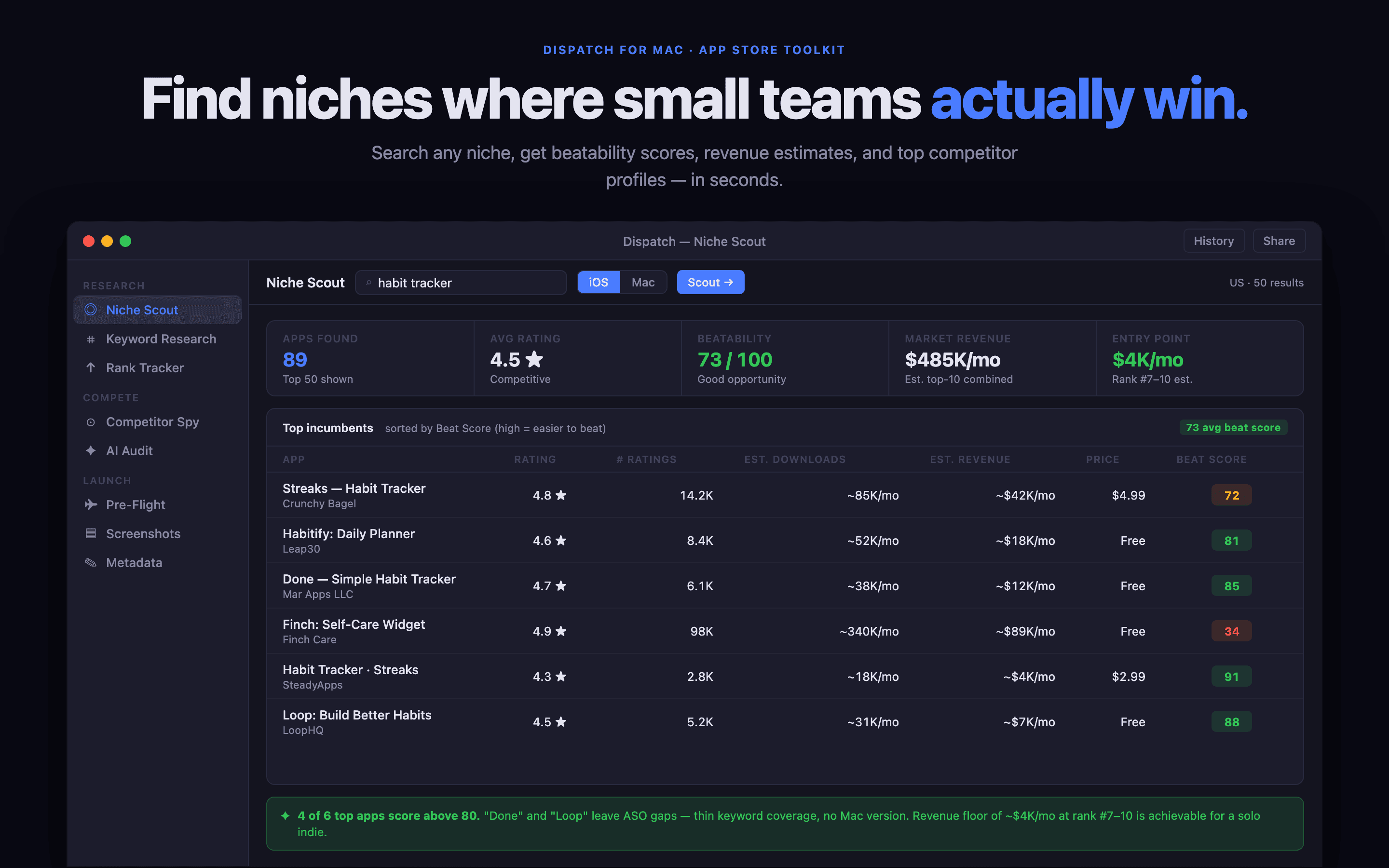
- Niche Scout scores a market's top-20 incumbents with 0–100 beatability ratings, abandonment flags, and rough revenue bands before you build.
- Pre-Flight scans your live App Store Connect listing for the most common rejection causes, each linked to the exact Review Guideline.
- Dispatch-kun, an on-device AI co-pilot, answers questions from your live app data and proposes one-click actions with nothing leaving the Mac.
- Worldwide Reviews Radar sweeps reviews across major storefronts and alerts you when a fresh 1–3 star review lands anywhere.
- Rank Tracker puts every keyword across every storefront on one dense movers board with signed deltas and trend sparklines.
- Local-first design keeps drafts, screenshots, and credentials on the Mac, with API keys in Keychain and on-device AI.
How It Works
Type a niche and a country into Niche Scout to see the top-20 incumbents scored on beatability, then mine their reviews on-device for pain points that shape your feature set. From there, use Keyword Discovery and the AI ASO Audit to build and grade your metadata, design screenshots in Screenshot Studio, run Pre-Flight rejection checks, and coordinate the launch across channels with the Launch Day Coordinator — all before the app ever goes to review.
Use Cases
- Indie iOS developers use Niche Scout to decide which app to build next from public App Store signals.
- ASO specialists prepare metadata, run keyword gap analysis, and track ranks across up to 32 App Store countries.
- Solo Mac developers generate press kits and coordinate Product Hunt, Show HN, and community launch posts.
- App publishers monitor subscriptions, MRR, crashes, and reviews from a menu bar dashboard between launches.
- Marketers design App Store screenshots, app icons, and marketing sites without switching between tools.
Why Choose This Product
Dispatch replaces a stack of subscription ASO tools — which the page notes can run $700–$1,200 a year — with a single one-time purchase that stays local. On-device AI features require Apple Silicon; Intel Macs can run the research, metadata, and screenshot tools but not the AI-powered audits, translations, or review-reply drafting.
Dispatch Pros & Cons
- One-time purchase replaces roughly $700–$1,200/year of SaaS ASO tools
- Local-first privacy with no backend, no analytics, and keys in Keychain
- On-device AI via Apple Foundation Models with no API key or cloud
- Covers the full loop: research, ASO, screenshots, launch, and reviews
- On-device AI features require Apple Silicon (M1 or later)
- Intel Macs miss AI-powered audits, translations, and review-reply drafting
- Revenue estimates are deliberately wide bands, not exact figures
Key Features
Niche Scout
Scores a niche's top-20 incumbents with 0–100 beatability ratings, abandonment flags, and rough install and revenue bands from public App Store signals.
Pre-Flight checks
Scans your live App Store Connect listing across locales for the most common rejection causes, each linked to its exact Review Guideline.
Dispatch-kun co-pilot
An on-device chat assistant that answers questions from your live app data and proposes one-click actions, running entirely on Apple Foundation Models.
Rank Tracker
Tracks every keyword across every storefront on a dense movers board with difficulty bars, live positions, and signed-delta trend sparklines.
Review mining
Clusters any rival's reviews on-device into bugs, feature requests, pricing gripes, and UX friction to show where to beat them, and re-checks for changes later.
Screenshot Studio
Full-resolution canvas with device frames, headlines, custom palettes, and per-locale variants, with one-click upload to App Store Connect.
Press Kit Generator
Builds a journalist-ready ZIP with icons at 7 sizes, hero screenshots, a press release template, testimonials, and JSON-LD structured data.
Launch Day Coordinator
Coordinates launch posts across Product Hunt, Show HN, Reddit, X, Bluesky, Mastodon, and Indie Hackers with per-channel AI-drafted copy.
Site Studio
Generates a marketing site with Liquid Glass themes, per-locale pages, blog, documentation, JSON-LD, sitemap, and analytics embed.
Local-first privacy
Keeps drafts, screenshots, and App Store Connect credentials on the Mac, with API keys in Keychain and on-device AI that never sends data off the wire.
Dispatch Pricing
- Core App Store launch workflow
- Keywords, ranks and metadata
- Screenshots and submission checks
- Competition analysis in a streamlined view
- Review mining focused on essentials
- Purchase and updates via Apple ID and Mac App Store
- Everything in the streamlined edition
- Deeper competition and market analysis
- Expanded review mining and pain discovery
- More detailed niche and cost-to-compete research
- Updates via Polar and Yuzool updates portal
- 14-day Yuzool refund window
| Feature | Mac App Store $29.99 one-time | Direct via Polar $39 one-time |
|---|---|---|
| Core App Store launch workflow | ||
| Keywords, ranks and metadata | ||
| Screenshots and submission checks | ||
| Competition analysis in a streamlined view | ||
| Review mining focused on essentials | ||
| Purchase and updates via Apple ID and Mac App Store | ||
| Everything in the streamlined edition | ||
| Deeper competition and market analysis | ||
| Expanded review mining and pain discovery | ||
| More detailed niche and cost-to-compete research | ||
| Updates via Polar and Yuzool updates portal | ||
| 14-day Yuzool refund window |
Pricing extracted from the product website and may change. Check the source for current details.
Frequently asked questions about Dispatch
Which edition should I buy?
Choose the $29.99 Mac App Store edition for the focused core workflow with Apple-managed purchases and updates. Choose the $39 direct edition when you want deeper competition analysis, expanded review mining, and more detailed niche and cost-to-compete research, delivered through Polar and the Yuzool updates portal.
Will my data leave my Mac?
No. Dispatch is local-first by design — drafts, screenshots, icons, and projects live in the Mac's SwiftData store, and the on-device AI runs via Apple Foundation Models without sending prompts off-device. App Store Connect API keys stay in Keychain, and the app is sandboxed and Hardened-Runtime signed.
Do I need an App Store Connect API key?
Only for features that interact with App Store Connect directly, such as Pull from ASC, Push to ASC, Reviews, In-App Events, and the Conversion Funnel. Everything else — AI ASO Audit, Keyword Opportunity Finder, Screenshot Studio, Site Studio, and more — works without any sign-in or keys.
What if Apple changes the API or breaks something?
Dispatch includes free updates throughout 1.x. If a feature breaks, the founder fixes it — the maker relies on the App Store Connect and Apple Search Ads APIs for his own apps, so keeping them working is a priority.
Why one-time and not subscription?
Dispatch is local-first with no backend, so there are no ongoing server costs to cover. The maker says you should keep your money — if you never need 2.0, everything in 1.x stays usable for free for as long as you use it.
Is there a money-back guarantee?
The direct Polar edition includes a 14-day, no-questions refund window through Yuzool; email [email protected]. Purchases made on the Mac App Store follow Apple's refund process and terms.