
About Celoxis
Overview
Celoxis is an enterprise project and portfolio management (PPM) platform that brings projects, resources, budgets, and risks into one execution system. PMOs and project-driven teams use it to plan portfolios, manage capacity, track financials, surface risks, and give leadership real-time visibility across delivery.
Built since 2001 by two co-founders who still write code, Celoxis serves more than 500 organizations across manufacturing, technology, healthcare, and financial services. Customers can deploy it in the cloud or on-premise, and it offers a 14-day free trial with no credit card required.
Key Benefits
- Consolidates planning, resources, financials, governance, and portfolio intelligence in one connected system
- Provides a 14-day free trial with no credit card, plus cloud or on-premise deployment
- Offers AI Project Intelligence (LEX) that answers plain-English queries against live project data
- Connects to 400+ apps through native integrations, Zapier, and a REST API
- Serves 500+ active customers that have planned and delivered over one million projects
How It Works
Celoxis carries the same plan, numbers, and people through nine lifecycle stages from intake to closeout. Demand enters through dynamic forms with conditional logic, gets ranked with scoring and what-if analysis, and is scheduled on an interactive Gantt with baselines. Teams then match work to real capacity, budget with rate cards, execute through task views and timesheets, govern with RAID logs and approval workflows, bill through invoicing and a client portal, and close with variance and benefits reporting.
Use Cases
- PMO and program leaders standardize delivery, govern the portfolio, and report trustworthy board status
- Resource managers balance capacity across projects, forecast demand, and prevent burnout with utilization data
- Financial controllers track budgets, actuals, and margins without month-end spreadsheet reconciliation
- IT and security leaders choose cloud or on-premise deployment to meet governance and data-residency needs
- Manufacturing and engineering teams keep complex builds and multi-site programs on schedule and budget
- Professional services firms bill accurately, forecast demand, and protect project margins
Why Choose This Product
Celoxis positions itself between lightweight task tools and legacy enterprise PPM. It aims to deliver enterprise-grade control over planning, resources, financials, and governance while keeping adoption easy, with real-people 24x5 support and no modules bolted on as separate products.
Celoxis Pros & Cons
- 14-day free trial with no credit card required
- Cloud or on-premise deployment options
- Built-in AI assistant LEX for plain-English analytics
- 400+ integrations via native, Zapier and REST API
- 500+ active customers and 1M+ projects delivered
Key Features
Portfolio Planning
Plan portfolios, sequence demand, and run projects end-to-end with critical-path scheduling that adjusts as reality changes.
Demand Intake
Collect project, change and service requests through dynamic forms with conditional logic and automated routing.
Capacity Planning
Assign by role, skill and availability against a live capacity view with instant overload alerts.
Financial Management
Track budgets, rate cards, cost rules, expenses, invoicing and receivables against live project schedules.
Timesheets
Teams submit timesheets and effort, percent complete and status roll up automatically to the plan and portfolio.
Dashboards & Reporting
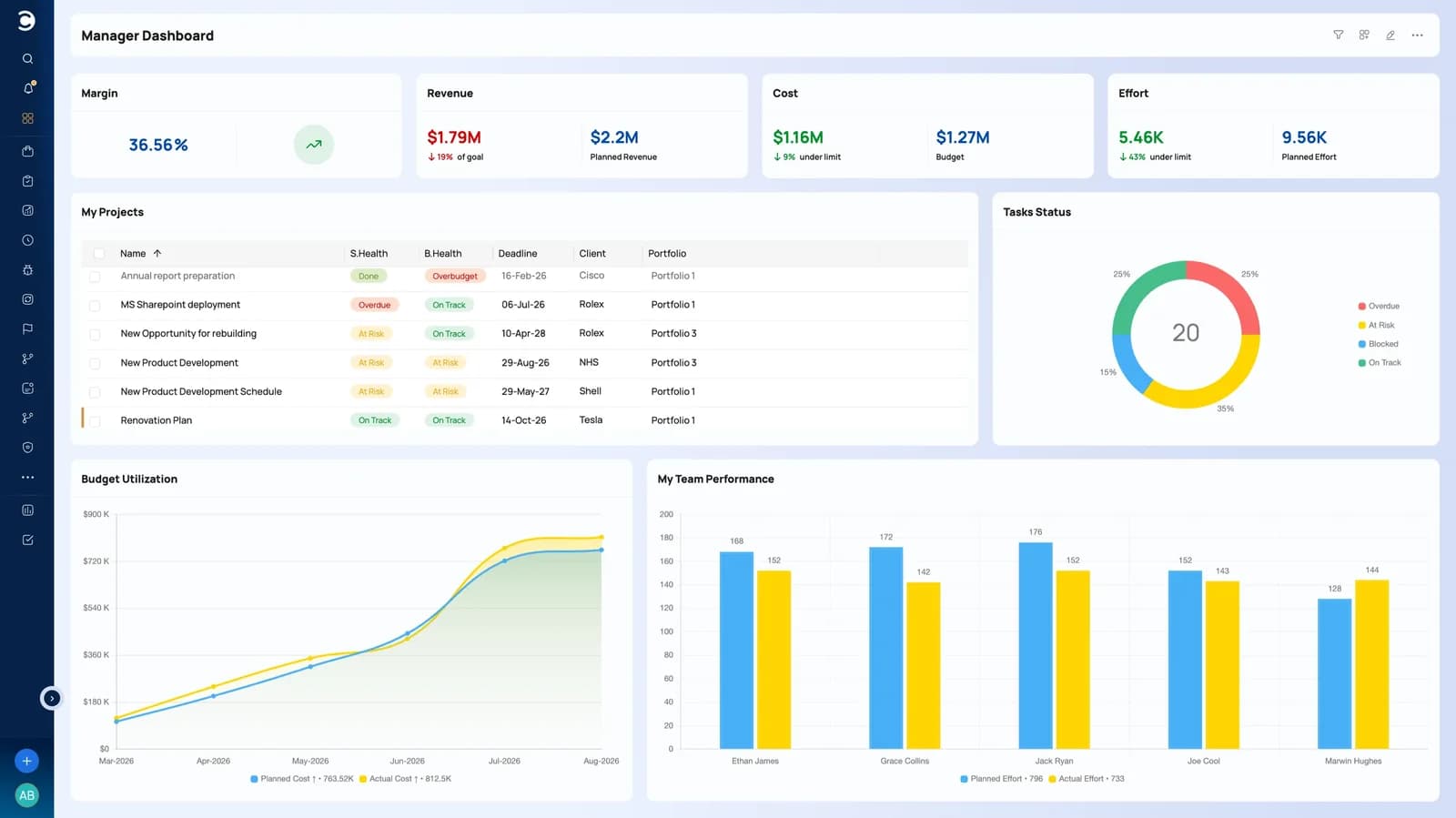
Consolidate real-time insight with customizable dashboards, drill-down charts and scheduled email delivery.
Risk & Issue Management
Track risks, issues and project health with RAG indicators and automatic threshold alerts.
Workflow Automation
Build custom workflow apps with custom fields, routing rules, escalation policies and RAID logs.
AI Project Intelligence
LEX answers plain-English queries against live project data for real-time risk and budget insights.
Celoxis Pricing
View full pricing →- Gantt charts and advanced scheduling
- Project templates and baselines
- Dashboards and BI reporting
- Project and task management
- Portfolio visibility
- 2 Read-Only Users included
- Everything in Core
- Resource workload and capacity planning
- Job roles and work calendars
- Timesheets
- Resource-conflict visibility
- Executive portfolio reporting
- 5 Read-Only Users included
- Everything in Essentials
- Project intake management
- Risk management
- Issue tracking
- Expenses and project costing
- Advanced portfolio controls
- 10 Read-Only Users included
- Everything in Professional
- Project billing
- Client portal
- Advanced security
- Expanded administrative controls
- Higher platform limits
- 15 Read-Only Users included
- Enterprise-scale portfolio management
- Higher platform and API limits
- Advanced governance requirements
- Cloud or on-premise deployment
- Enterprise support
- Custom commercial requirements
| Feature | Core $10/mo | Essentials $25/mo | Professional $35/mo | Business $45/mo | Enterprise Custom |
|---|---|---|---|---|---|
| Gantt charts and advanced scheduling | |||||
| Project templates and baselines | |||||
| Dashboards and BI reporting | |||||
| Project and task management | |||||
| Portfolio visibility | |||||
| 2 Read-Only Users included | |||||
| Everything in Core | |||||
| Resource workload and capacity planning | |||||
| Job roles and work calendars | |||||
| Timesheets | |||||
| Resource-conflict visibility | |||||
| Executive portfolio reporting | |||||
| 5 Read-Only Users included | |||||
| Everything in Essentials | |||||
| Project intake management | |||||
| Risk management | |||||
| Issue tracking | |||||
| Expenses and project costing | |||||
| Advanced portfolio controls | |||||
| 10 Read-Only Users included | |||||
| Everything in Professional | |||||
| Project billing | |||||
| Client portal | |||||
| Advanced security | |||||
| Expanded administrative controls | |||||
| Higher platform limits | |||||
| 15 Read-Only Users included | |||||
| Enterprise-scale portfolio management | |||||
| Higher platform and API limits | |||||
| Advanced governance requirements | |||||
| Cloud or on-premise deployment | |||||
| Enterprise support | |||||
| Custom commercial requirements |
Pricing extracted from the product website and may change. Check the source for current details.
Frequently asked questions about Celoxis
Does Celoxis offer a free trial?
Yes. Celoxis offers a 14-day free trial that requires no credit card, covering both cloud and on-premise deployment.
Can Celoxis be deployed on-premise or in the cloud?
Both. Customers can choose cloud or on-premise deployment to match internal governance and data-residency requirements, and IT and security leaders pick the option that fits their controls.
Which license type do my users need?
Standard User, Team Member and Timesheet User are paid seats, while Client and Read-Only User licenses are free. Celoxis helps map users to the right license types before you buy.
Is there a free license for stakeholders?
Yes. Read-Only Users view permitted projects, dashboards, reports and tasks without editing, and free Client licenses let external stakeholders collaborate on permitted projects and workspaces.
What does Celoxis pricing start at?
Core plans start at $10 per Standard user per month billed annually. Essentials, Professional and Business add capacity, financial and governance features at higher prices, while Enterprise is quoted custom.
What integrations does Celoxis support?
Celoxis connects to Jira, Azure DevOps and QuickBooks Online and ships 21 native integrations, with 400+ apps reachable through Zapier and an open REST API.