
About RadianceKit — 3D Gaussian Splatting App for Mac
Overview
RadianceKit is a native macOS app that runs the complete 3D Gaussian Splatting workflow on Apple Silicon — import photos or video, align, train, edit, and export in one application. Everything processes locally on the Mac's Metal GPU, so there is no cloud upload, no Python environment, and no command-line setup. It is a fast, local alternative to cloud-based NeRF and photogrammetry tools.
The app detects and unwraps 360° and panorama footage into overlapping perspective views, supports a wide range of import and export formats, and pairs a guided Simple Mode with a professional Expert Mode.
Key Benefits
- Native GPU training runs directly on Apple Silicon from M1 to M5 using Metal, with no cloud upload
- Simple Mode walks you from photo import to a finished 3D scene with one click
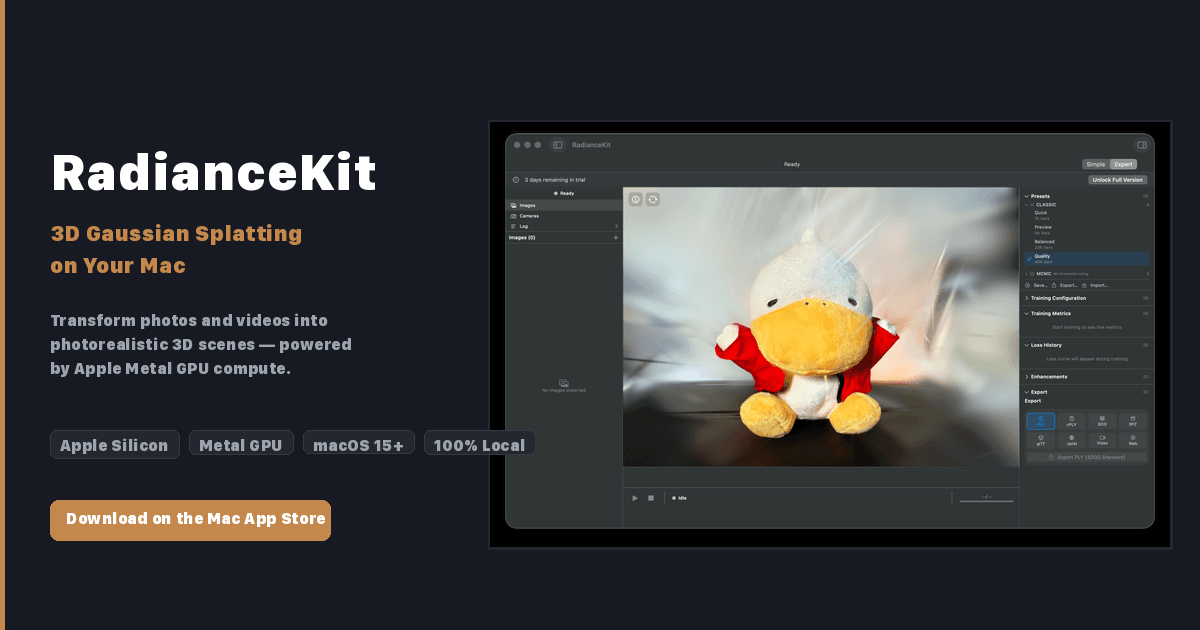
- Expert Mode adds a three-panel layout with project navigator, 3D viewport, and full training inspector
- Imports 360° and panorama media: equirectangular, stereo 360°, cubemap, and fisheye, as photos or video
- Exports PLY, Compressed PLY, SPZ, glTF, .splat, and SOG, plus orbit videos and interactive web viewers
- Interactive Gaussian editor removes artifacts with a brush tool and undo in the 3D viewport
How It Works
Users drop photos or a video into the app, and Apple Photogrammetry computes camera positions automatically. Gaussian Splatting then trains millions of tiny 3D ellipsoids that represent the scene, which the user previews from any angle in real time before exporting in a preferred format or as a shared web viewer.
Use Cases
- Professional 3D scanning teams use Expert Mode's training inspector and live loss curves for precise reconstructions
- 360° camera owners import equirectangular or fisheye footage captured from multiple positions to build full scenes
- Photographers turn photo sets into photorealistic 3D scenes for client presentation without leaving their Mac
- Content creators export self-contained interactive web viewers they can share without any extra software
Why Choose This Product
RadianceKit keeps the entire pipeline on-device: no account and no internet connection are required for processing, and scenes never leave the Mac. A one-time US$7.99 in-app purchase unlocks the full version after a free 3-day trial, with no subscription or upgrade fees. One limit to note is that a single 360° photo cannot become a 3D scene — depth requires several camera positions.
RadianceKit — 3D Gaussian Splatting App for Mac Pros & Cons
- Runs entirely on-device via Apple Metal, no cloud or account needed
- One-time US$7.99 purchase, no subscription or upgrade fees
- Native 360° and panorama import with automatic projection detection
- Six export formats plus orbit videos and interactive web viewers
- Simple and Expert modes suit beginners and professionals
- Requires Apple Silicon Mac (M1 or later) and macOS 26 Tahoe or later
- A single 360° photo cannot produce a 3D scene — multiple camera positions needed
- Raw dual-fisheye files must be stitched in external tools before import
Key Features
Native Metal training
Trains 3D Gaussian Splatting directly on the Apple Silicon GPU via Metal, running on every Apple Silicon Mac from M1 to M5.
Simple and Expert Mode
Simple Mode guides step-by-step from import to a 3D scene, while Expert Mode offers a three-panel layout with project navigator, 3D viewport, and full training inspector with live loss curves.
360° panorama import
Imports equirectangular, stereo 360°, cubemap, equi-angular cubemap, fisheye 180/200°, and partial panoramas as photos or video, with projection detected from metadata.
Six export formats
Exports scenes as PLY, Compressed PLY, SPZ, glTF, .splat, or SOG, and can create orbit videos and self-contained interactive web viewers.
Interactive Gaussian editor
Selects and deletes regions directly in the 3D viewport with a brush tool, removing floating artifacts with undo support.
Multi-format import
Opens existing .ply, .spz, and .splat splats plus .radiancescene bundles, COLMAP workspaces, and .radiancecapture bundles from the iPhone companion app.
100% local processing
Runs the whole pipeline on-device with no account and no internet connection required for processing.
RadianceKit — 3D Gaussian Splatting App for Mac Pricing
- Complete 3D Gaussian Splatting workflow: import, align, train, edit, export
- All six export formats: PLY, Compressed PLY, SPZ, glTF, .splat, SOG
- 360° and panorama import as photos or video
- Simple Mode and Expert Mode interfaces
- Interactive Gaussian editor with brush tool and undo
Pricing extracted from the product website and may change. Check the source for current details.
Frequently asked questions about RadianceKit — 3D Gaussian Splatting App for Mac
What is 3D Gaussian Splatting?
A technique that reconstructs a real scene as millions of tiny 3D ellipsoids ("splats") from ordinary photos or video. The result is a photorealistic 3D scene you can explore from any angle in real time — a faster, sharper alternative to NeRF and traditional photogrammetry.
Do I need any other tools or a Python setup to use RadianceKit?
No. RadianceKit is a complete Gaussian Splatting workflow in a single Mac app. You import photos or video, align, train, edit, and export all inside the app — no command line, no Python environment, and no external software to install.
Does RadianceKit run in the cloud or on my Mac?
Everything runs locally on your Mac. Training uses the Apple Silicon GPU through Metal — your photos and 3D scenes never leave your device. No account and no internet connection are required for processing.
What Mac do I need to run RadianceKit?
RadianceKit requires an Apple Silicon Mac (M1 or later) running macOS 26 Tahoe or later. 16 GB of RAM is recommended for comfortably training larger scenes.
How much does RadianceKit cost?
RadianceKit is free to download and includes a 3-day trial of all features. After the trial you can unlock the full version with a one-time in-app purchase of US$7.99 — no subscription and no upgrade fees. Prices are set per region, so your local App Store may show a different amount (8.99 € across the euro zone, for example).
Which file formats can I import?
RadianceKit imports three kinds of files. Source media for training a new splat: video (.mp4, .mov, .m4v, .avi) and photos (.jpg/.jpeg, .png, .heic, .tiff/.tif, .bmp). Existing splats you can open without training: .ply, .spz and .splat. Scenes and camera data: .radiancescene bundles, COLMAP workspaces, and .radiancecapture bundles from the iPhone companion app.