About JSFiddle
Overview
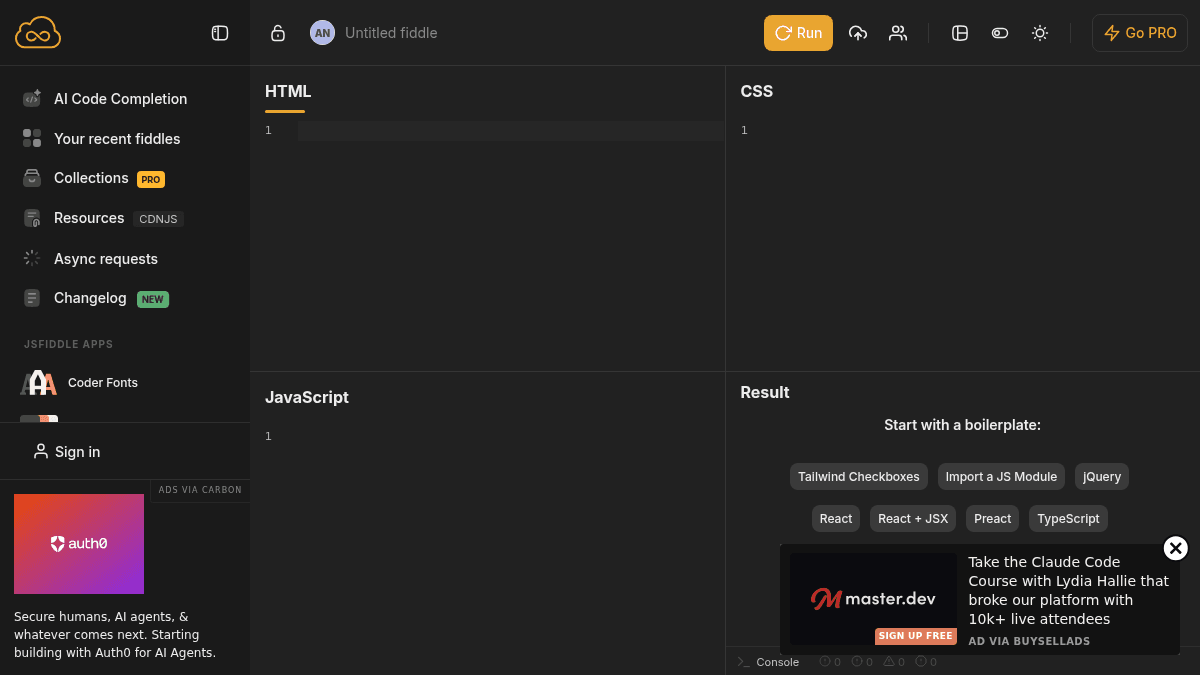
JSFiddle is an online code playground where developers write and test JavaScript, CSS, HTML, and CoffeeScript directly in the browser without installing tools or frameworks locally. It solves the friction of setting up a development environment by offering immediate feedback through a split editor and result view.
Web developers, designers prototyping interactions, students learning front-end code, and technical writers demonstrating solutions use JSFiddle to share reproducible code examples. Unlike local editors, JSFiddle lets you share a single URL that runs instantly in any browser, making it ideal for bug reports, code reviews, and teaching.
Key Benefits
- Support for 50+ JavaScript libraries including React, Vue, Angular, D3, Three.js, and jQuery with automatic CDN loading.
- Multiple CSS preprocessors (SCSS, SASS, PostCSS, Tailwind CSS) and JavaScript variants (TypeScript, Babel, CoffeeScript).
- Embed fiddles on websites and blogs with customizable iframe settings and visual appearance options.
- AI code completion powered by Mistral Codestral that stores API keys only in your browser, never on servers.
- Built-in tools: CSS Flexbox generator, color palette generator, and coder fonts library for faster workflow.
- Auto-save code, live validation, hot reload for CSS and HTML, and console access directly in the editor.
How It Works
You open JSFiddle and type HTML, CSS, and JavaScript into separate panels. The result panel renders your code live as you type. You select libraries from CDNJS, choose language preprocessors, and hit "Run" to execute your code. When ready, you share the URL or embed the fiddle on your website using the generated iframe snippet.
Use Cases
- Front-end developers reporting bugs by creating minimal reproducible examples linked in issue trackers.
- JavaScript educators teaching students with live, shareable code walkthroughs without asking students to download editors.
- UX designers prototyping interactive components and micro-interactions before handing off to developers.
- Technical writers documenting library usage by embedding working code examples directly in tutorials.
- Open-source maintainers reviewing pull requests by asking contributors to share fiddles reproducing reported issues.
Why Choose This Product
JSFiddle is best for developers, students, and teams who need instant feedback without setup overhead. The free tier includes all core features — editor, 50+ libraries, preprocessors, and sharing. The paid PRO tier (not detailed in visible content) likely adds collaboration or storage features, but the free version is fully functional for testing, learning, and sharing code.
JSFiddle Pros & Cons
- Supports 50+ JavaScript libraries with automatic CDN loading and instant access
- Multiple language variants (TypeScript, Babel, CoffeeScript) and CSS preprocessors (SCSS, SASS, PostCSS, Tailwind)
- Free tier includes all core features; sharing and embedding without payment
- Built-in productivity tools: CSS Flexbox generator, color palette generator, and curated coder fonts
- AI code completion with privacy-first design (API keys stored only in browser)
Key Features
Library Support
Access 50+ JavaScript frameworks and libraries including React, Vue, Angular, D3, Three.js, jQuery, and Ember loaded directly from CDNJS.
CSS Preprocessors
Write CSS using SCSS, SASS, PostCSS, and Tailwind CSS with automatic compilation.
Language Variants
Code in TypeScript, Babel with JSX, CoffeeScript, and pure JavaScript with multiple version options.
AI Code Completion
BYOK Mistral Codestral AI completion that stores your API key only in the browser for privacy.
Embed Fiddles
Generate customizable iframe snippets to embed working code examples directly on websites and blogs.
Live Editing Tools
Auto-save code, live validation, hot reload CSS and HTML, and built-in console for debugging.
Layout Generators
CSS Flexbox generator and color palette generator tools for rapid UI design and prototyping.
Coder Fonts Library
Curated selection of monospace fonts including premium options like Input and Commit Mono for the editor.
JSFiddle Pricing
Pricing extracted from the product website and may change. Check the source for current details.
Frequently asked questions about JSFiddle
Can I use frameworks like React, Vue, and Angular on JSFiddle?
Yes, JSFiddle supports 50+ JavaScript libraries loaded from CDNJS, including React, Vue, Angular, D3, Three.js, jQuery, and many others. You select the library from a dropdown and it loads automatically.
What CSS preprocessors does JSFiddle support?
JSFiddle supports SCSS, SASS, PostCSS (Stage 0+ and Stage 3+), and Tailwind CSS. You switch the language option in the CSS panel and the code compiles automatically.
Can I embed my JSFiddle on my website?
Yes, JSFiddle generates customizable iframe snippets that let you embed working code examples on websites and blogs. You can choose which tabs (JavaScript, HTML, CSS, Result) to display and select light or dark visual themes.
How does the AI code completion work?
JSFiddle offers BYOK (bring your own key) AI completion powered by Mistral Codestral. Your API key is stored only in your browser, never saved on JSFiddle servers.
Is JSFiddle free?
JSFiddle offers a free plan with optional paid upgrades. See the pricing section for what's included in each tier.
What platforms does JSFiddle support?
JSFiddle is available on: Web.
How JSFiddle compares
J JSFiddleThis | ||
|---|---|---|
| Starting price | — | from free |
| Pricing model | Freemium | Freemium |
| Platforms | Web | — |
| Top features |
|
|
| Rating | — | — |