About Grok Build
Overview
Grok Build is a coding agent that runs on your computer, now powered by the Grok 4.6 model. It covers the entire development workflow — plan, build, test, and deploy — from a single terminal tool.
Install with one command, curl -fsSL https://x.ai/cli/install.sh | bash, and use it with any codebase and any language. It is available to try for free, and the project is open source.
Key Benefits
- Grok 4.6 powers planning, code generation, and deep step-by-step reasoning
- Plan mode proposes a structured approach and blocks every edit until you approve it
- Parallel subagents research, build, and review with their own context windows
- Skills, plugins, hooks, AGENTS.md, and MCP servers work out of the box
- Capture any session as a reusable skill with /skillify
- Share capabilities across your team with marketplace installs or self-hosted bundles
How It Works
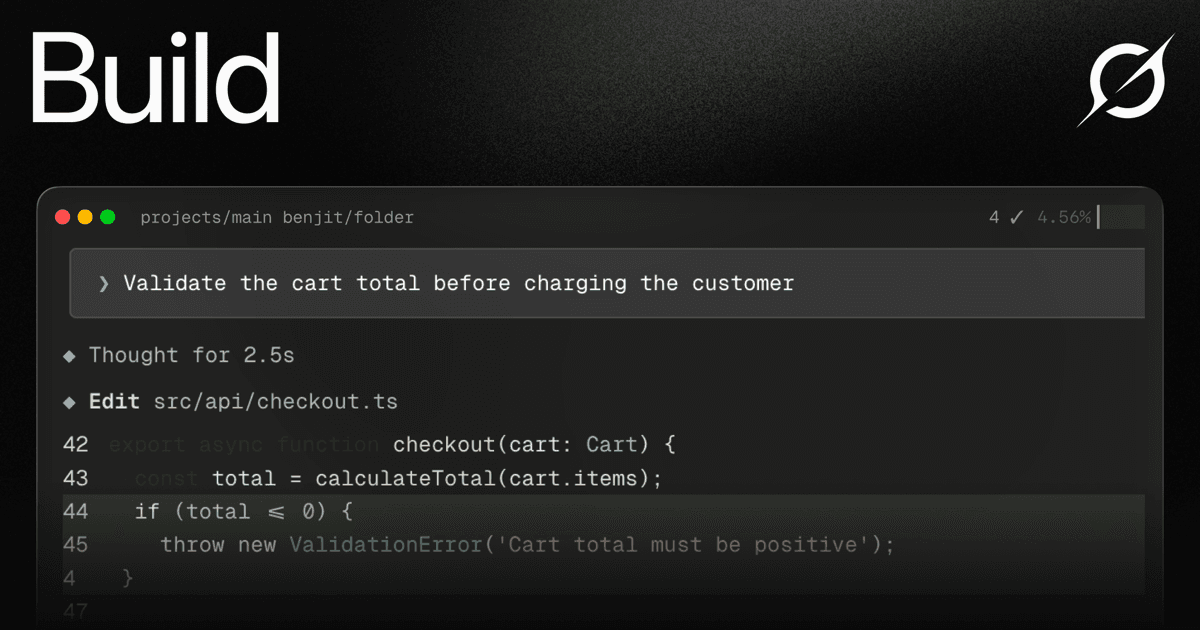
Run the one-line install command to bring Grok to your computer. Start a task in the terminal and use Plan mode to propose a structured approach first — every edit stays blocked until you approve, comment on individual steps, or rewrite the plan. Each approved change then appears as a clean diff, with ambiguous tasks resolved through quick multiple-choice questions.
Use Cases
- Developers use plan mode to architect complex projects before writing code
- Engineering teams bundle skills, agents, and MCP servers to share capabilities
- Teams run parallel subagents to research and review while main work proceeds
- CI/CD pipelines run Grok Build in headless mode to script builds and tests
- Developers get line-by-line code review feedback before opening a pull request
- Engineers look up docs and packages from the terminal with web search
Why Choose This Product
Grok Build is open source and free to try, with a single-command install that works with any codebase and language. It connects to Linear, Sentry, Grafana, Postgres, and anything else with an MCP server, and it adapts to your workflows through skills, hooks, and per-directory AGENTS.md rules.
Grok Build Pros & Cons
- Free to try
- Open source project
- Powered by the Grok 4.6 model
- Single-command install works with any codebase and language
- Connects to Linear, Sentry, Grafana, and Postgres via MCP
Key Features
Plan Mode
Plan mode proposes a structured approach before any code is written, and every edit stays blocked until you approve it.
Parallel Subagents
Grok Build delegates larger tasks to specialized subagents that run in parallel, each with its own context window and optional worktree support.
Reusable Skills
Turn workflows into reusable slash commands and capture any session as a new skill with /skillify.
Plugin Marketplace
Bundle skills, agents, hooks, and MCP servers behind one install from a marketplace or self-hosted from any git repo.
MCP Server Support
Connect to Linear, Sentry, Grafana, Postgres, browsers, or anything else with an MCP server out of the box.
Hooks & AGENTS.md
Run scripts on file edits and tool calls, and set conventions and rules per directory with AGENTS.md.
Code Search & Refactor
Grep and navigate large codebases fast, and refactor across files with search-and-replace.
Headless Mode
Script Grok Build in CI/CD pipelines and monitor long-running builds as background tasks.
Grok Build Pricing
View full pricing →- Generous free limits to try Grok capabilities
- Real-time web and X search
- Voice mode
- SOC 2 compliance (Type I & II)
- Connectors
- Grok 4.6 model
- Grok Bot access
- Higher rate limits across all features
- Image and video generation
- Connectors
- Expert support
- Everything in SuperGrok
- Create 1080p videos
- Higher usage across Chat, Imagine, Voice & Build
- Lightning-fast replies
- Priority access at peak times
- Early access to new features
- Custom rate limits
- Dedicated support with named account team
- SSO & SCIM
- Data residency
- Volume pricing
| Feature | Free Free/mo | SuperGrok $30/mo | SuperGrok Plus $100/mo | Enterprise Custom |
|---|---|---|---|---|
| Generous free limits to try Grok capabilities | ||||
| Real-time web and X search | ||||
| Voice mode | ||||
| SOC 2 compliance (Type I & II) | ||||
| Connectors | ||||
| Grok 4.6 model | ||||
| Grok Bot access | ||||
| Higher rate limits across all features | ||||
| Image and video generation | ||||
| Expert support | ||||
| Everything in SuperGrok | ||||
| Create 1080p videos | ||||
| Higher usage across Chat, Imagine, Voice & Build | ||||
| Lightning-fast replies | ||||
| Priority access at peak times | ||||
| Early access to new features | ||||
| Custom rate limits | ||||
| Dedicated support with named account team | ||||
| SSO & SCIM | ||||
| Data residency | ||||
| Volume pricing |
Pricing extracted from the product website and may change. Check the source for current details.
Frequently asked questions about Grok Build
Is Grok Build free?
Grok Build offers a free plan with optional paid upgrades. See the pricing section for what's included in each tier.
How much does Grok Build cost?
Grok Build offers the following plans: Free, SuperGrok, SuperGrok Plus, Enterprise. See the pricing section for what's included in each tier and any per-seat or usage-based costs.
What platforms does Grok Build support?
Grok Build is available on: Web, iOS, Android.