About fort
Overview
fort is a free, open-source command-line tool that audits more than 15 macOS security settings and remediates the ones it can change safely. It runs on macOS 12 Monterey through the latest release and ships as a single MIT-licensed Go binary.
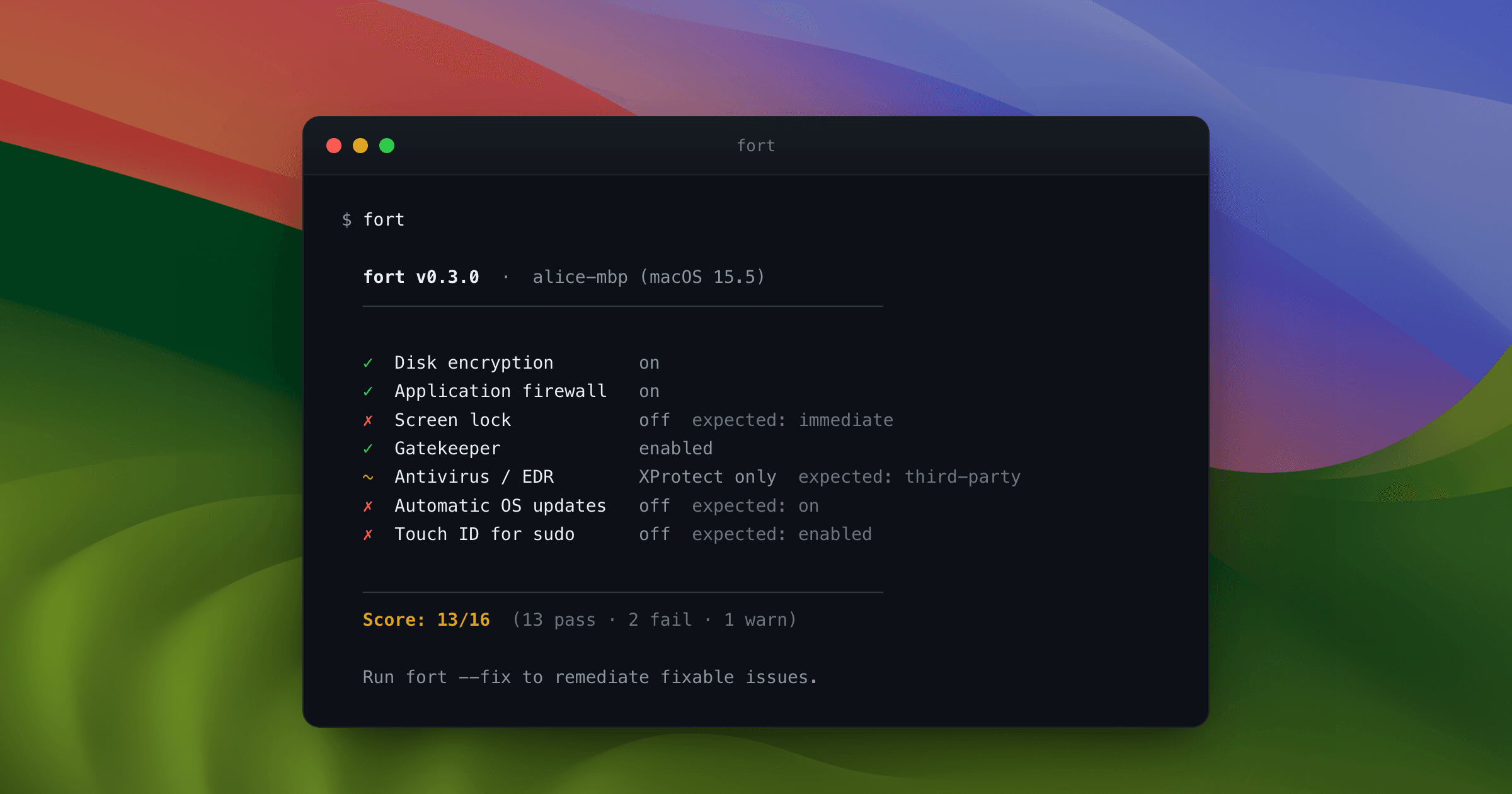
One command checks disk encryption, the application firewall, screen lock, remote login, Gatekeeper, sharing services, AirDrop, system integrity protection, guest accounts, local admin rights, OS patch status, and Touch ID for sudo. Each result pairs a plain-English explanation with the current state and the state macOS expects, so you can read a finding before acting on it.
Key Benefits
- Runs 15+ documented checks in under three seconds with no agent, daemon, or background process.
- Auto-fixes fixable settings with fort --fix, while --dry-run shows every change before it runs.
- Writes a self-contained HTML report with machine identity, serial number, and per-check results.
- Maps each check to SOC 2, ISO 27001, NIST CSF, and CIS v8 controls for compliance evidence.
- Keeps every audit local: zero network calls, no account, and no telemetry.
- Detects 13 password managers and 17 endpoint security tools by app and process.
How It Works
Install fort with a one-line Homebrew, curl, or go install command. Run fort to see your score and each control's current versus expected state, then run fort --fix to remediate fixable settings or fort --dry-run to preview the changes first. Finally, run fort --report to write a timestamped HTML snapshot that opens in any browser and prints to PDF.
Use Cases
- Developers and power users lock down their own Mac in seconds and read every check before running the fix.
- Privacy-conscious users run an audit that reads local state, prints its exact commands, and exits without uploading anything.
- Small teams and consultants check and harden Macs without enrolling them in MDM — one command per machine, no IT department.
- Compliance leads gathering SOC 2 or ISO 27001 evidence attach the fort --report HTML snapshot to auditor requests.
- Claude Code users ask whether their Mac is secure inside a conversation and approve each remediation individually.
Why Choose This Product
fort sets itself apart from MDM platforms and agent-based scanners by shipping as one Go binary that reads local macOS APIs and exits. Every check prints the exact command it ran, so you verify the result instead of trusting it. The CLI stays free and MIT-licensed, and the team dashboard with fleet view, drift alerts, and policy files remains on the waitlist.
fort Pros & Cons
- Free and MIT-licensed, with every check's source on GitHub
- Audits 15+ macOS controls in under three seconds
- Auto-fix with a --dry-run preview of every change
- Zero network calls, no account, no telemetry, no background agent
- Self-contained HTML report with machine identity and exact commands
- macOS only — builds target macOS 12 Monterey and later
- Team dashboard with fleet view, drift alerts, and policy files is still on the waitlist
Key Features
15+ Security Checks
fort audits more than 15 macOS controls, including FileVault, the application firewall, screen lock, SSH, Gatekeeper, and Touch ID for sudo, in under three seconds.
One-Command Fix
fort --fix remediates every fixable setting, and the --dry-run flag shows exactly what will change before it runs.
HTML Audit Report
fort --report writes a self-contained HTML file with machine identity, serial number, timestamp, and per-check results that prints to PDF in one click.
Framework Mapping
Each check references the relevant controls in SOC 2, ISO 27001, NIST CSF, and CIS v8.
Verbatim Command Output
Every finding records the exact command executed and its raw output, and the report expands to the full terminal transcript.
Touch ID for sudo
fort detects whether PAM accepts Touch ID for sudo and enables it through /etc/pam.d/sudo_local while keeping the password as a fallback.
Zero Telemetry
The audit makes no network calls and needs no account, reading local system state and exiting when finished.
Claude Code Plugin
Adding the fort plugin runs audits inside a Claude Code conversation, explains each finding, and fixes only what you approve.
App and EDR Detection
fort detects 1Password, Bitwarden, LastPass, and nine other password managers, plus CrowdStrike Falcon, SentinelOne, Malwarebytes, and 14 other security tools by app and process.
Sharing and AirDrop Checks
fort confirms file sharing, screen sharing, remote management, and internet sharing are off, and requires AirDrop set to Contacts Only or Off.
Frequently asked questions about fort
How do I check my Mac's security settings with fort?
Install fort with brew install djadmin/tap/fort and run fort. It audits 15+ security settings — disk encryption, firewall, screen lock, SSH, Gatekeeper, Touch ID for sudo, automatic updates and more — in about 3 seconds and explains each result in plain English.
Is fort free and open source?
Yes. fort is free and released under the MIT license. The full source, including every check, is on GitHub, and the CLI is always free.
How do I install fort?
Use Homebrew with brew install djadmin/tap/fort, run the curl one-liner from the GitHub releases page and move the binary to /usr/local/bin, or run go install github.com/djadmin/fort/cmd/fort@latest with Go 1.21 or newer. The binary supports Apple Silicon and Intel.
Which macOS versions does fort support?
fort works on macOS 12 Monterey through the latest release. Every check uses stable, documented macOS APIs rather than private frameworks.
Does fort send my data anywhere?
No. The audit makes zero network calls. fort reads local system state and exits — no account, no telemetry, nothing uploaded. Every check prints the exact command it ran, so you can verify it instead of trusting it.
Can fort fix security settings automatically?
Yes. Run fort --fix to remediate every fixable setting, including screen lock, firewall, Gatekeeper, SSH, automatic updates, guest account, auto-login, AirDrop, and Touch ID for sudo. Use --dry-run first to see exactly what changes before it runs.