About CleanShot
Overview
CleanShot X is a native Mac application that replaces the default macOS screenshot tool with over 50 screen capture features. It targets Mac users who need more control over screenshots, screen recordings, annotations, and sharing than the built-in tool allows.
Unlike basic alternatives, CleanShot X combines annotation, scrolling capture, OCR text recognition, GIF recording, and cloud sharing into a single app — described by users as feeling like "7 apps in one."
Key Benefits
- Capture any scrollable content — including chat histories and long code blocks — that does not fit on a single screen.
- Annotate screenshots in seconds using a built-in tool that users rate above standalone annotation apps.
- Record your screen and export as a video or an optimized GIF file with mouse click and keystroke highlighting.
- Copy non-selectable text from images or scanned documents using on-device OCR technology.
- Upload screenshots and recordings to CleanShot Cloud and get a shareable link in a single click.
- Hide desktop icons during capture so they do not appear in screenshots or screen recordings.
How It Works
You trigger a capture — screenshot, scrolling capture, or screen recording — directly from the CleanShot overlay that sits above all other windows. After capturing, you annotate, trim, or apply a background, then instantly save, copy, drag-and-drop, or upload to CleanShot Cloud to get a shareable link.
Use Cases
- Web designers and developers documenting UI bugs by recording annotated screen captures exported as GIFs.
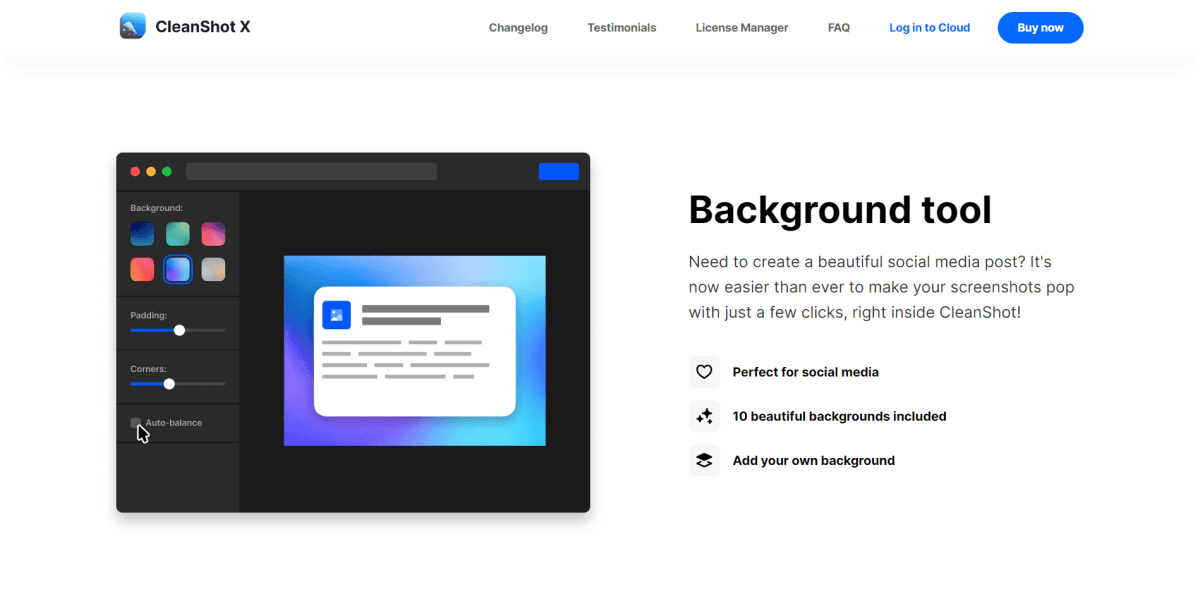
- Social media managers creating polished screenshot posts using the built-in background tool with 10 included backgrounds.
- Technical writers and support teams copying non-selectable text from images using on-device OCR.
- Remote team members sharing screen recordings with teammates via CleanShot Cloud with custom domain and branding.
- Developers and power users capturing long code snippets or chat histories using scrolling capture.
- Presenters and educators pinning reference screenshots that float above all windows during live screen sharing.
Why Choose This Product
CleanShot X is built exclusively for Mac and runs as a fully native app, delivering the performance expected on Apple Silicon and macOS. A cloud account is not required to use the app, making it equally suitable for users who prefer local-only workflows and those who need team collaboration features.
Key Features
Screenshot Annotation
A built-in annotation tool lets users highlight, mark up, and edit screenshots in seconds without a separate app.
Scrolling Capture
Captures any scrollable content — such as chat histories or long code blocks — that extends beyond the visible screen area.
Screen Recording
Records the screen and saves output as a video or an optimized GIF, with support for webcam overlay, microphone, and macOS audio.
CleanShot Cloud
Uploads screenshots and recordings directly from the app and generates a shareable link in a single click, with optional custom domain and branding.
Text Recognition (OCR)
Copies non-selectable text from images or scanned documents using fast on-device OCR technology.
Background Tool
Applies one of 10 included decorative backgrounds or a custom background to screenshots for social media posts.
Pin Screenshots
Pins a screenshot so it floats above all other windows with adjustable size and opacity for use as a persistent reference.
Hide Desktop Icons
Hides all desktop icons during capture or permanently so they do not appear in screenshots or screen recordings.
Self-Timer
Delays a screenshot capture by a specified amount of time to capture the exact desired moment.
Quick Access Overlay
An on-screen overlay lets users instantly save, copy, or drag-and-drop screenshots and recordings into other apps after capture.
How CleanShot compares
CleanShotThis | ||
|---|---|---|
| Starting price | — | $9/yr |
| Pricing model | Paid | Paid |
| Platforms | macOS | macOS |
| Top features |
|
|
| Rating | — | — |
